
MarkTrack vs Schoology: the alternative built for K-12 Islamic schools
Schoology is a capable K-12 learning management system, owned by PowerSchool and built for districts running courses at scale. An Islamic school needs something different at its center: parents who find everything in one app, tuition that collects itself, behavior handled with care, and Hifz and Qaidah kept as real records. Here is that difference, screen by screen.
Updated September 2026
The short version
Schoology runs courses.
MarkTrack runs the Islamic school around them.
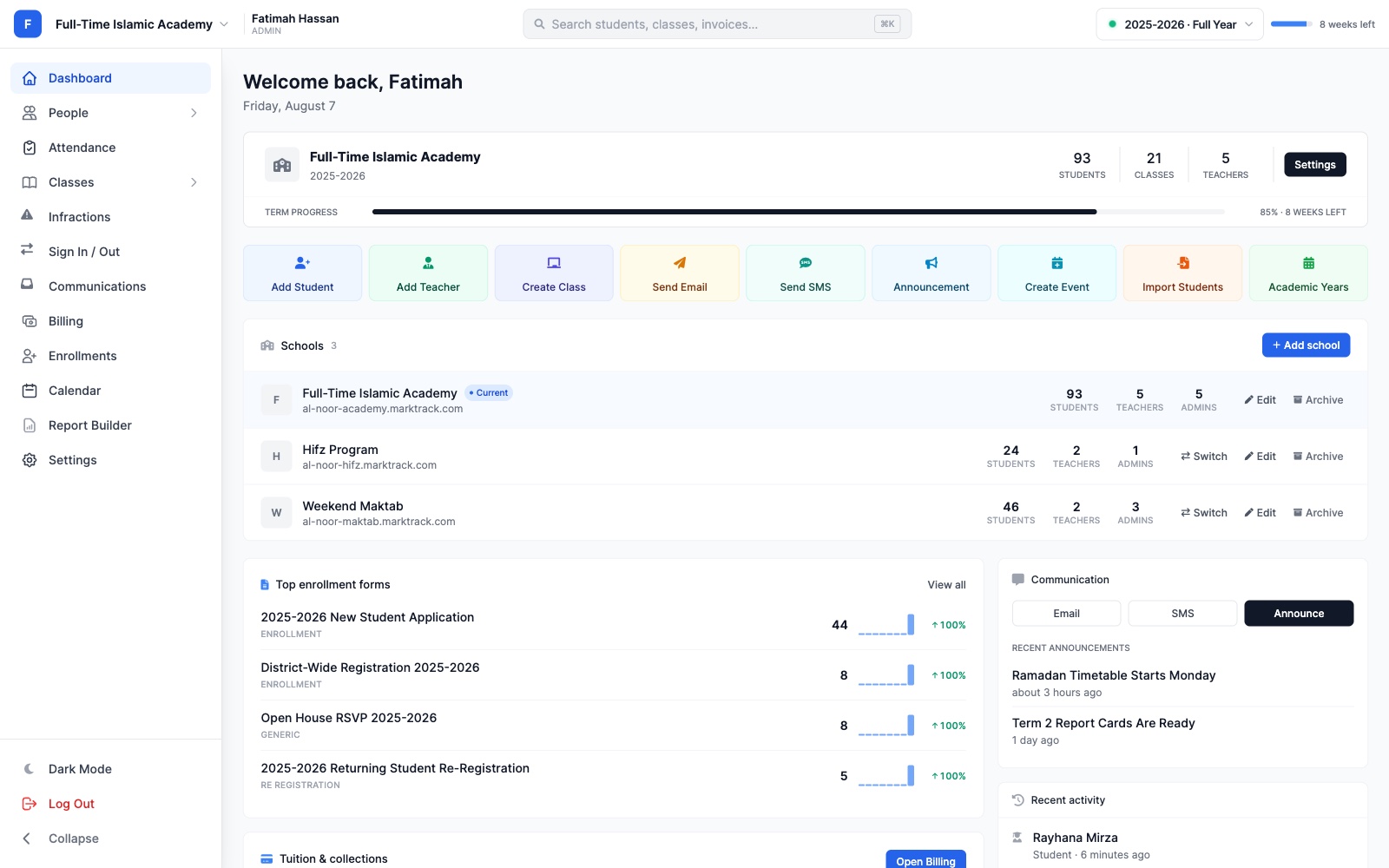
Schoology is a good learning management system, and a district that already runs PowerSchool has every reason to use it. But an LMS is one piece of a school. A K-12 Islamic school also has to enroll families, bill them, take the register, handle behavior, keep parents informed and track every child's Qur'an. That's usually four or five separate systems. MarkTrack is one.
One login for everything
Grades, Hifz, attendance, behavior, messages and the bill, for every child.
District LMSA course-by-course guardian view
Native iPhone and Android apps
For parents and teachers, with push notifications.
District LMSAn app built around courses and grades
A family inbox
Email, text and announcements, with every reply in one place.
District LMSMessaging organized by course
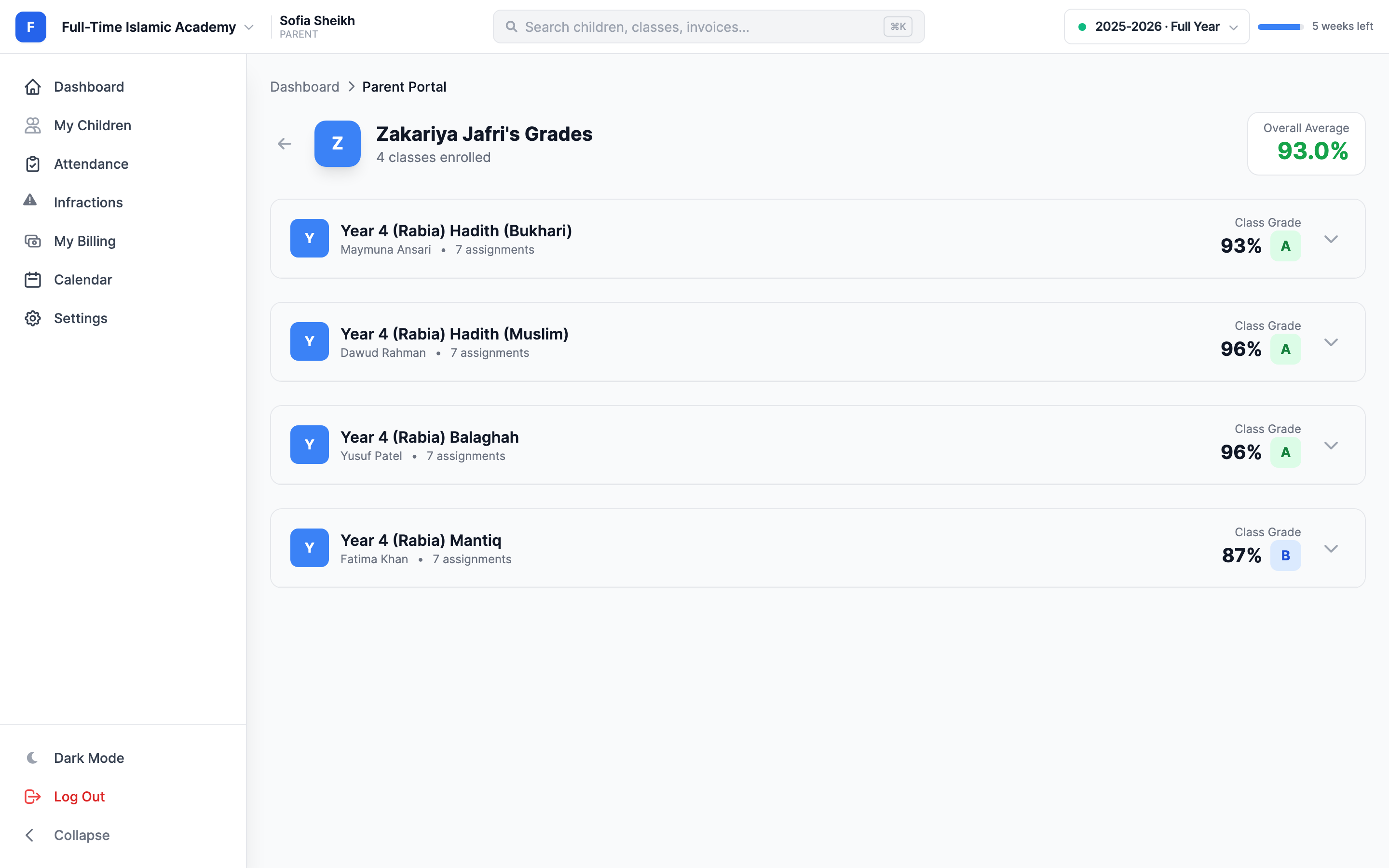
Gradebook to report card
Weighted grades, GPA, and report cards you can design with AI.
District LMSA course gradebook; report cards in the SIS
Reports that send themselves
Progress reports, attendance alerts and reminders on a schedule.
District LMSAssignment and grade notifications
Behavior with follow-up
Severity, status and parent acknowledgment on every incident.
District LMSUsually a module of the SIS
Tuition on autopay
Family invoices, sibling discounts, payment plans and autopay.
District LMSNot part of an LMS
Hifz and Qaidah built in
Sabaq, sabqi, manzil and daily Qaidah lessons parents can see.
District LMSNo record for Qur'an progress
Track any subject
Name the columns and track duas, hadith, Arabic and more.
District LMSNot applicable
01For parents
One login for every child, every class and every bill.
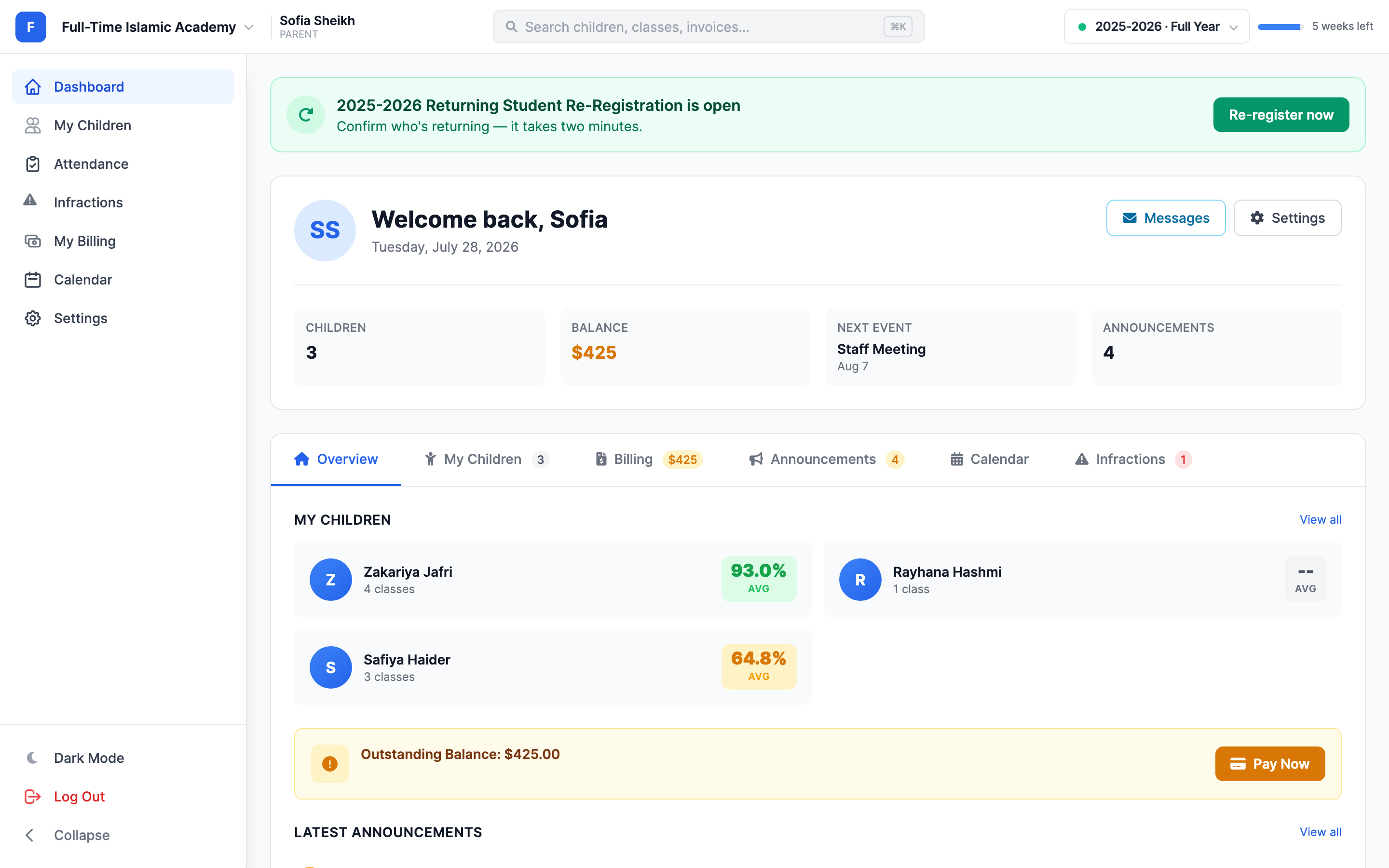
Ask a parent at a district school how they keep up and you'll often hear three answers: the LMS for homework, the SIS for attendance and report cards, and a payment site for fees. In MarkTrack it's one login. A mother with three children sees each child's grades, Hifz, attendance and behavior, the family balance with a Pay Now button, and next year's re-registration, all on the first screen.
- One account covers every child, and a school switcher covers every program the family attends.
- Invite parents by email. They set their own password from a secure link, with nothing to install.
- Absence requests, re-registration and paying a bill each take a couple of taps.
- Parents can read their child's class discussions, so nothing happens out of sight.
Guardian access is organized by course. It works well for checking assignments, but attendance, report cards and fees usually live in separate systems.
02Native mobile apps
A real iPhone and Android app, for the whole school day.
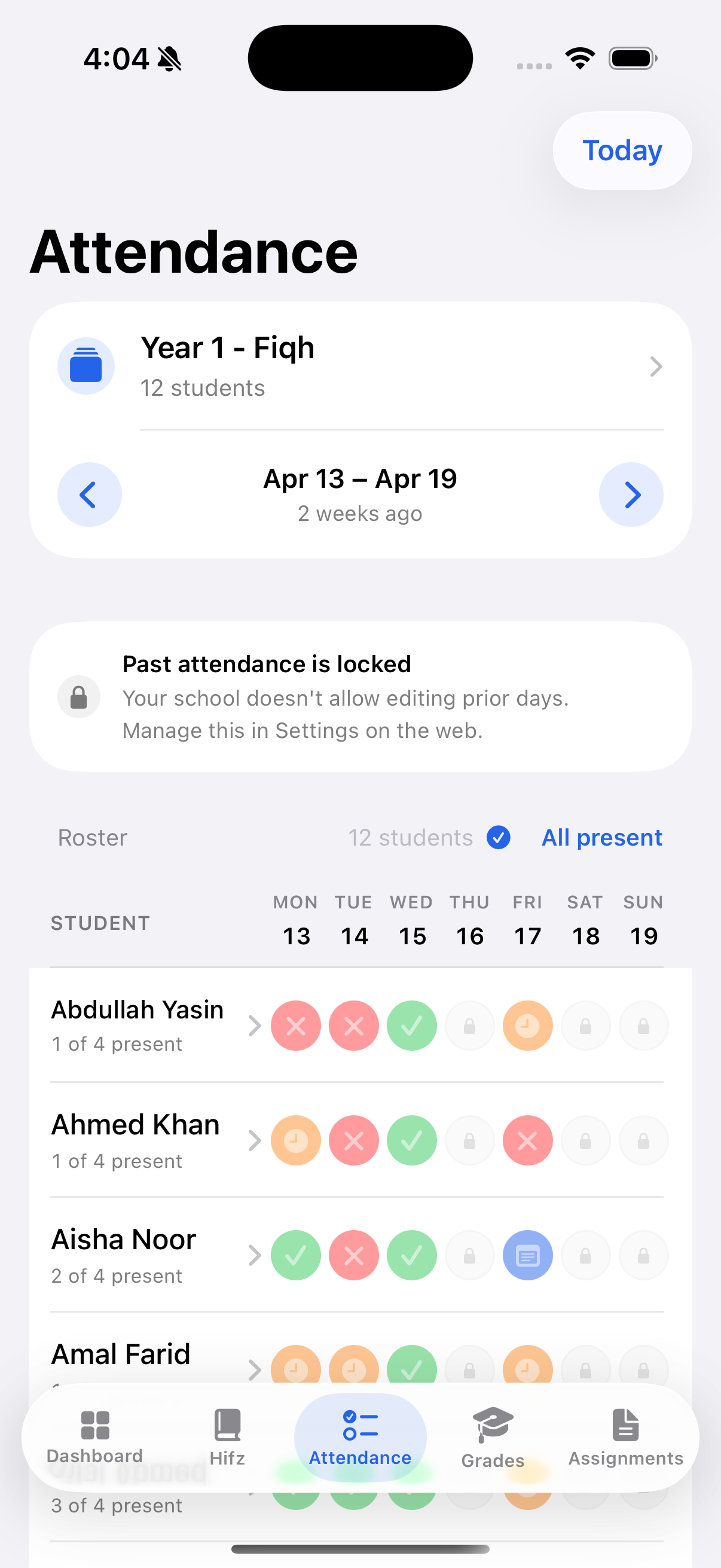
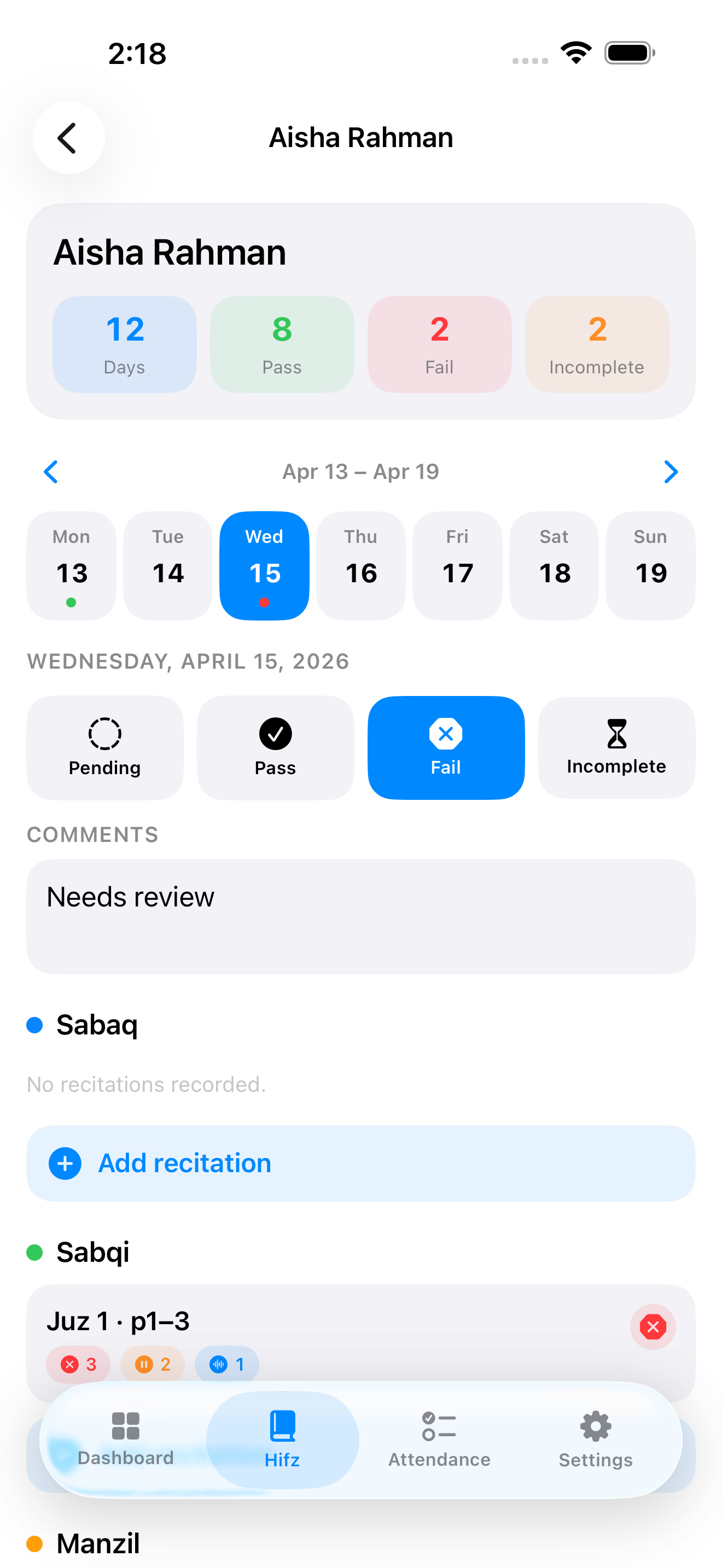
MarkTrack's apps are native, not a website squeezed onto a phone. Teachers take the register and record Hifz from the classroom. Parents follow the day, acknowledge their child's Hifz lesson, check grades and attendance, and get a push notification when something needs them.
- Teachers: attendance, Hifz, Qaidah and grades from the app.
- Parents: the daily Hifz acknowledgment, grades, attendance and announcements.
- Push notifications for absences, Hifz reminders and school news.
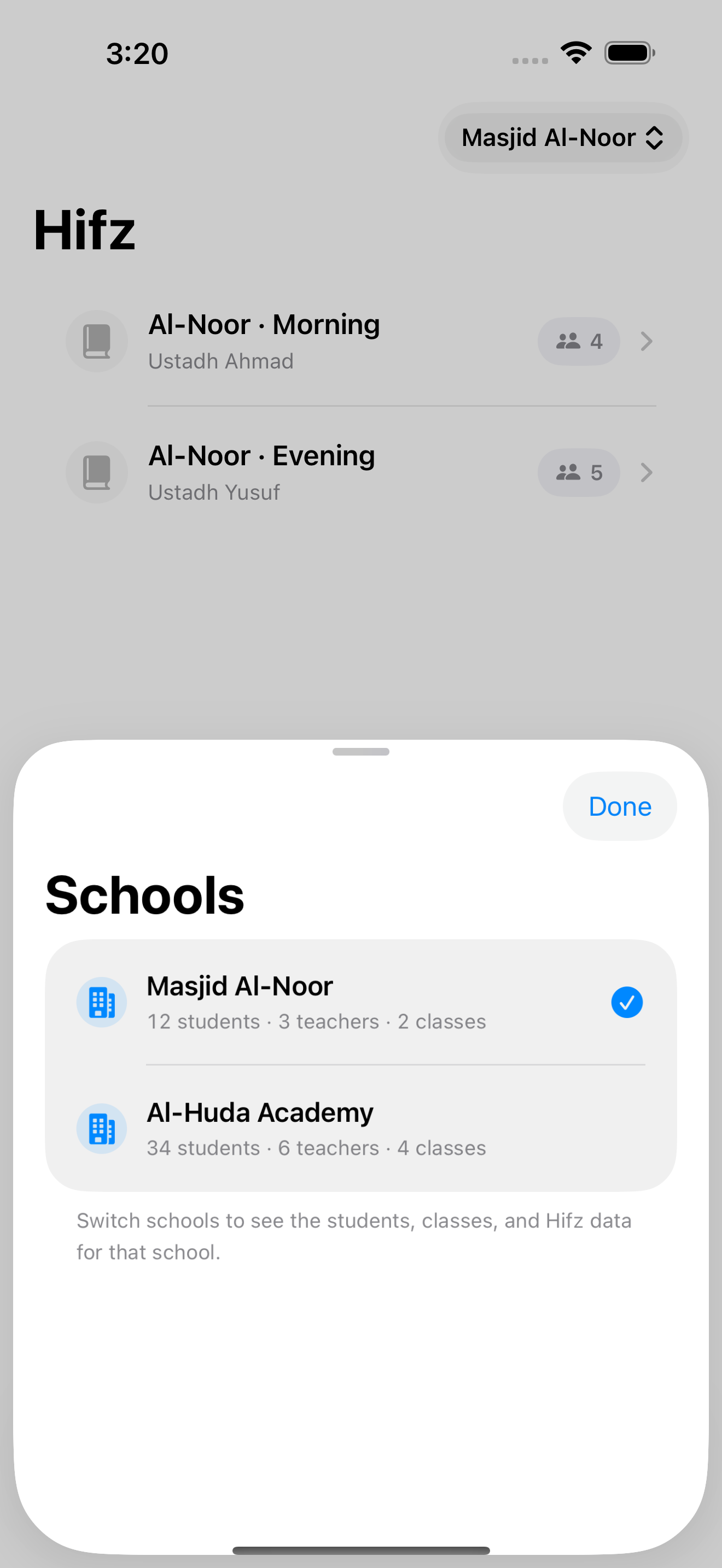
- Switch schools and programs without signing out.
Schoology has mobile apps too. The difference is what's inside: an LMS app is built around courses and grades, and has no idea which juz a child is on.
03Communication
Every family conversation, with the family right beside it.
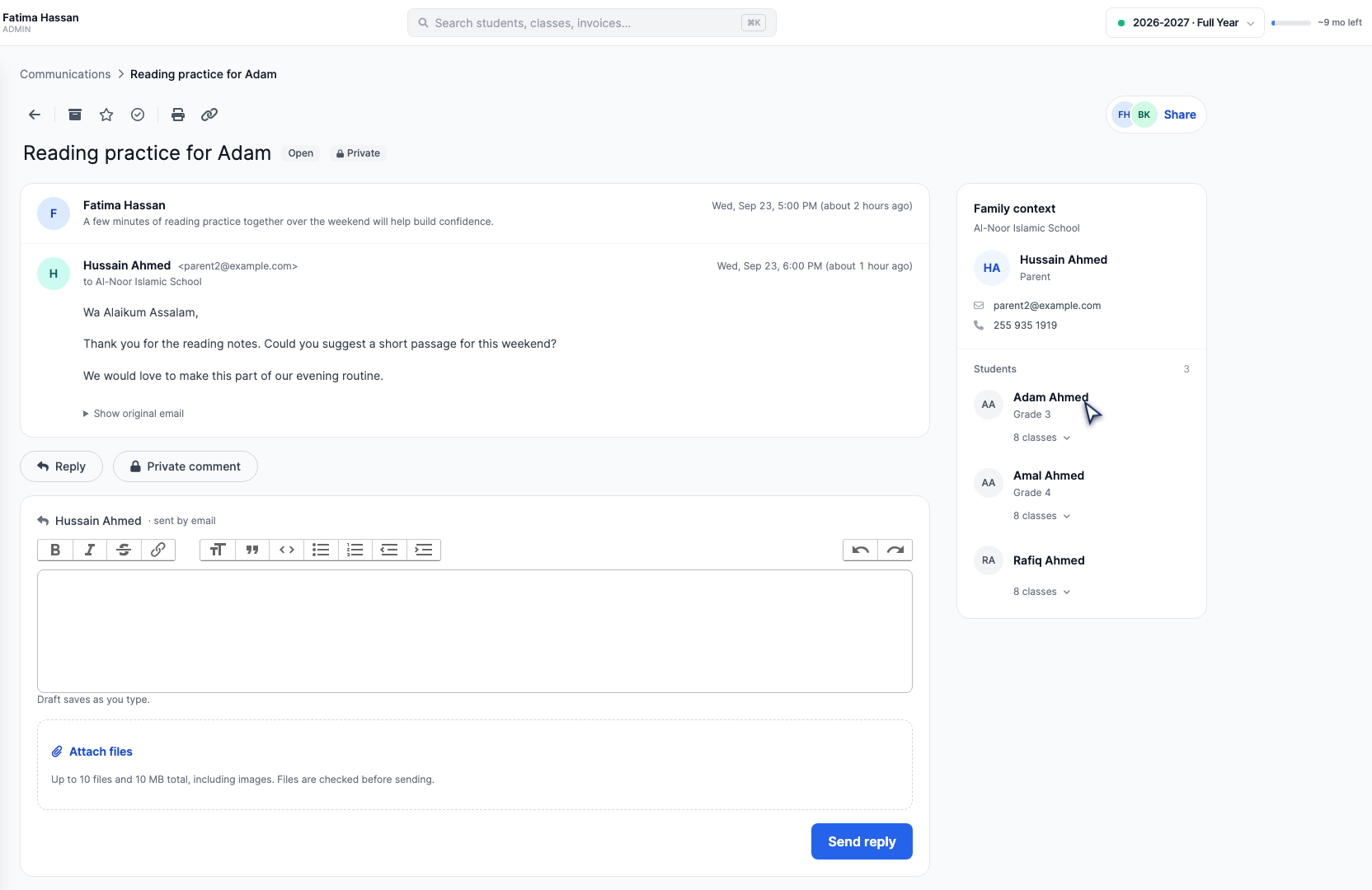
Communications opens on an inbox. Every family you email gets their own conversation, and their replies come straight back into it. Open one and a panel shows both parents' contact details and every child with their grade and classes, so you never reply without the full picture.
- Email or text one family, a class, a grade or the whole school, now or scheduled for later.
- Leave a private note for colleagues, @mention them, or hand the conversation over.
- Announcements appear on the parent dashboard and in the app.
- Emails carry your school's logo and name, and you choose which automatic alerts parents receive.
- A Delivery issues folder shows exactly which messages didn't arrive.
Messages are organized around courses and teachers. School-wide messages to families usually go through a separate communications product.
04Gradebook & report cards
A gradebook teachers like, and report cards families keep.
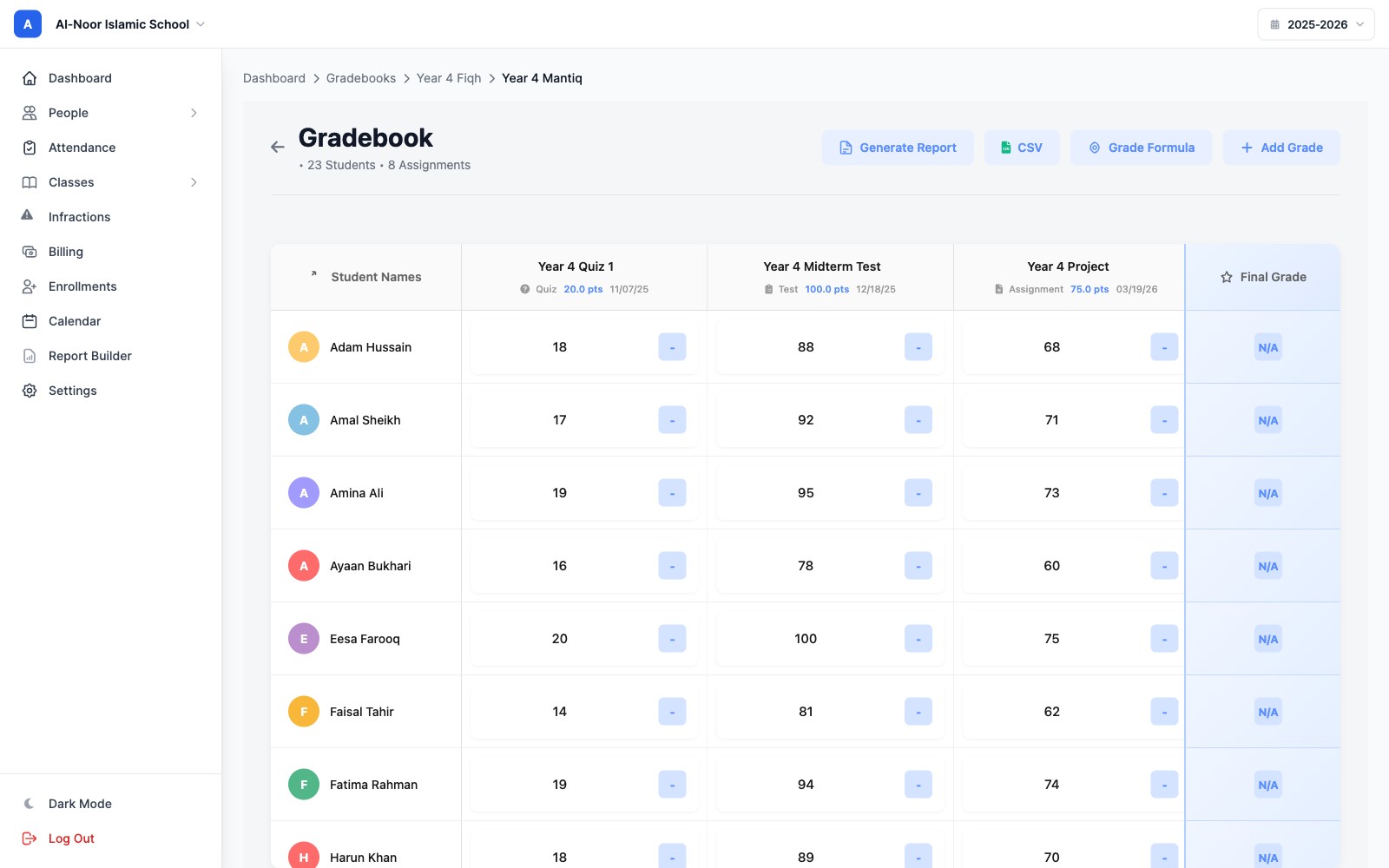
Students down the side, work across the top, and the final grade updating as you type. Weight homework, quizzes and exams the way your school does, mark work as missing or excused so the average stays fair, and attach a comment to any grade with an optional email home. At the end of term, the same marks become report cards.
- Weighted categories, your own grading scale and term weights, with the formula on show.
- Missing counts as zero. Excused and exempt work is left out of the average.
- GPA, transcripts and class rankings when you turn them on.
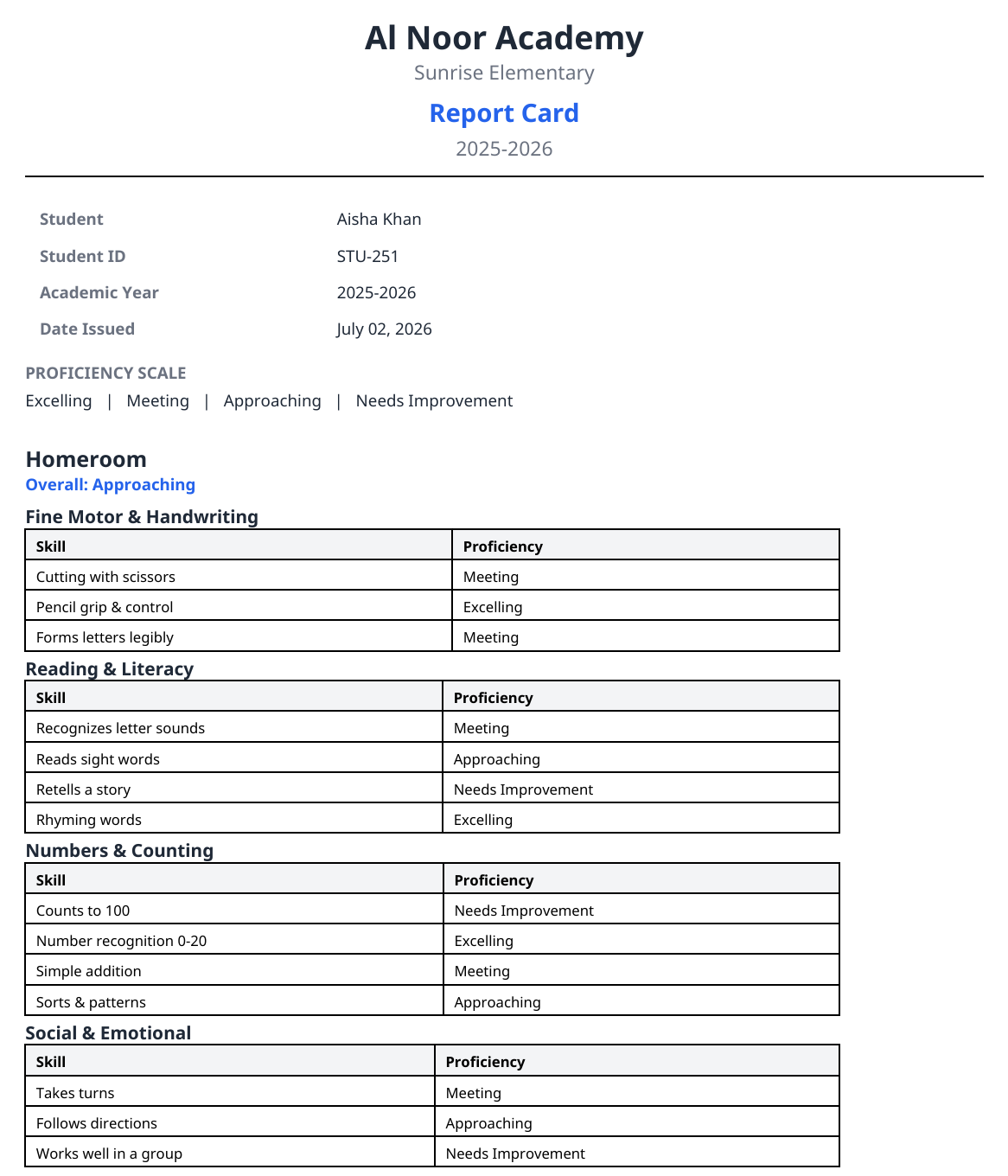
- Design report cards yourself, or describe one and get three AI-drafted designs to choose from.
- Skills-based, non-numeric report cards for the younger years.
- Moving grades over? Import Grades With AI reads the PDF, CSV or screenshot your old system prints.
The course gradebook is capable. Report cards and transcripts of record usually come from the SIS, which is one more system to keep in step.
05Automated reports
Reports and reminders that go out without you.
Much of what a school office sends each week is the same message going to different families. MarkTrack sends those for you on a schedule you set. The ones you want to check first go out with one press, and each family only ever receives their own children's results.
- The weekly progress report: one press, and every family gets their own children's report as a PDF, with a message your office writes.
- Attendance alerts by email, text or push notification, a set time after the mark or in one end-of-day summary at the hour you choose.
- Overdue reminders, autopay charges and evening Hifz reminders, every day, without anyone pressing a button.
- A list in Settings of every alert parents can receive, each switched on or off for the whole school.
Families are notified about assignments and grades in each course. Attendance alerts, fee reminders and progress reports belong to the SIS and the finance system, if those are set up to send them.
-
Automatic
Every morning
Overdue reminders
Families with an overdue bill get a reminder by email, by text, or both, whichever you've switched on.
-
Automatic
After the register
Absence and late alerts
The family hears by email, text or push notification, a few minutes after the mark or in one summary at the end of the day.
-
Automatic
On each due date
Autopay and payment plans
Saved cards are charged on schedule. A failed payment is retried and you're told, and a family hears when their saved card stops working.
-
Automatic
Every evening
Hifz reminders
Parents who haven't acknowledged the day's Hifz get a push reminder in your school's evening.
-
One press
Friday
Weekly progress report
Pick the week, check the list of families, write the message, press Send to parents. Each family gets only their own children's PDF.
-
One press
End of term
Report cards
Generate cards for a student, a class or the whole year, then email them to parents from the same screen.
06Infractions & behavior
Behavior records handled with care, and with the family.
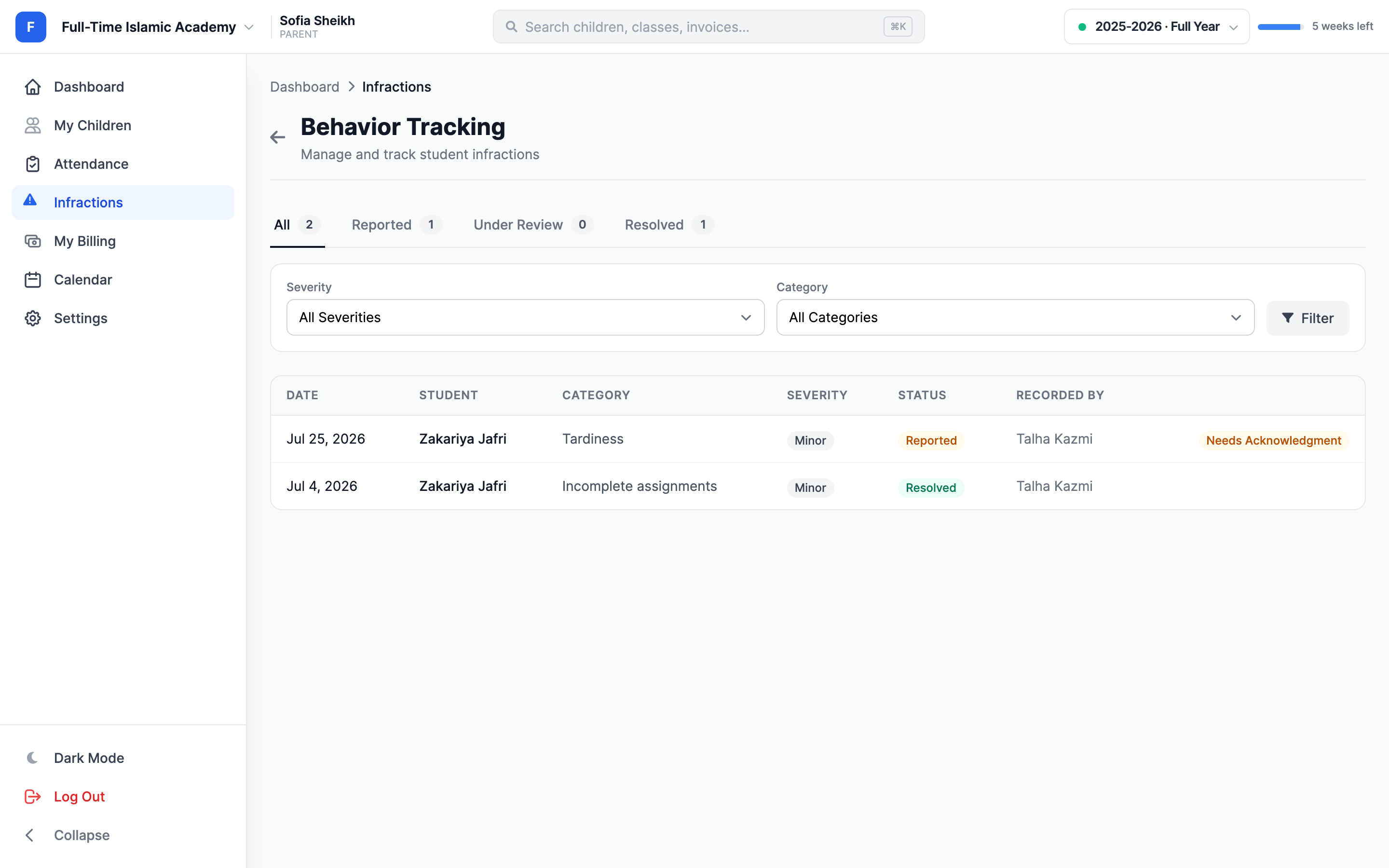
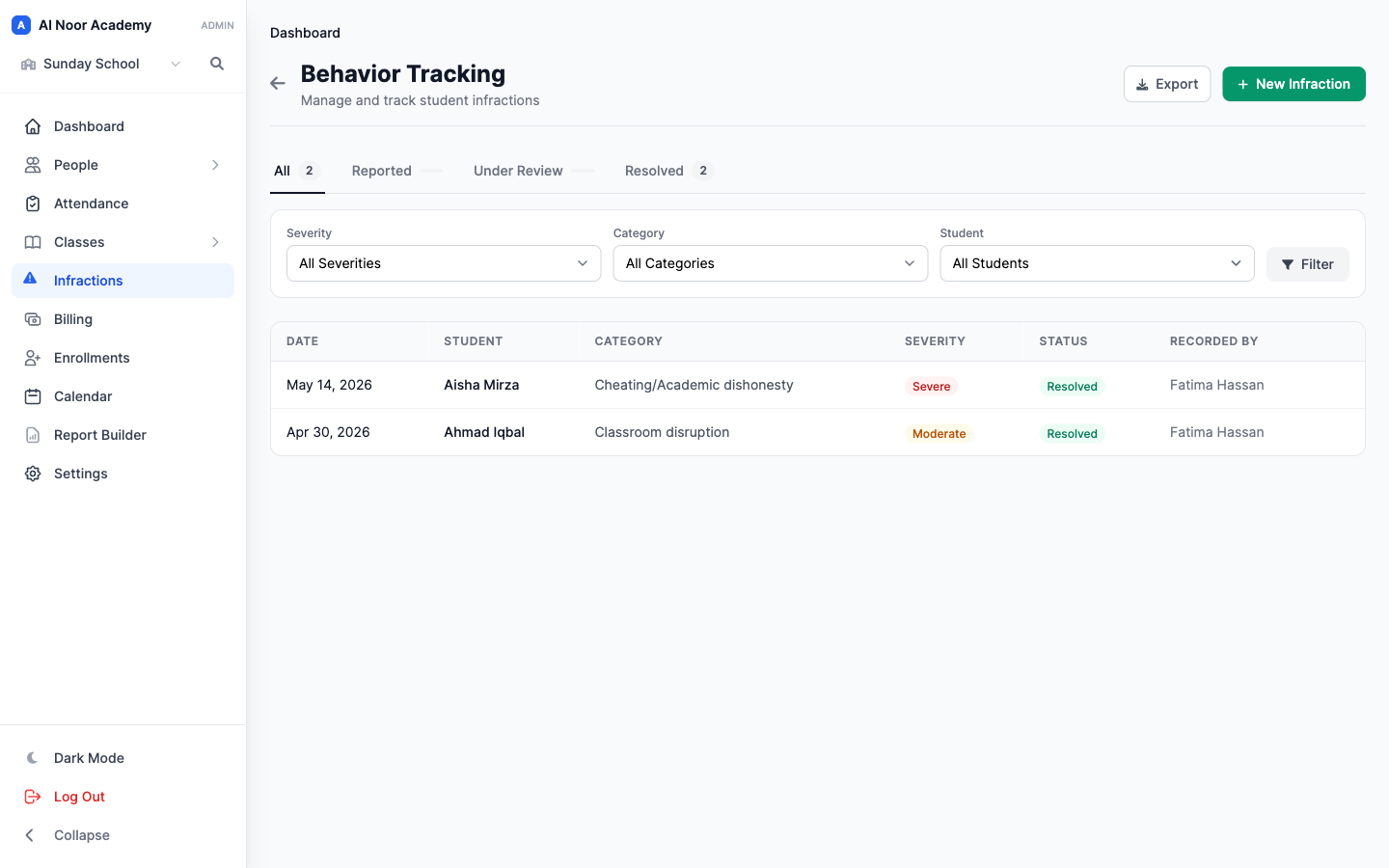
A teacher records what happened: the student, the category, how serious it was and what was done about it. Admins follow it through Reported, Under Review and Resolved. Parents see the incidents you choose to share and acknowledge each one, so there's a record that the conversation took place.
- Severity, category and the action taken on every record.
- Hide an incident from parents while staff deal with it. Admins still see it.
- The admins you pick get an email, plus a push notification in the app, when a teacher records one.
- Parents acknowledge from their own account. Staff can't do it for them.
- Reports for repeat incidents and anything still waiting for follow-up.
Discipline isn't what an LMS is for. In a district setup, behavior records usually live in the SIS or in a separate tool.
07Tuition & billing
Tuition that collects itself, billed to the family.
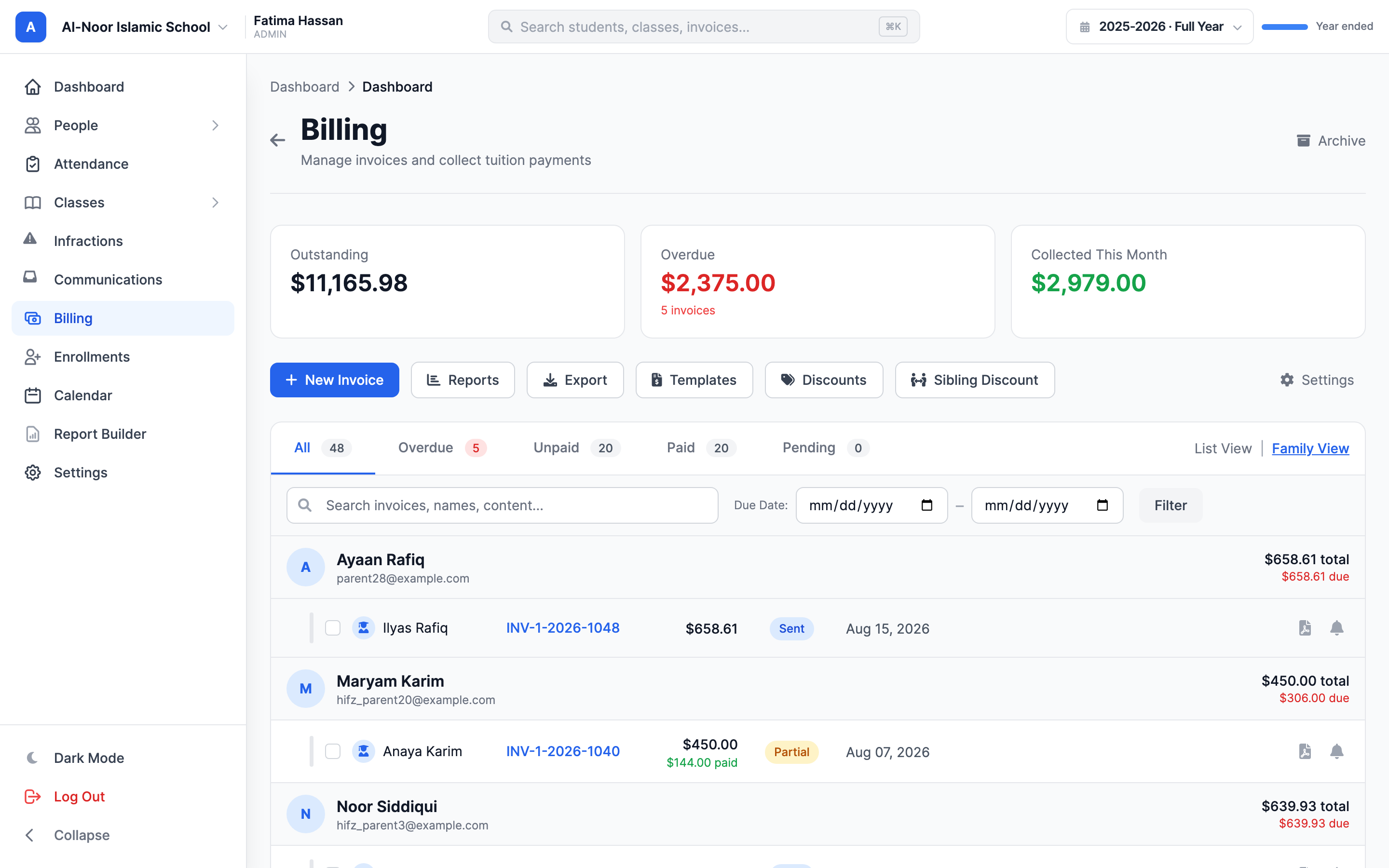
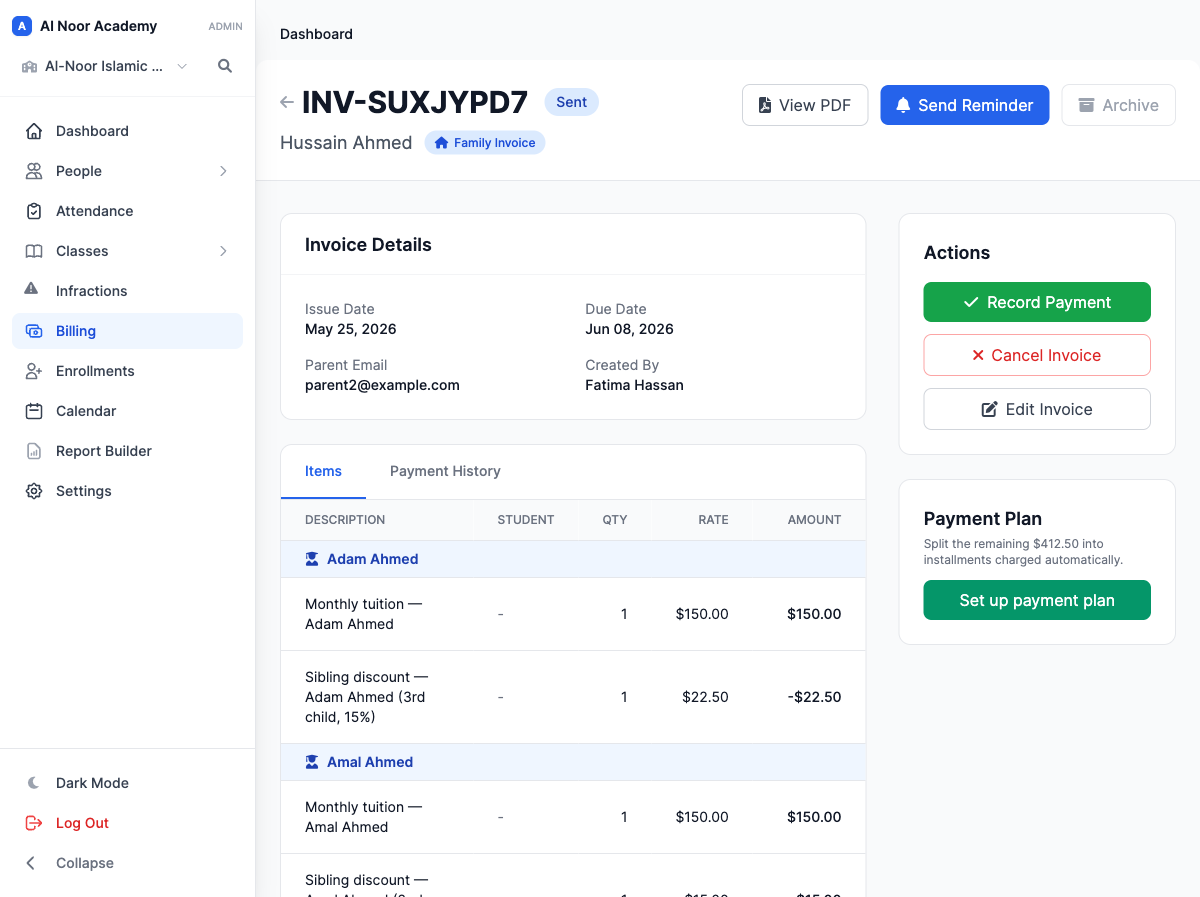
Islamic schools bill families, often with three or four children, a sibling discount and a weekend program on top. MarkTrack bills the way you already think about it: one family invoice with each child on it and the discount worked out for you. Families pay online, autopay takes care of the monthly charge, and the money goes to your school's own Stripe account.
- Family invoices with sibling discounts, discount codes and per-child rates.
- The enrollment form takes the registration fee and the card on file. Tuition starts when you accept.
- Autopay can be off, offered or required, and payment plans spread a larger balance.
- Overdue, aging, revenue and balance reports, downloadable as Excel.
An LMS doesn't bill anyone. Fees are handled by a separate finance or payments product, if the school has one at all.
08Hifz & Qaidah tracking
Hifz and Qaidah as real records, not a spreadsheet on one teacher's laptop.
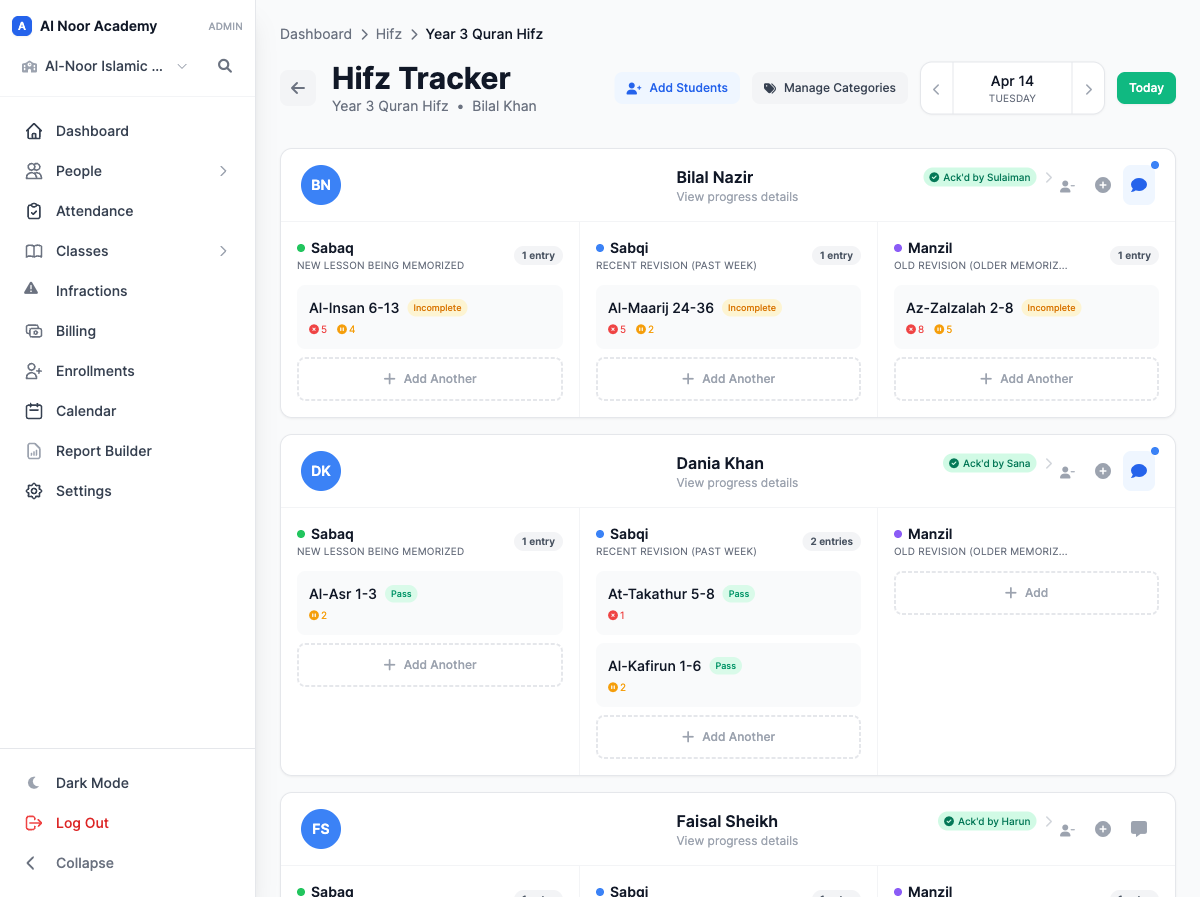
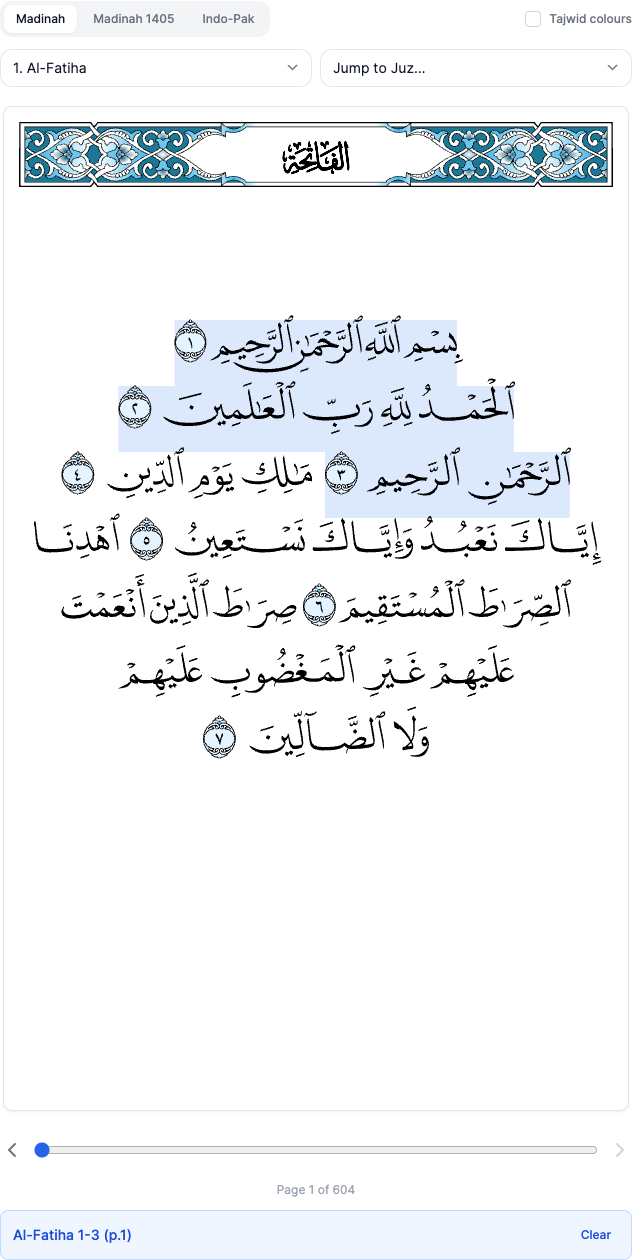
Sabaq, sabqi and manzil are recorded separately, each with the passage, the mistakes, the tajwid slips and the hesitations. A teacher can pick the passage by tapping it on a Mushaf page, in Madinah or Indo-Pak script. Parents see the day in the app and acknowledge it, and a PDF report covers any date range when you need the full picture.
- Six ways to record a lesson: full juz, ayah range, several selections, page range, lines, or the Mushaf.
- Mistakes, tajwid mistakes and hesitations are counted separately.
- A Parent Engagement view shows which families haven't acknowledged.
- Qaidah lessons in the notation your book uses, with homework (PDFs, pictures, audio) and a note home.
There's no record for Qur'an progress. Schools end up with a Hifz "course", a percentage standing in for juz completed, or a sheet only one teacher understands.
09Use it for anything
Built for the Qur'an. Flexible enough for anything taught one lesson at a time.
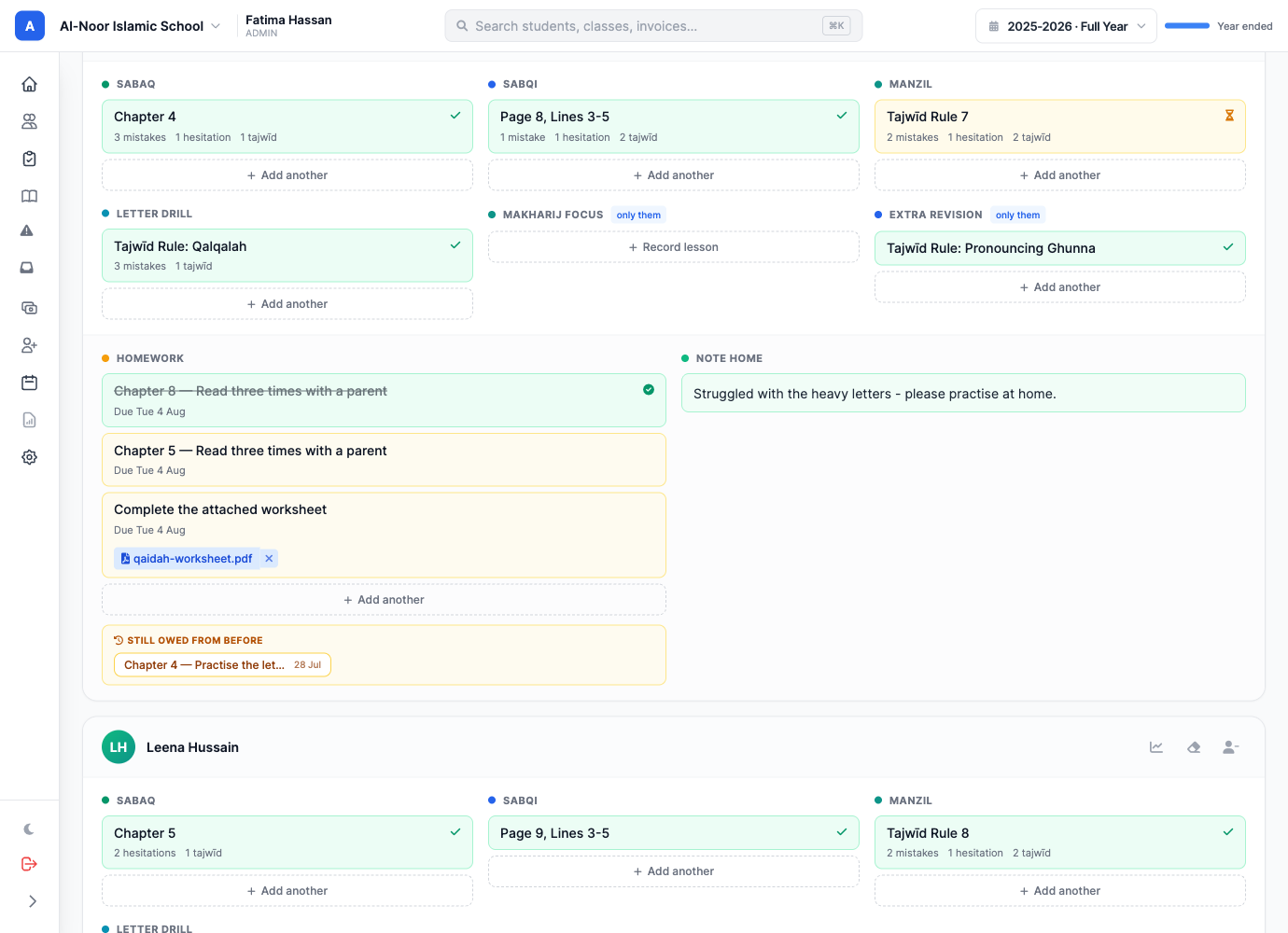
The Qaidah tracker is a daily lesson card with columns you name and cells that take whatever reference your curriculum uses. Rename the columns, add one for the whole school, or add one for a single student who needs a different path. That makes it a tracker for any subject that moves forward a lesson at a time.
- Duas and adhkar
- 40 Hadith
- Arabic vocabulary
- Nazirah reading
- Juz Amma for juniors
- Tajwid rules
- Salah and wudu
- Seerah
- Letter drills
- Makharij practice
- Reading levels
- Times tables
- Every lesson gets an outcome (passed, partial or repeat), mistake counts and a teacher's note.
- Homework and a note home sit on the same card, and parents mark each day as seen.
- Retire a column without losing a single lesson recorded in it.
- Hifz categories work the same way: rename them, recolor them, or add one for one student.
The honest part
When to stay with Schoology, and what switching takes.
When Schoology is the better choice
If you're a district, or a large school already standardized on PowerSchool's student information system, with IT staff and teachers who build rich online courses, Schoology fits that world and we wouldn't try to talk you out of it. The same goes for a school with no Qur'an program, one campus and fees handled somewhere else.
What switching actually involves
Less than you'd expect. Upload the roster spreadsheet or export you already have and MarkTrack's AI import finds the students, parents and families for you to approve. Import Grades With AI brings a gradebook across from a printout. Most schools are set up in an afternoon, and some keep Schoology for coursework while the school itself runs on MarkTrack.
Side by side
The MarkTrack column describes what ships today. The second column describes what software in this category typically does — we deliberately do not assert specifics about another vendor's current release, because those change without notice. Confirm the details with Schoology before you decide.
| MarkTrack | District K-12 LMS | |
|---|---|---|
| What it is built to run | The whole Islamic school: enrollment, tuition, attendance, grades, behavior, parent communication, Hifz and Qaidah | Courses: materials, assignments, assessments and discussions, usually next to a separate student information system |
| The parent experience | One login and one app for every child and every program: grades, Hifz, Qaidah, attendance, behavior, messages, the calendar and the bill | A guardian view organized around courses; attendance, report cards and fees usually sit in other systems |
| Native mobile apps | Native iPhone and Android apps for parents and teachers, including Hifz acknowledgment, attendance and school switching | Mobile apps are available; check which features are in the app and which are web-only |
| Tuition and fees | Family invoices, sibling discounts, payment plans and autopay, paid into the school's own Stripe account | Not part of an LMS; fees are handled by a separate finance or payments product |
| Hifz and Qaidah | Built in: sabaq, sabqi and manzil, a tap-to-select Mushaf, daily Qaidah lessons and parent acknowledgment | No record type for Qur'an progress; usually improvised as a course, a rubric or a spreadsheet |
| Behavior and infractions | Built in, with severity, follow-up, staff control over what parents see, and parent acknowledgment | Usually handled in the SIS or a separate behavior tool |
| Automated reports and reminders | Weekly progress reports to every family in one press; attendance alerts, overdue reminders and Hifz reminders on a schedule | Course notifications for assignments and grades; school-wide reporting comes from the SIS |
| Setup | Self-serve; most schools are running in an afternoon, with AI import for the spreadsheets you already have | District roll-outs are usually implementation projects with IT involvement |
| Who it suits | Islamic schools, madrasahs, weekend programs and Hifz academies, from 20 students to several hundred | Districts and large schools with IT staff and an existing SIS |
Questions schools ask us
01 Is MarkTrack a full replacement for Schoology?
For most Islamic schools, yes. MarkTrack includes assignments, quizzes, file uploads, class modules, discussions and a weighted gradebook, and adds everything an LMS leaves to other systems: enrollment, tuition, attendance, behavior, report cards, parent messaging, and Hifz and Qaidah. If your teachers depend on a deep course-authoring feature set, some schools keep Schoology for coursework and run the school itself on MarkTrack.
02 Do parents have to download an app?
No. The parent portal works in any browser, and the native iPhone and Android apps are there for families who want them. A parent invited by email sets their own password, and that one login covers every child, every class and every program the family has at your school.
03 Can MarkTrack send progress reports to parents automatically?
One press of Send to parents emails every family their own children's weekly progress report as a PDF, with a message your office writes. The routine messages run by themselves: attendance alerts by email, text or push notification, an end-of-day attendance summary at the hour you choose, overdue reminders, and evening Hifz reminders. Report cards are generated and emailed from the same place.
04 Can the Hifz and Qaidah tracker be used for other subjects?
Yes. The Qaidah tracker's columns and lesson cells are yours to name, so schools use the same daily card for duas, hadith, Arabic vocabulary, Nazirah reading or anything taught one lesson at a time, and a column can apply to a single student. The Hifz tracker's categories can be renamed, recolored and extended beyond sabaq, sabqi and manzil to fit your program.
05 How does MarkTrack handle tuition?
Tuition is billed to the family, not the individual student: one invoice across siblings, with sibling discounts, per-child rates, payment plans and autopay that can be off, offered or required. Families pay online by card, money goes to the school's own Stripe account, and a failed autopay payment is retried automatically and you are told.
06 Can we move our data over from Schoology?
Yes. MarkTrack's AI import reads the spreadsheets and exports you already have and creates students, parents and families once you have reviewed them. Each gradebook also has Import Grades With AI: upload the PDF, CSV, Excel file or screenshot your old system produces and it matches every grade to your students and columns before anything is saved.
07 How current is this comparison?
The MarkTrack column describes what ships today. Schoology is a large, actively developed product, so the second column describes what district K-12 learning management systems are typically set up to do rather than asserting specifics about its current release. Confirm the details with PowerSchool before you decide.
Other comparisons
See it with your own school's data
Start a 30-day free trial, or bring the spreadsheet you already keep and we will show you what it looks like once it is imported. No card required to start.