

K-12 Islamic school software
A full-time Islamic academy needs everything a mainstream K-12 school needs — academic years and semesters, admissions, a real gradebook, report cards, transcripts, a parent portal and tuition — and then it needs the Islamic programme on top, in the same system rather than in a spreadsheet beside it.
Updated August 2026
A full-time Islamic academy is two schools in one building. On one side it has every obligation a mainstream private K-12 school has — an academic year divided into semesters, an admissions cycle, a gradebook that survives an audit, report cards parents recognise, a transcript for the upper grades, and tuition that has to be collected from families rather than students. On the other side it has the programme that made the school exist in the first place.
Most schools end up running the first half in a student information system and the second half in a spreadsheet. This page is about not doing that.
The year: semesters, quarters and term grades
An academic year in MarkTrack contains terms, and terms nest — so quarters sit inside semesters and each level carries its own grades. A quarter can produce its own report card; a semester grade can be built from the quarters inside it. Term grades roll up out of the gradebook rather than being entered a second time in a different screen, which is where most double-entry errors come from.
Teachers set their own weighted categories and grading scale. If your school uses letters in the upper grades and standards in the lower ones, that is a per-level setting rather than a compromise.
Admissions, and the re-registration cycle
New families apply through an online form that takes their details, the documents you require, and the registration fee in the same pass. Applications land in one review queue rather than an inbox, and accepting one creates the student and the parent accounts.
The part that saves a full-time school the most time is the spring: returning families re-register through the same form, so the school is not rebuilding next year's roster from a mail-merge. Acceptance starts next year's tuition schedule automatically. There is a fuller walkthrough in how MarkTrack collects tuition from parents.
Reports parents actually recognise
Report card templates are configured per grade level, because a second-grade report and an eleventh-grade report are not the same document. Standards-based and narrative formats are supported alongside percentages, and transcript-style layouts exist for the upper school.
Beyond report cards there is a report builder for everything else a K-12 office is asked for — attendance summaries, honour rolls, per-class breakdowns, year-over-year comparisons — so requests from a board or an accreditor do not turn into an evening of spreadsheet work.
What the parent gets
One login covering every child in the school, on the web and in native iPhone and Android apps: attendance, assignments, grades, report cards, announcements, absence requests, behaviour records if you choose to share them, and Hifz or Qāʿidah progress if the child is in that programme.
Communication runs from the same place. Email and SMS to a class, a grade level or the whole school, with templates for the messages you send every year, and a record of what went out and to whom.
Tuition, billed to the family
This is where general K-12 software tends to fail an Islamic school. Fees are usually modelled per student; Islamic schools bill families with three, four and five children, often at sibling rates, sometimes across two campuses.
MarkTrack invoices the family. Rates can differ per child and per campus, sibling handling is built in rather than recalculated each September, autopay can be off, offered or required, and schedules end on their own at the end of the year instead of needing to be cancelled one at a time.
And the Islamic programme, in the same system
Hifz records — sabaq, sabqi and manzil, with juz-by-juz progress and a projected completion date — and Qāʿidah lesson records sit alongside attendance and the gradebook rather than in a separate tool. Hifz progress can be printed on the report card itself, so a family receives one document about their child rather than two.
Multiple campuses run as separate schools under one organization, each with its own roster, staff and rates, while a family with children in more than one keeps a single login and a single invoice. If you also run a weekend programme, see the weekend and Sunday school page — it is the same organization, not a second account.
See it
The parts of MarkTrack this kind of school spends its time in.
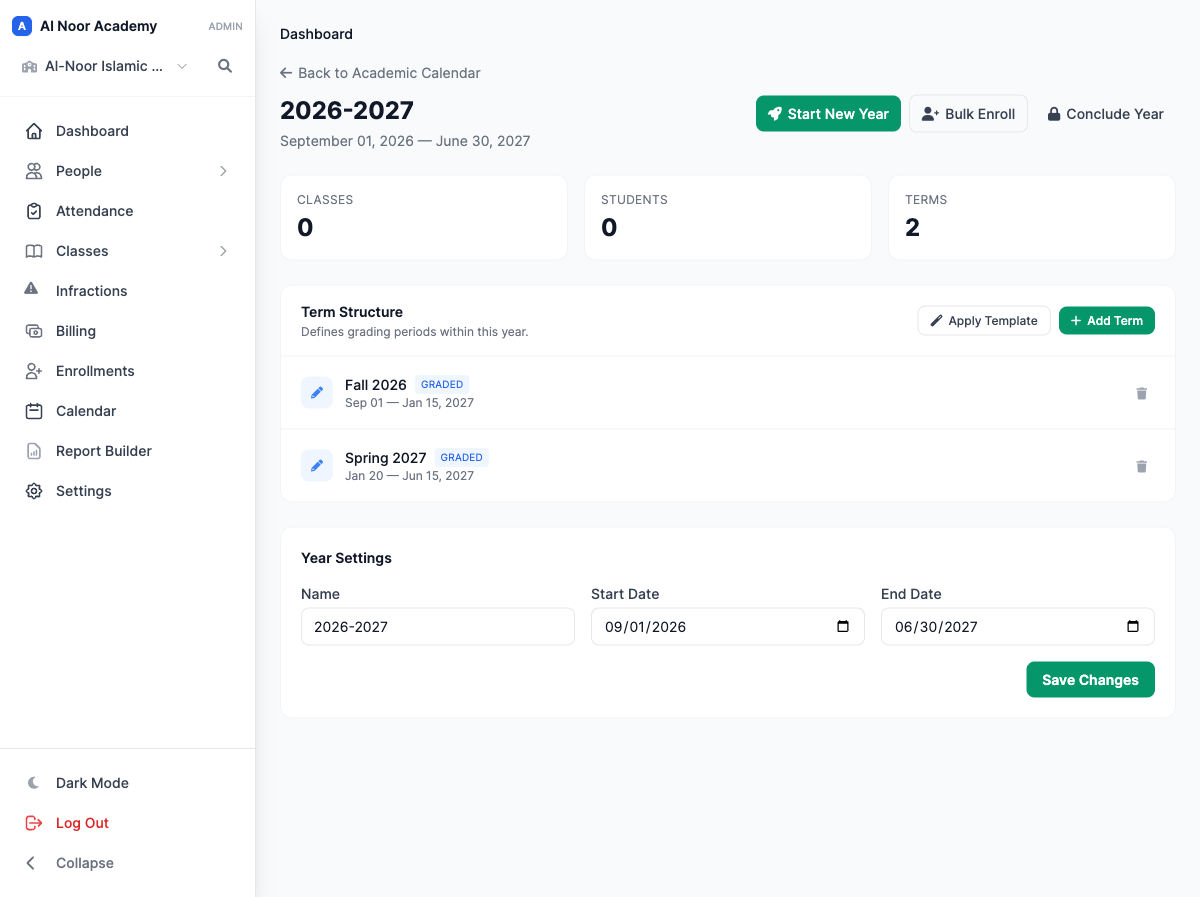
Academic years, semesters and quarters
Set up the year once. Terms nest, so quarters sit inside semesters and each one carries its own grades and its own report card.
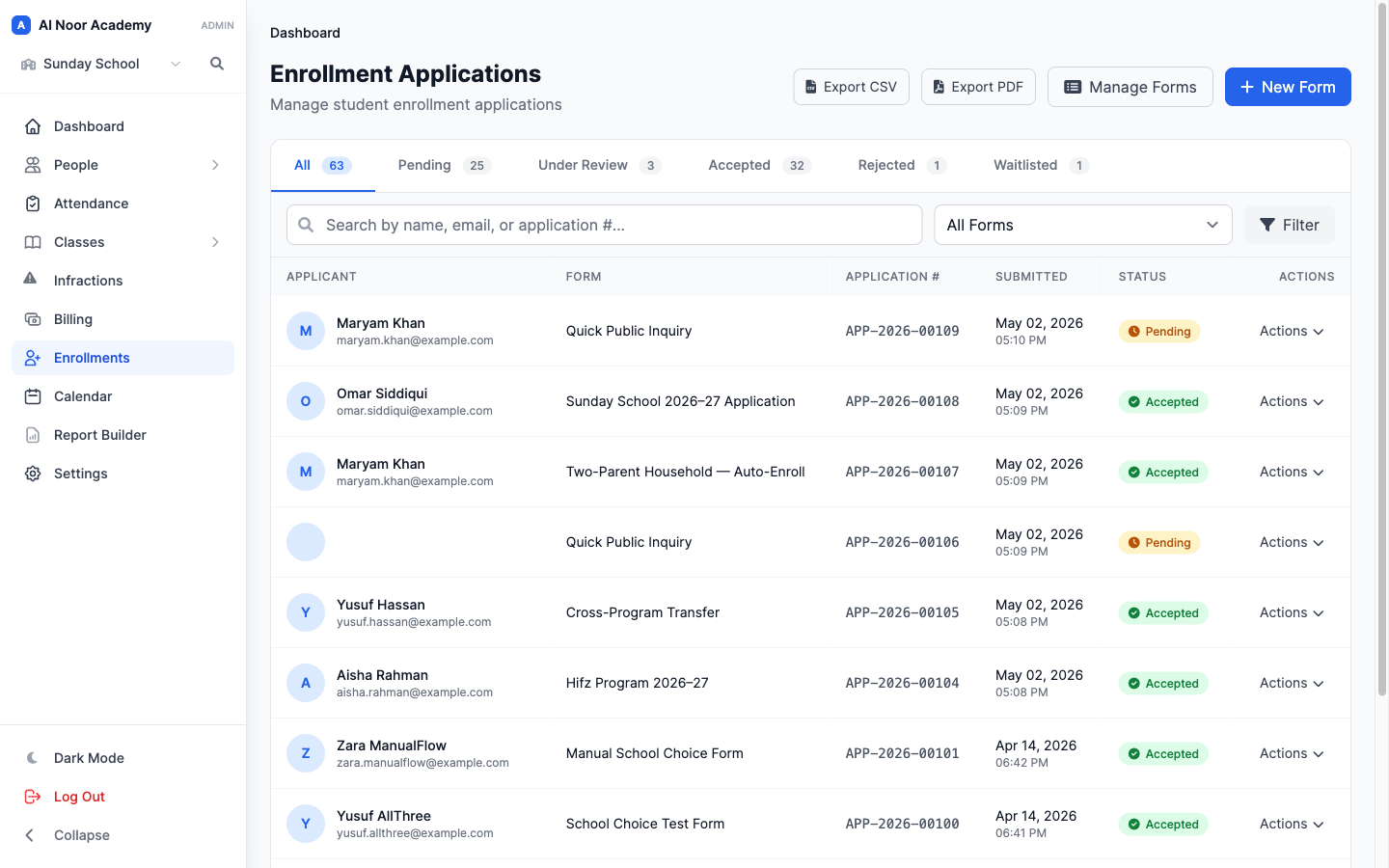
Admissions and re-registration
Online applications with documents and fees, reviewed in one queue. Returning families re-register through the same form each spring.
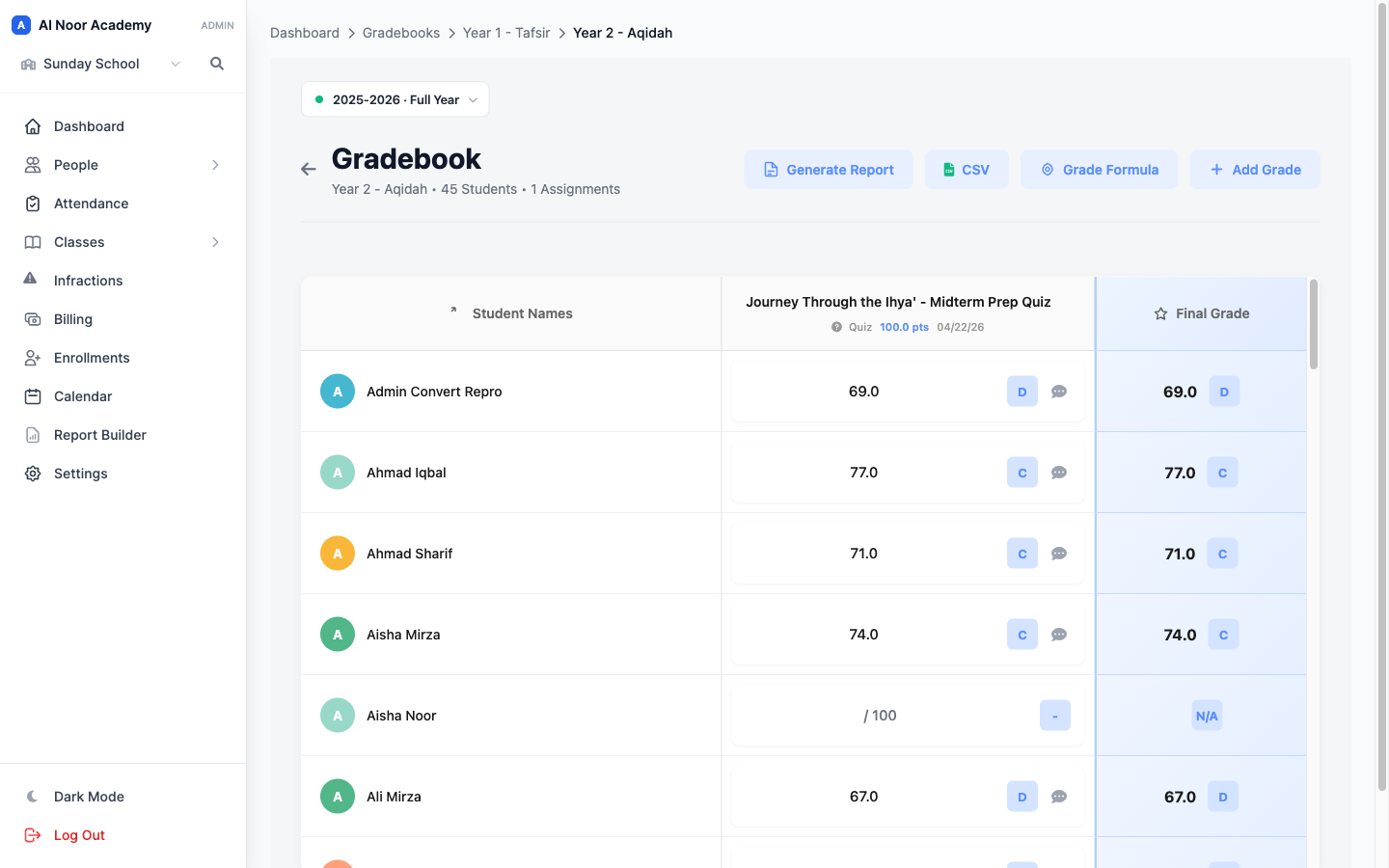
Gradebook and term grades
Weighted categories, your own grading scale, and a term grade that rolls up automatically rather than being retyped.
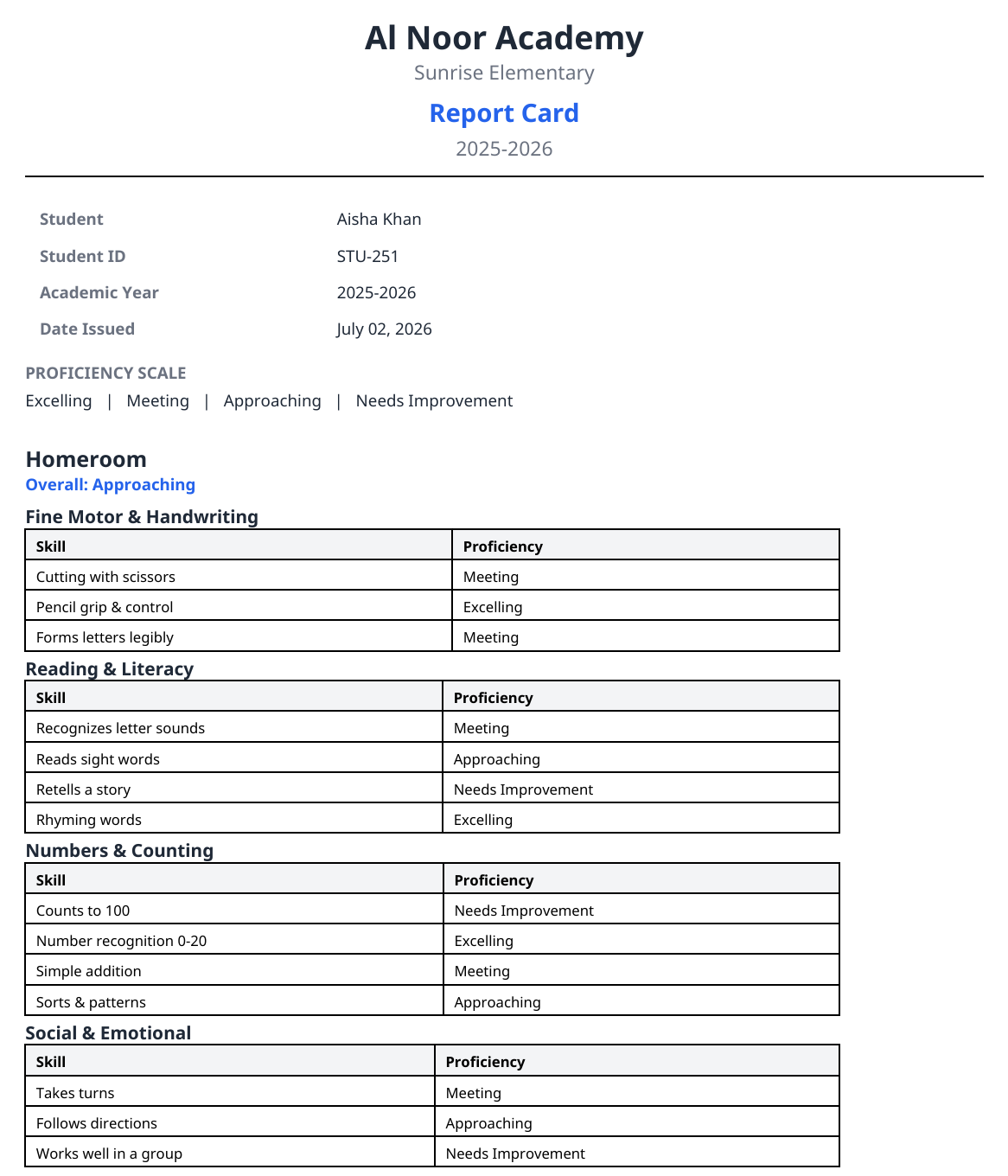
Report cards and transcripts
Report card templates per grade level, including standards-based and narrative formats, and transcript-style layouts for upper grades.
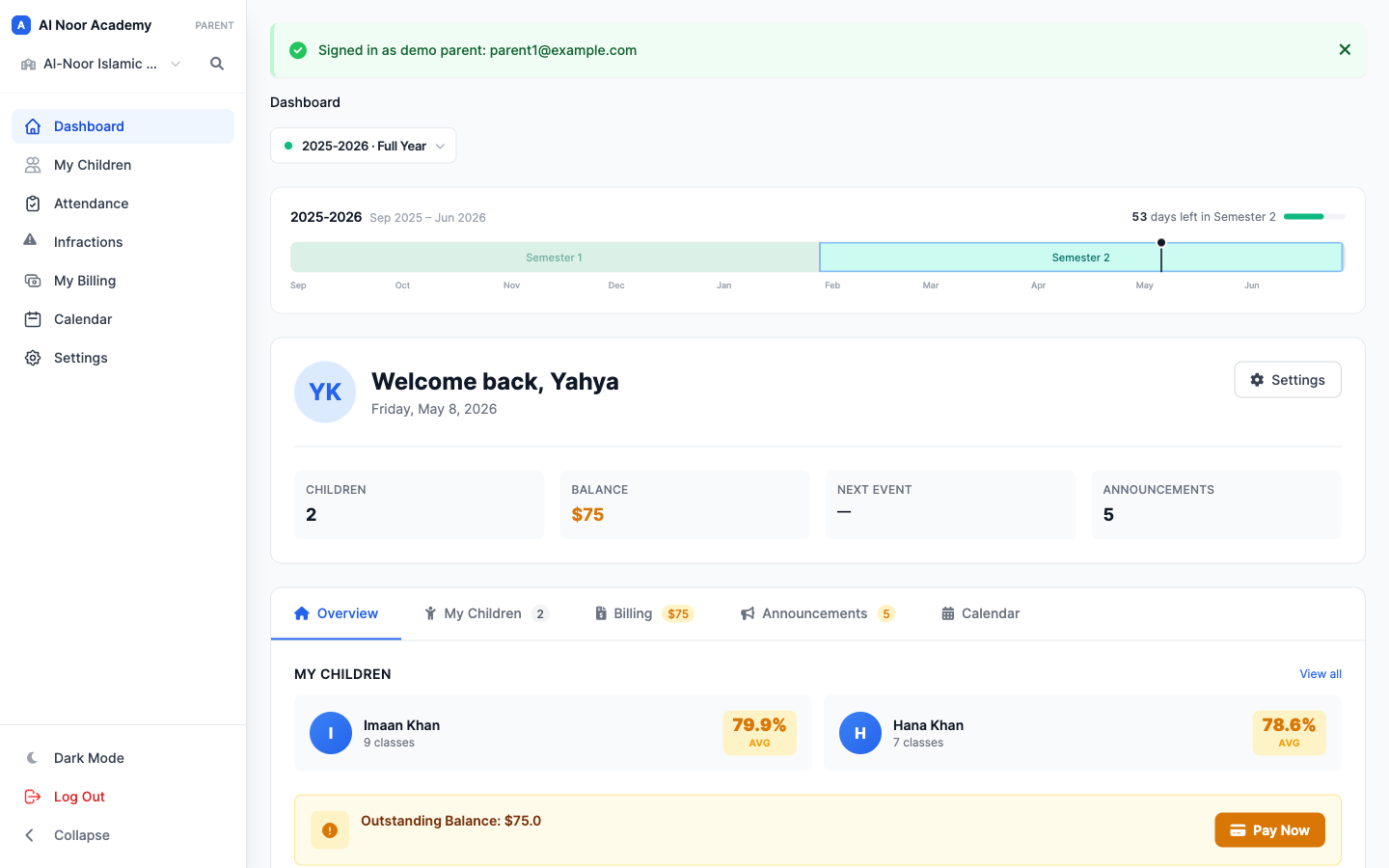
The parent portal
One login covering every child: attendance, grades, assignments, announcements, and Hifz progress if you run a programme.
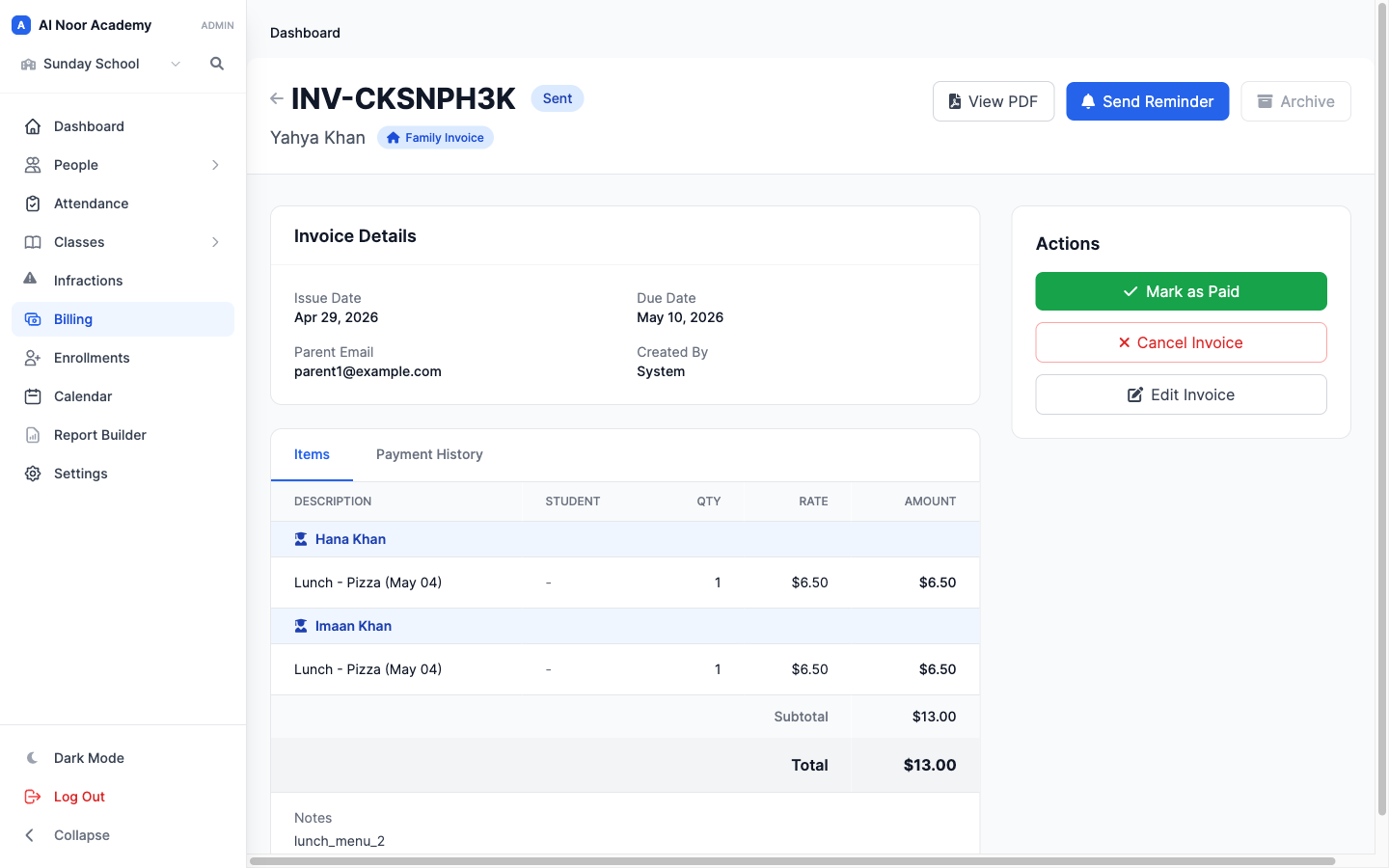
Family-level tuition
One invoice per family across every child, with sibling rates and payment plans that end automatically at year end.
Questions schools ask us
01 Does MarkTrack handle semesters and quarters?
Yes. An academic year contains terms, and terms nest — so quarters sit inside semesters. Each term carries its own grades and can produce its own report card, and term grades roll up from the gradebook rather than being entered a second time.
02 Can we produce transcripts for high school students?
Report card templates are configurable per grade level and include transcript-style layouts, so an upper-school record can look like a transcript rather than an elementary report card. If you have a specific format your accreditor expects, show it to us before you commit.
03 What does re-registration look like each spring?
The same enrollment form you use for new families, reused for returning ones: it collects the updated details and documents, takes the registration fee, keeps the card on file and starts next year's tuition schedule on acceptance.
04 We have more than one campus. Is that supported?
Yes. Campuses are separate schools under one organization with their own rosters, staff and tuition rates, and a family with children across two campuses still gets one login and one invoice.
05 Can teachers grade on their phones?
There are native iPhone and Android apps for teachers as well as parents — attendance and gradebook entry both work on a phone rather than being a shrunken desktop page.
06 Does the Islamic programme live in the same system?
Yes, and that is the point. Hifz and Qaidah records sit next to attendance and the gradebook, and Hifz progress can be printed on the report card instead of sent home as a separate sheet.
More from MarkTrack
See it with your own school's data
Start a 30-day free trial, or bring the spreadsheet you already keep and we will show you what it looks like once it is imported. No card required to start.