
How program payments work
Once your form has programs and add-ons, every family's total is the sum of what each child picked, plus any registration fee. This guide follows that money: when it's charged, what you see while you review, what the invoice says, and what happens when plans change.
Pay on the form
The family pays their whole total when they submit. You review, then accept each child; the payment becomes a paid invoice.
Invoice after acceptance
Nothing is charged at submit. Each child you accept is invoiced at the prices they picked, and the family pays by card or from their bank.
You choose between them in the form builder: open the settings with the gear, go to the Billing tab, and tick or untick Require registration payment on the form.
When families pay on the form
The family sees their total — every item under each child's name — and clicks Pay & Submit. They pay by card, or with Link — Stripe's saved checkout, which can also pay from a bank account the family has connected to it. Their answers are locked while they pay, so the total can't change underneath them. They land on a Payment Received page with What you registered for — every item, child by child — and get the same list by email.
Under the Pay button, families on a form for several children read that the payment covers every child's programs and add-ons and is not refunded for children who aren't offered a place.
While you review: the payment is held
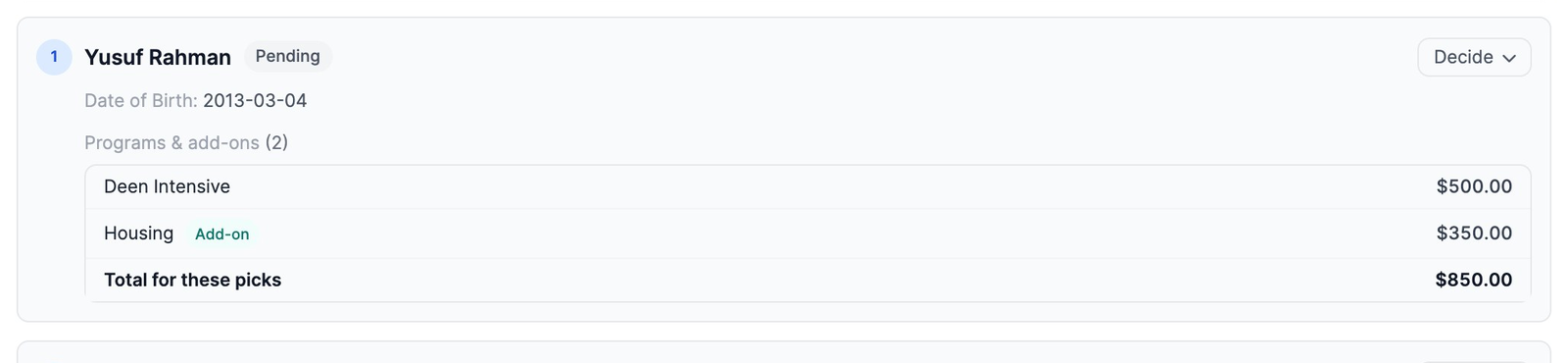
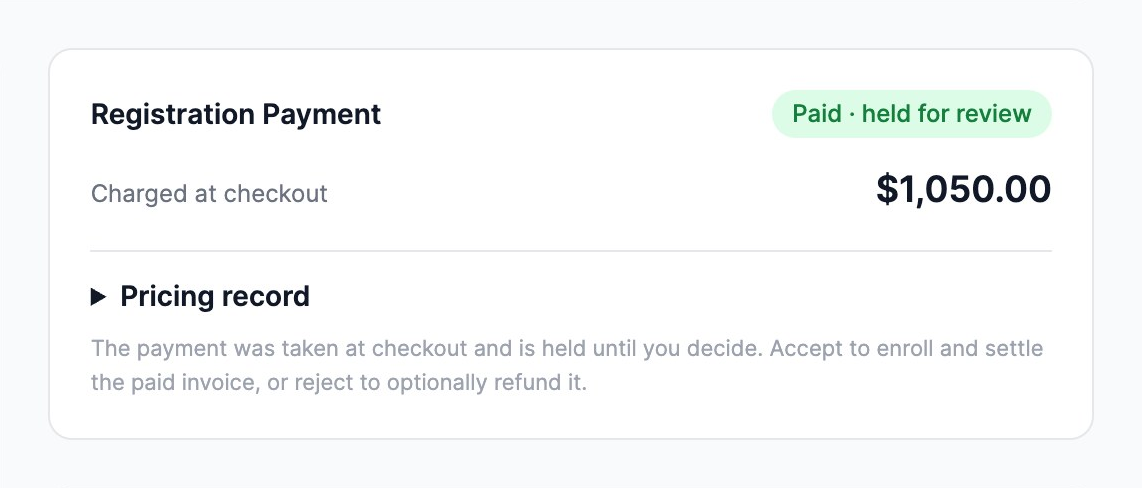
If Auto-accept submissions is off (Options tab), the application waits for you. Open it from Enrollments, or from the form's own page. You'll see:
- each child with their own Programs & add-ons and Total for these picks;
- a Registration Payment card reading Paid · held for review and Charged at checkout, with the amount. The money is captured, but nothing is final until you decide.
Accept each child
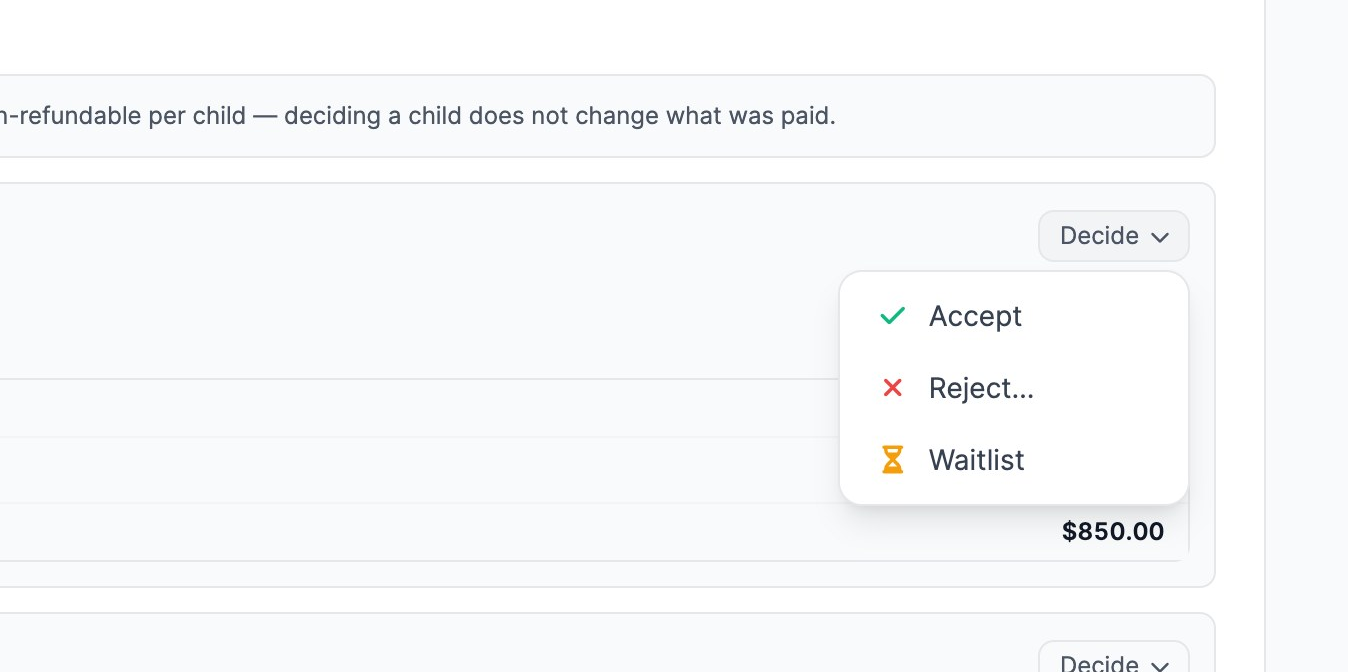
- Next to a child, click Decide, then Accept.
- The child is enrolled. The first time you accept a child, the family's payment becomes a paid invoice.
- Accept, reject or waitlist the other children the same way, on whatever day you decide. When a later child is accepted, you're told their items were already paid for at checkout — there is no second charge.
With Auto-accept submissions on, every child is enrolled the moment the payment goes through, and the invoice is paid straight away.
What the invoice says
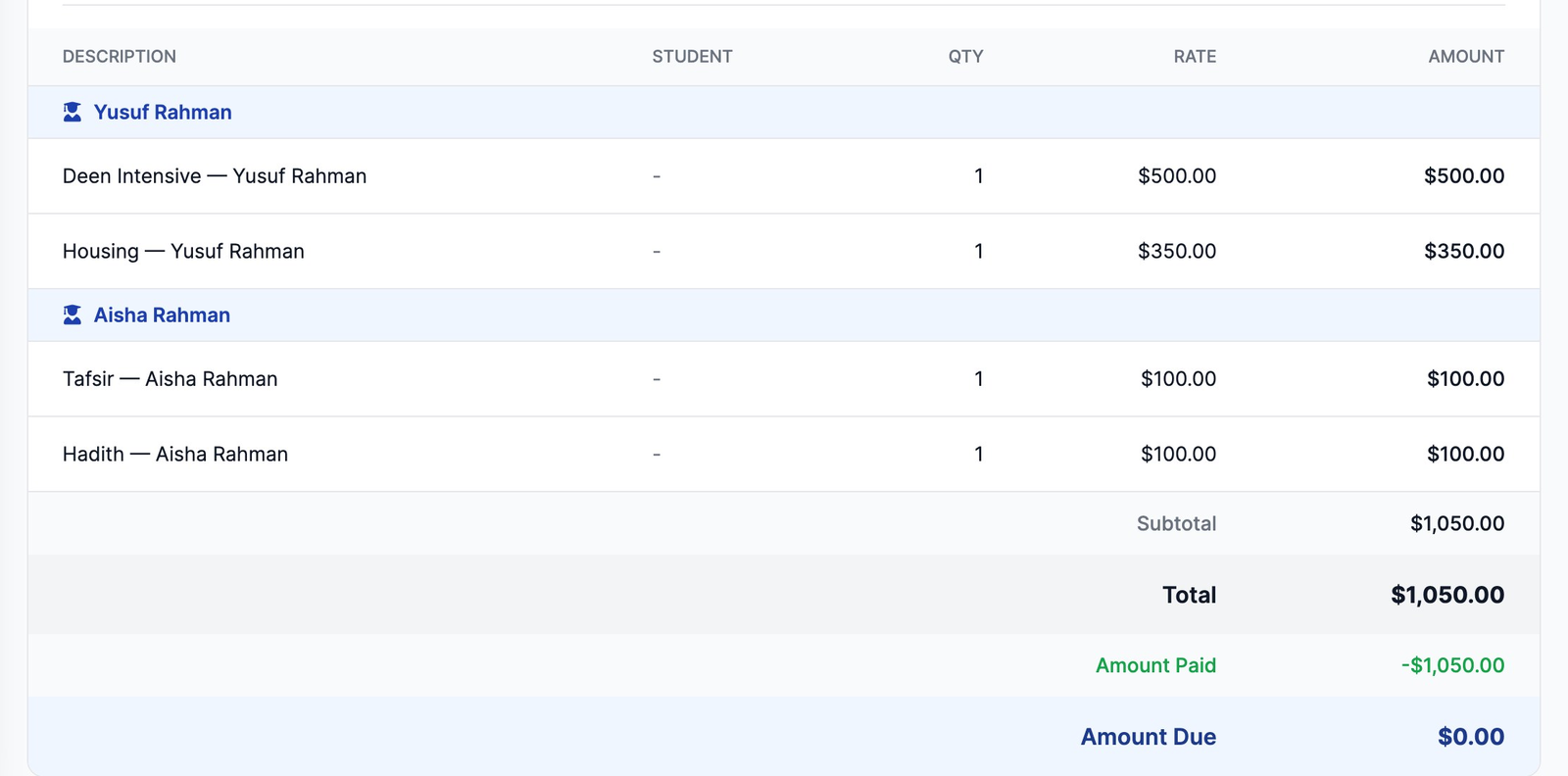
Every pick is its own line, grouped under the child who picked it and in the order the family chose them — “Deen Intensive — Yusuf Rahman”, “Housing — Yusuf Rahman”, and so on. The family sees the same lines in My Billing and on their emailed receipt.
While a child is still being decided, their lines on the paid invoice read, for example, “Application fee — Aisha Rahman · Tafsir (under review, non-refundable)”, so the invoice still adds up to what the family paid. When you accept that child, the lines go back to “Tafsir — Aisha Rahman”. If you don't place them, they read “not placed, non-refundable” (or “waitlisted, non-refundable”).
When you invoice after acceptance
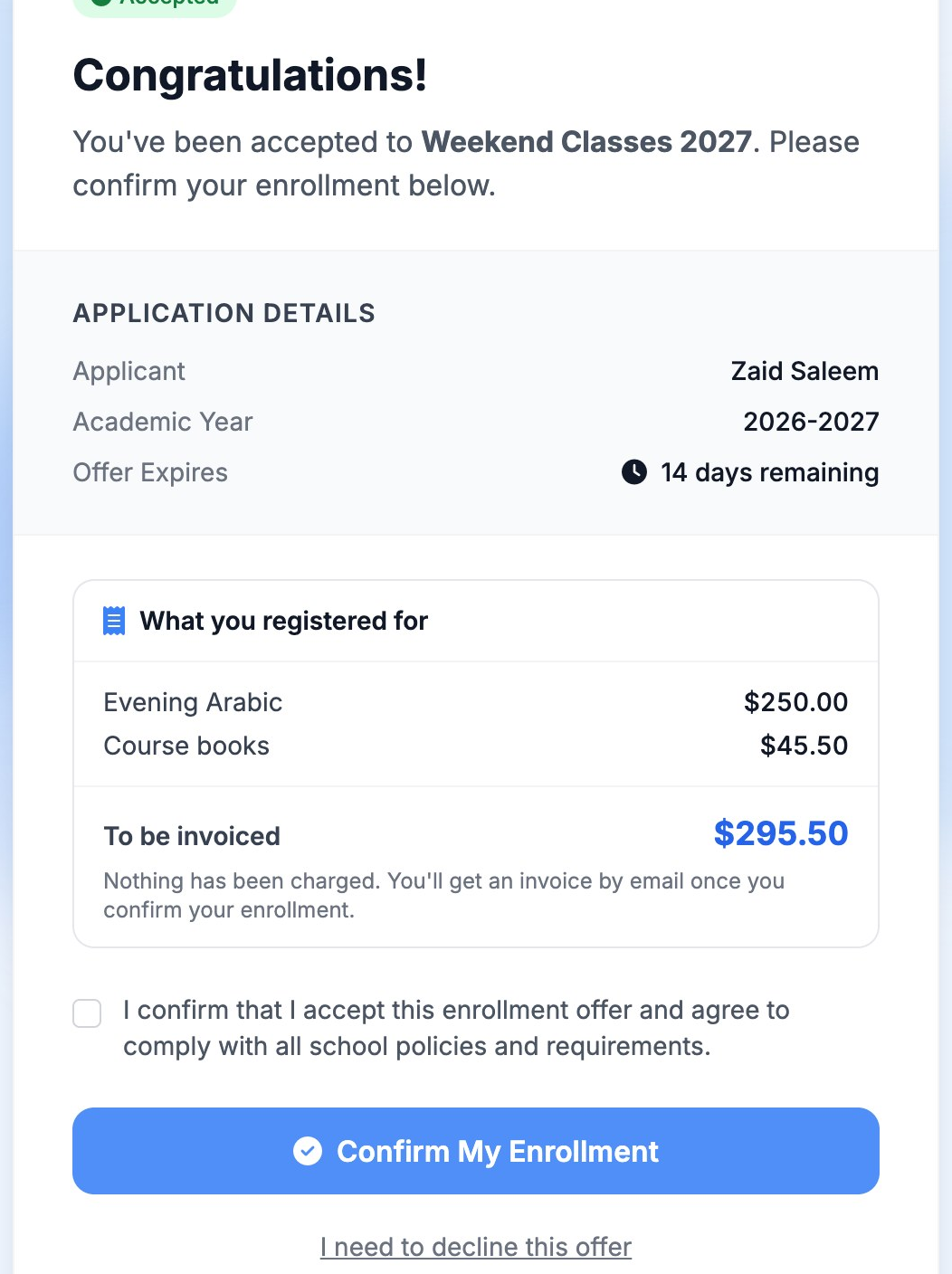
- The family submits without paying. Their summary is marked After acceptance, and their confirmation page and email say To be invoiced, with when the invoice will come.
- You accept the application (or each child).
- The family confirms their place from the link in the acceptance email. The page shows exactly what will be invoiced before they click Confirm My Enrollment. (With Auto-accept on, there's no confirmation step: the invoice is created when they submit.)
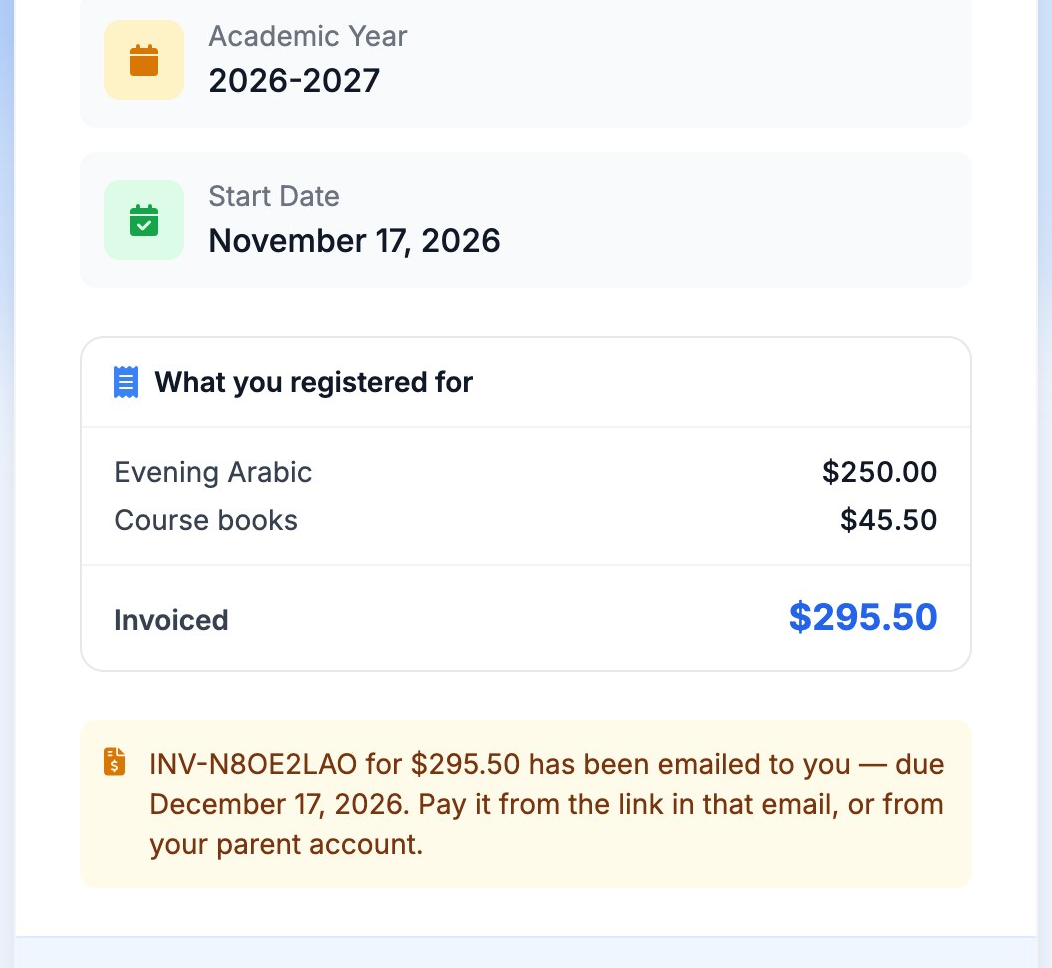
- The invoice is created at the prices they picked and emailed to them with its number and due date. The “You're Enrolled!” page and the welcome email name it too.
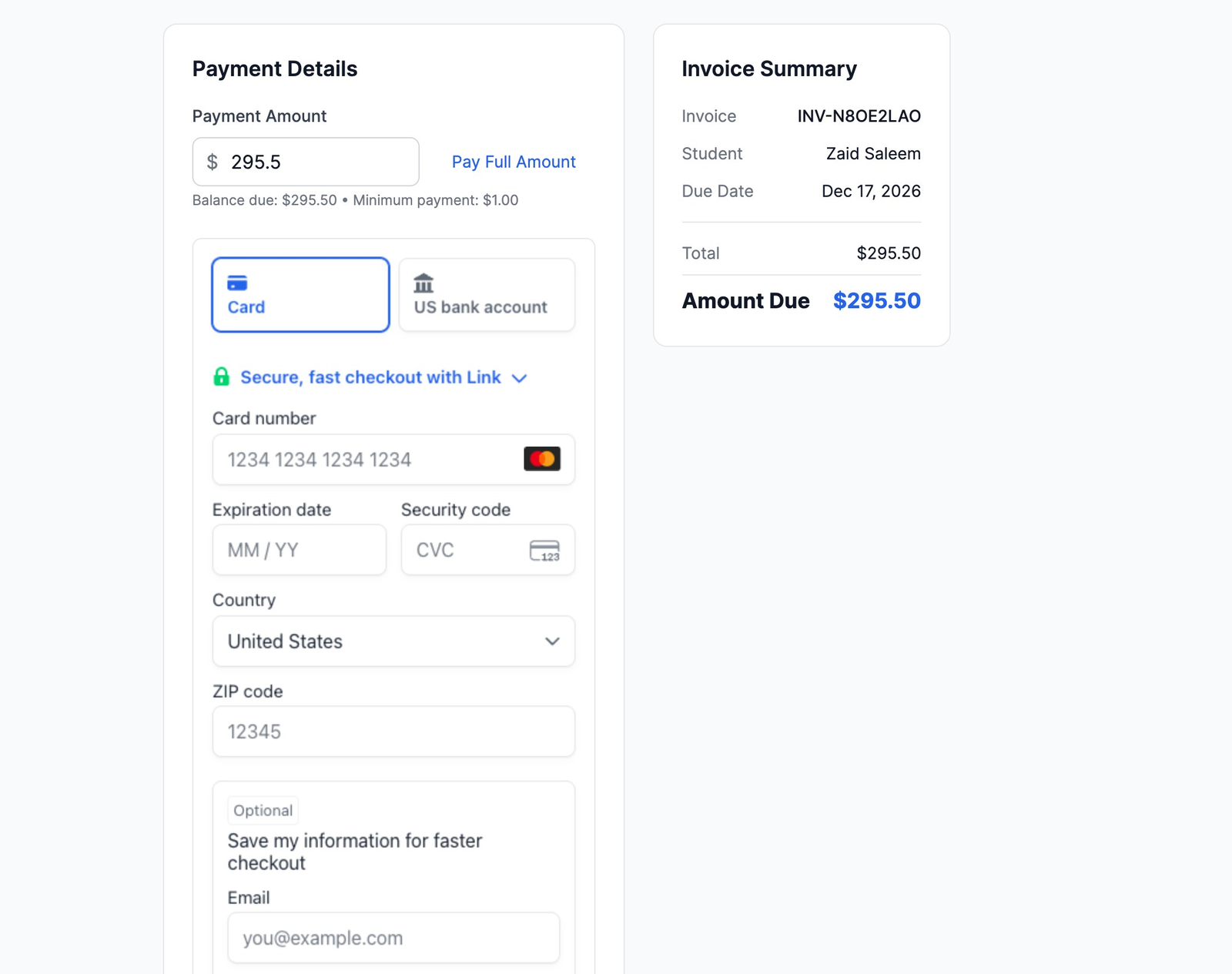
- They pay from the email link or from My Billing — by card, or from their bank account if your school takes bank payments.
Children accepted on different days
On a form for several children, accepting another child later updates the family's invoice to include them — re-working any sibling discount — as long as nothing has been paid toward it and nobody on your staff has edited it. MarkTrack never changes an invoice under a payment or over your corrections. In those cases the invoice is left as it is, you're told exactly what the new child owes (for example “Arabic Essentials $500.00”), and a reminder appears at the top of the application under Needs your attention until you click Mark as handled. If your admin notifications include Payment Failed (on the Billing dashboard), admins are emailed about it too.
Bank payments
If your school's Stripe account can take bank payments, families paying an invoice see US bank account next to Card. (On the form itself, families pay by card or Link.) A bank payment takes a few business days to clear:
- While it clears, the family's invoice shows Payment Processing — “Your payment is processing. You cannot start another payment yet.” You'll see it as pending.
- When it clears, the invoice is paid and a receipt is emailed.
- If the bank turns it down — for example, not enough money in the account — the invoice reopens as unpaid, the family is emailed that the payment couldn't be completed, and they can pay again by card or bank. The child stays enrolled.
Monthly tuition
Monthly tuition is set in the Billing tab, separately from programs. Programs and add-ons are a one-time charge and never appear on a monthly bill. When a child is accepted, their first month is charged then (or invoiced, if the family isn't on Auto-Pay), and later months follow the schedule. A child accepted later is added to the family's schedule and their own first month is charged at their acceptance. If the first month is still clearing from a bank account at that moment, the child is added as soon as it clears.
If the form offers Auto-Pay, families paying on the form see the monthly amount and agree to it at checkout; the card is saved and Auto-Pay switches on when you accept.
When plans change
- You reject one child
- Their part of a payment made on the form is kept: the form told the family it isn't refunded for children who aren't offered a place. The reject window says so.
- You reject the whole application, or revoke a place
- The window offers Refund the checkout payment ($…). Leave it unticked to keep the payment — it is non-refundable by default — or tick it to give it back. If a bank payment is still clearing when you revoke a place, the invoice is kept; once the money lands, you can refund it.
- You change a price
- Families who already applied keep the price they saw. Only new applications use the new price.
- You edit an invoice by hand
- Your edits stay. A child accepted afterwards is not added automatically; you're told what to add.
Common questions
- Do discount codes and sibling discounts apply?
- A discount code applies once to the family's whole total, programs included. Automatic sibling discounts apply to forms that invoice after acceptance; on pay-on-the-form forms the family pays the total shown at checkout.
- Does “family pays the card fee” cover programs?
- No — it applies to the registration fee only. Programs and add-ons cost exactly their listed price.
- We take payments through CardConnect.
- Paying on the form works the same way and the family is charged the same total. Refunds for CardConnect payments are made in CardPointe, not in MarkTrack.
- Where do I see what a family registered for?
- On their application (each child's picks and total), on the invoice, and in the emails you and the family receive. The form's page sums up what's due under Payments.
More in Enrollments
Still stuck?
Our team is happy to walk you through it.