
2026 Buyer's Guide
The best school management software for Islamic schools in 2026
An Islamic school runs two schools at once. There is the academic side — attendance, grades, report cards, tuition — and there is the Qur'an side: Hifz, Qāʿidah, tajwīd, the daily record of where each child has reached. Most school management software handles the first half and has never heard of the second. So schools end up with one system for grades, a notebook for Hifz, a WhatsApp group for parents, and a shoebox of enrollment forms.
MarkTrack was built for Islamic schools first — full-time K-12, weekend maktabs, Hifz programs, and ʿĀlim courses. This guide walks through what that actually looks like, with real screenshots from the product: the enrollment form that collects payment on the spot, a Qaidah tracker that bends to how your maktab teaches, Hifz records parents acknowledge from their phone, attendance that runs itself, and report cards you design yourself.
What's in this guide:
- Enrollment forms that collect payment
- A Qaidah Tracker that fits how you teach
- Hifz tracking with parent acknowledgment
- Reports you can hand to anyone
- Attendance, end to end — requests, approvals, the Command Center
- Native iOS and Android apps
- Quantitative and qualitative grading
- Build your own report card
Enrollment forms that collect payment
Every school knows this cycle: families fill in a form, the office types it into a spreadsheet, and then someone spends September chasing registration fees. The fix is simple — collect the money inside the form, at the one moment in the year when you have the family's full attention.
In MarkTrack you build the enrollment form yourself: drag in the questions you want, add conditional sections, set per-program fees, and embed the whole thing on your own website. No third-party form tool, no separate payment link.
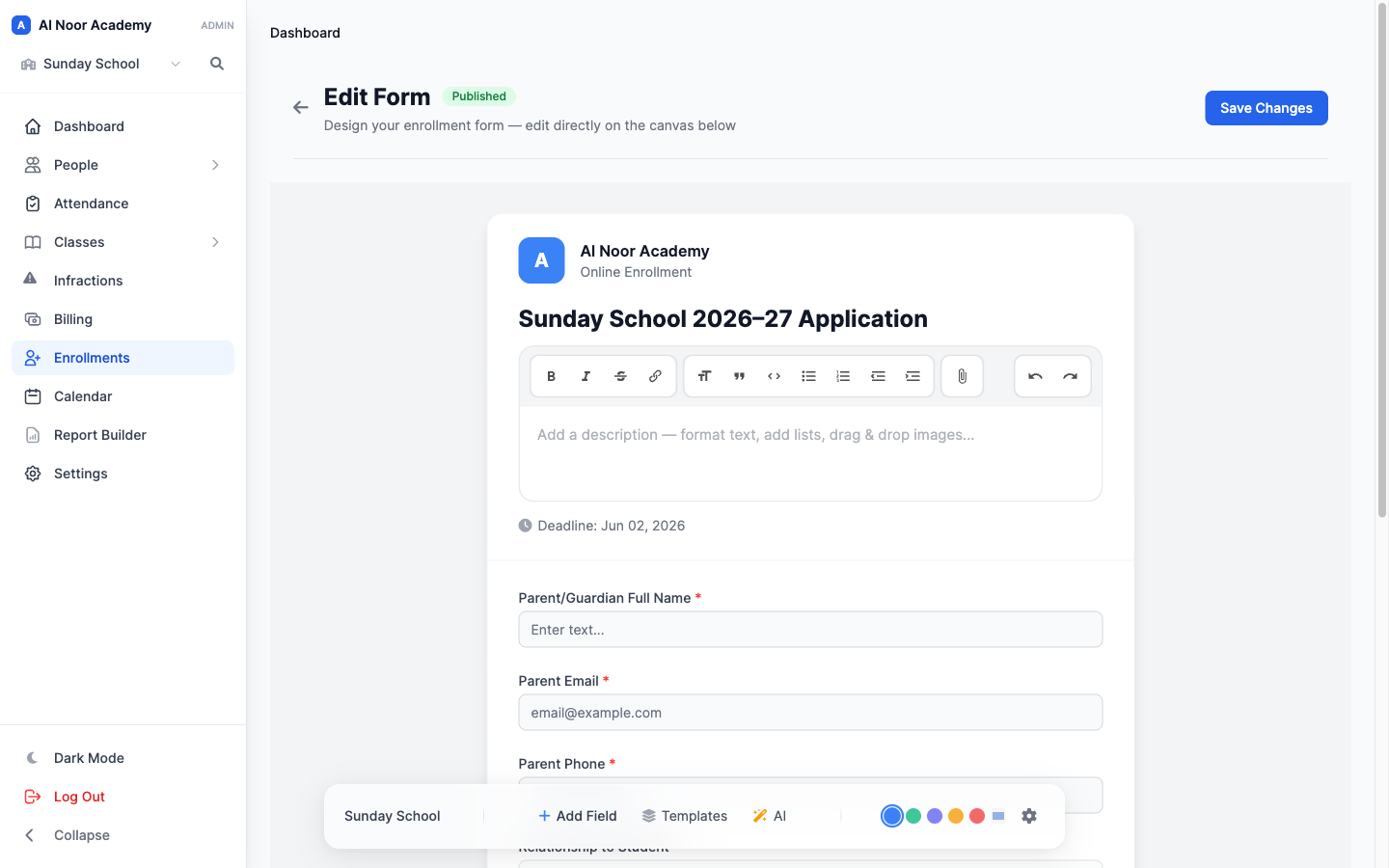
Attach a registration fee to the form and the application cannot be submitted without paying it. The fee arrives with the application, not three weeks after it. And because the parent is already entering a card, MarkTrack can keep that card on file and set up automatic tuition payments for the year — charged monthly once the application is accepted, ending by itself when the school year does.
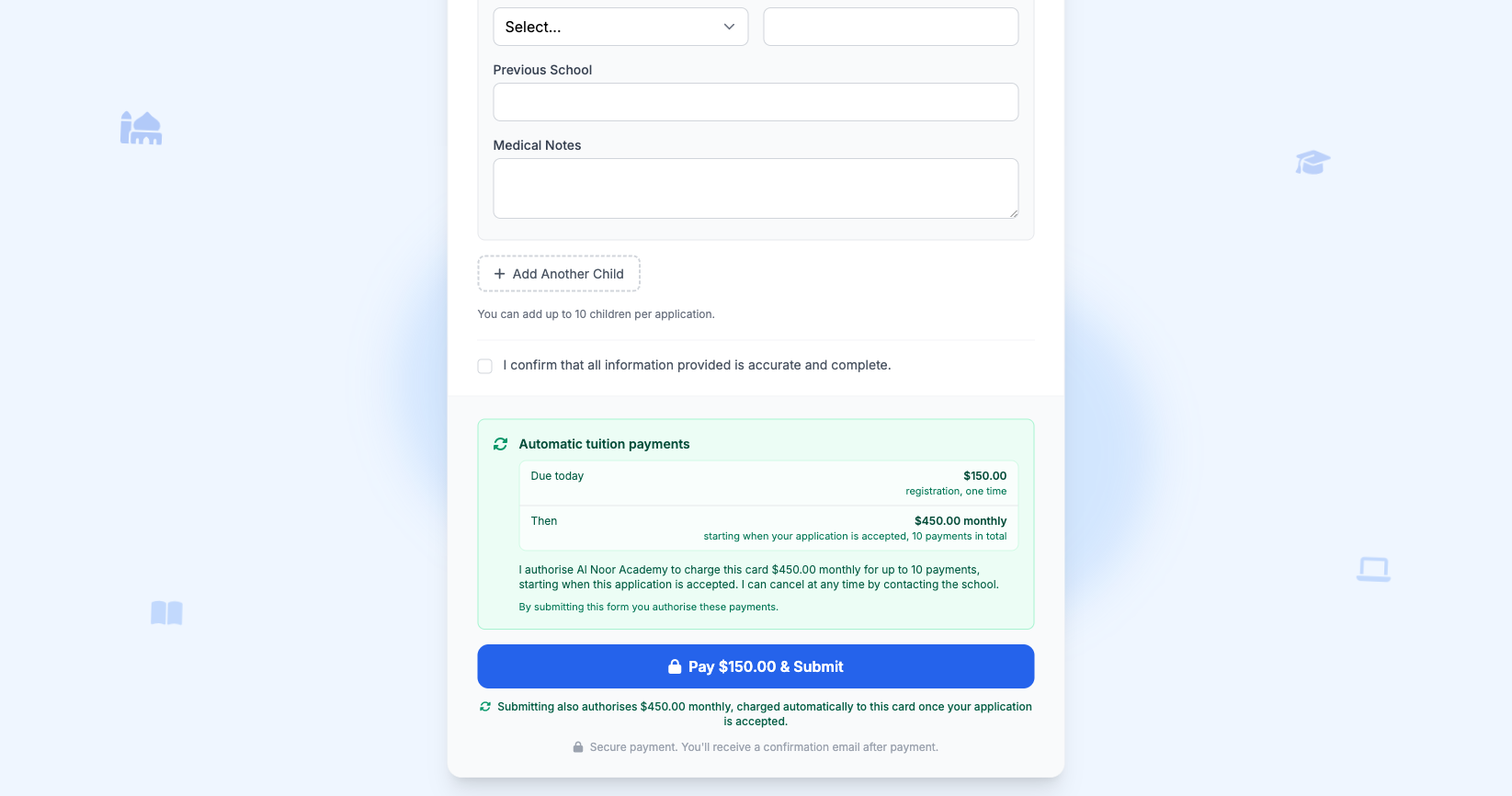
This is the single biggest change schools notice in their collections. Parent portals see very little use after enrollment — many families sign in once and never again. Anything that depends on a parent logging in every month will underperform. An arrangement settled at enrollment just runs.
Autopay is a per-form setting with three levels, because schools differ in what they can ask of families:
- Off — families get each invoice by email and pay it themselves.
- Offer — autopay appears at checkout, ticked by default, and a parent can untick it.
- Require — submitting the form authorizes the recurring charge, so every accepted family is set up before term begins.
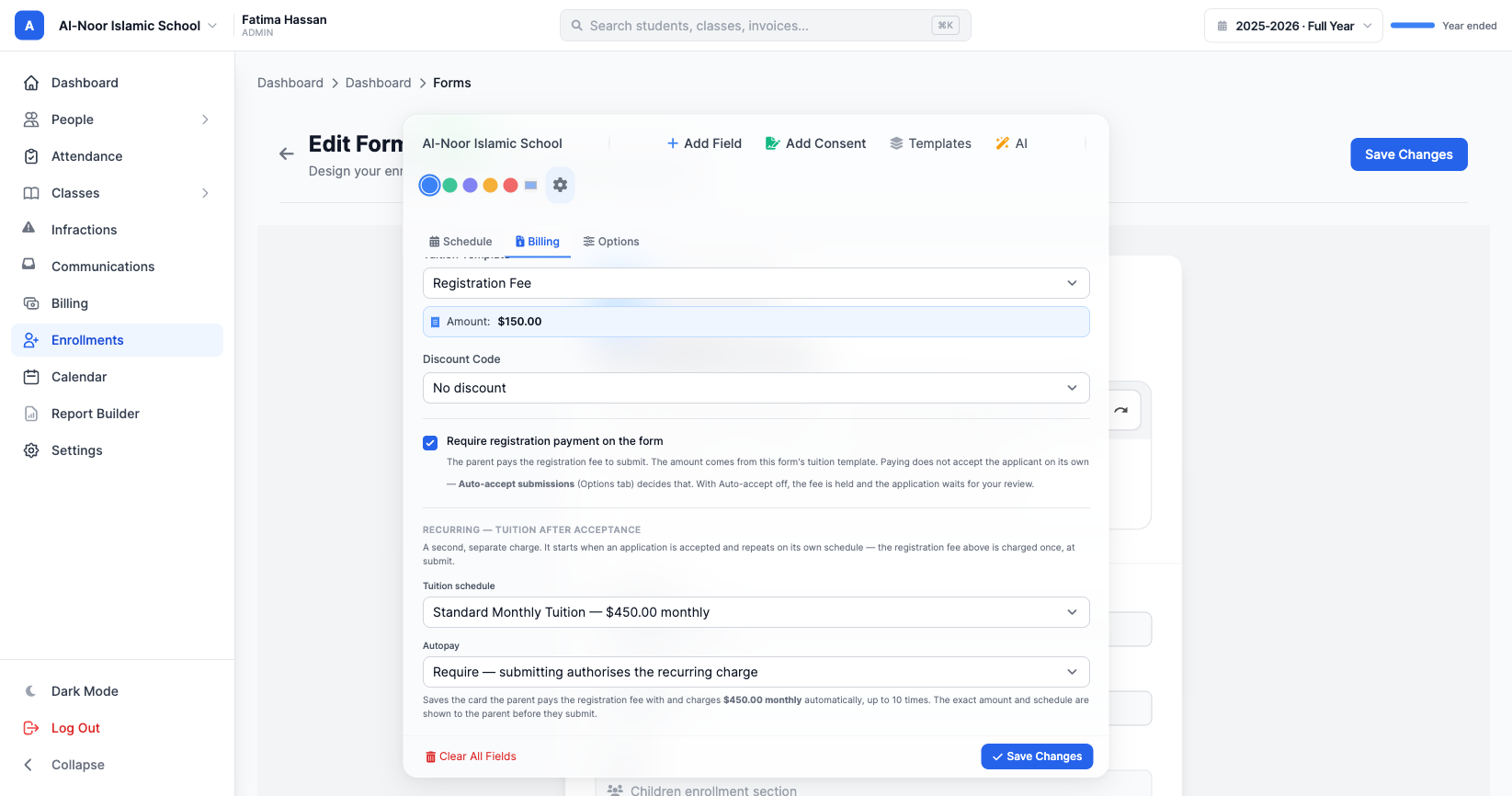
The details are handled the way a real school needs them handled: tuition is billed per child so a three-child family gets three clear lines, campuses can carry different rates, a revoked admission stops its schedule, and a failed card is retried with the family notified. The full setup is in our guide to collecting tuition from parents, and sibling discounts apply themselves.
A Qaidah Tracker that fits how you teach
A Hifz tracker assumes a lesson is a surah and some ayahs. A Qāʿidah lesson is none of those things — it's a chapter, or a page and a line, or a tajwīd rule, and every maktab writes it differently. Noorani, Baghdadi, Ahsanul Qawaid, and the booklet your school printed locally all disagree about which page holds what. Any dropdown we shipped would have been wrong for most schools using it.
So the Qaidah Tracker has no dropdowns for the lesson. You pick which of the three notations you use — chapter, page and line, or tajwīd rule — and type into an empty cell. A live preview shows exactly what will be recorded before you save it. Type 2 and it stores "Tajwīd Rule 2". Type pronouncing Ghunna and it stores "Tajwīd Rule: Pronouncing Ghunna".
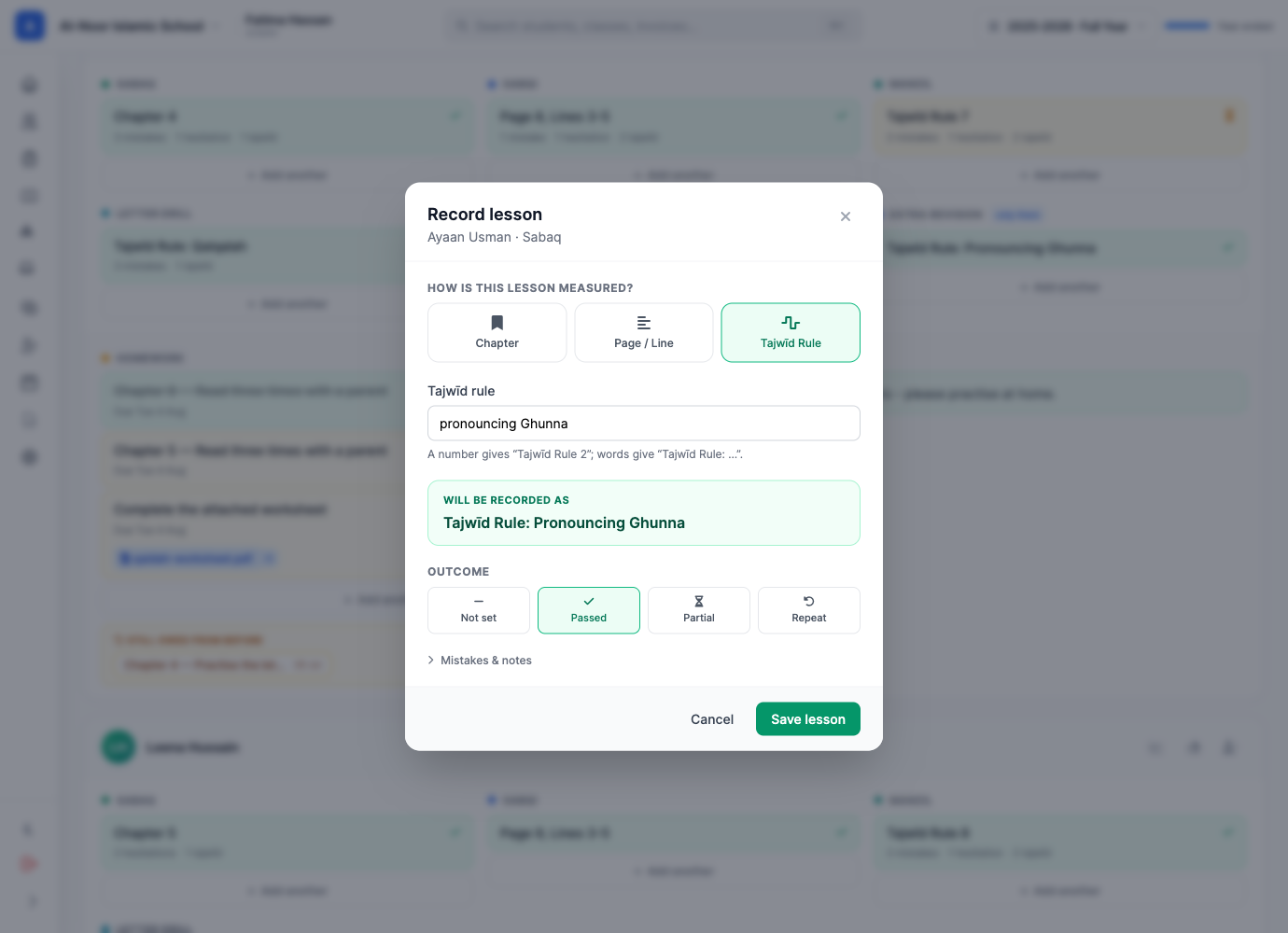
The day is divided into slots — Sabaq, Sabqi, Manzil out of the box — and the slots are yours: rename them, recolor them, add a fourth ("Letter Drill", "Dhor"), retire one you never use. A column can even belong to a single child, so a student who needs a makhārij drill nobody else needs gets that column on their row and nowhere else. Retiring a slot never deletes its history — dropping "Manzil" in March doesn't erase a term.
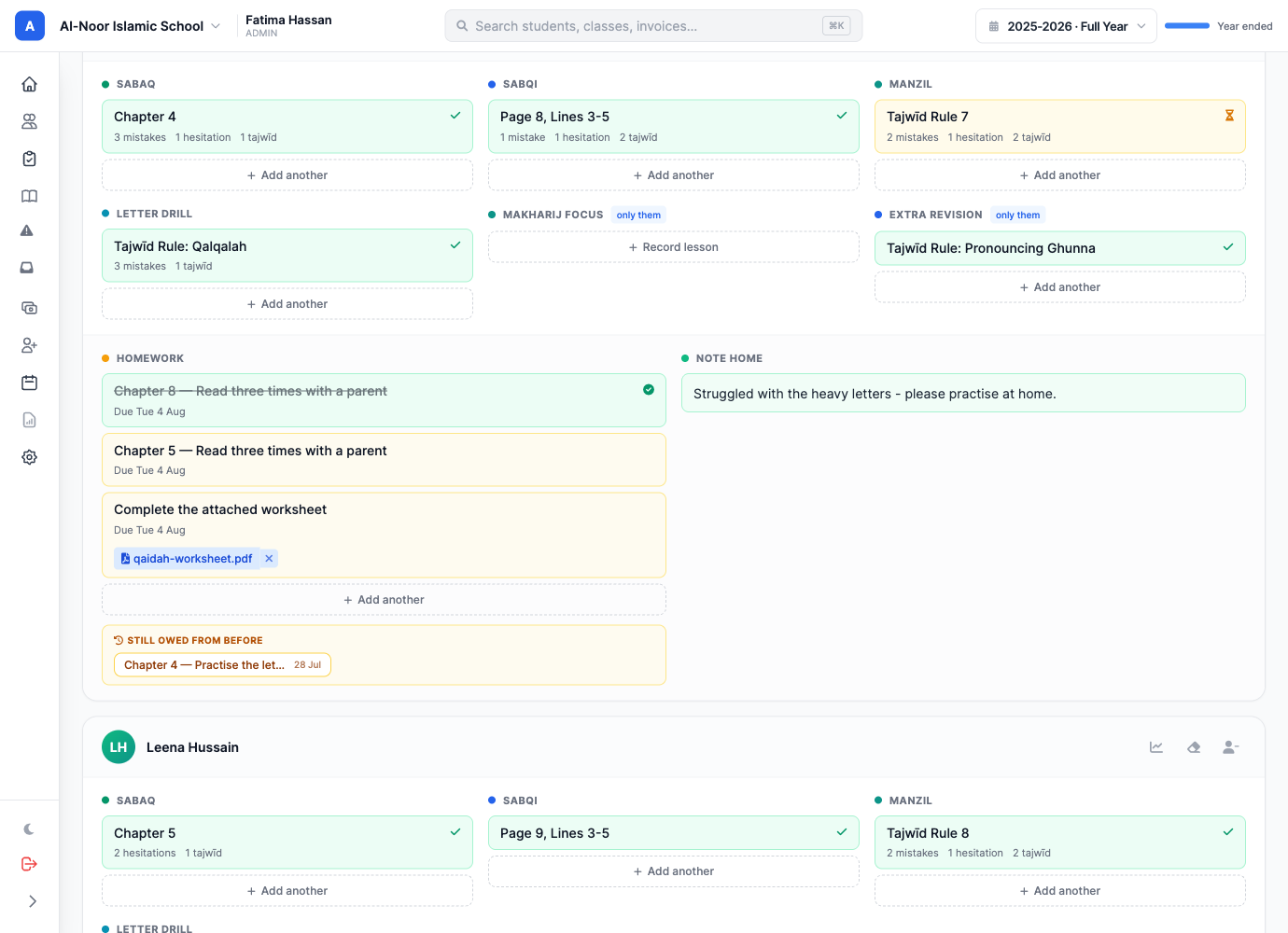
Homework is set per child — a lesson reference, an instruction ("read three times with a parent"), or both — and can carry a worksheet, a scanned page, or a recording of the sound you want imitated. A Repeat button copies a student's last recorded day forward in one click, because most Qāʿidah students continue where they left off, and re-typing three slots for thirty children is the real cost of a daily tracker.
Parents open the app to the one answer they actually want — where has my child reached? — with tonight's homework and the teacher's note underneath, and a "Mark as seen" button on each day so teachers know who reads what they write. The full story is in the Qaidah Tracker announcement.
Hifz tracking with parent acknowledgment
Hifz is a daily thing: new lesson, recent review, old review, every single day. Most schools track it in a notebook the parent never opens — so the child says it went fine, and nobody at home really knows.
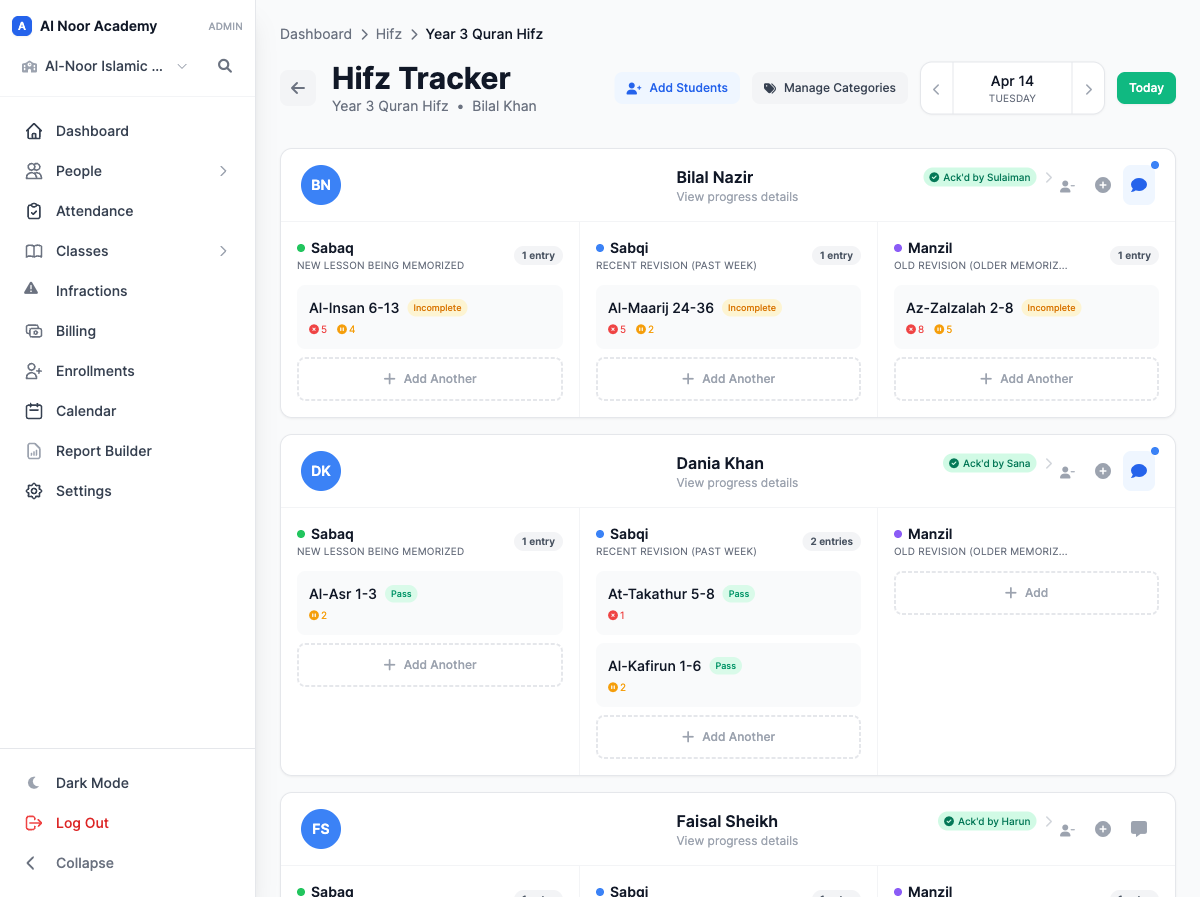
In MarkTrack the teacher opens the class, picks the day, and records each student's Sabaq (new lesson), Sabqi (recent review), and Manzil (older review) — the surah and ayahs, mistakes, hesitations, tajwīd slips, and whether it passed. Not "page 3". The actual recitation.
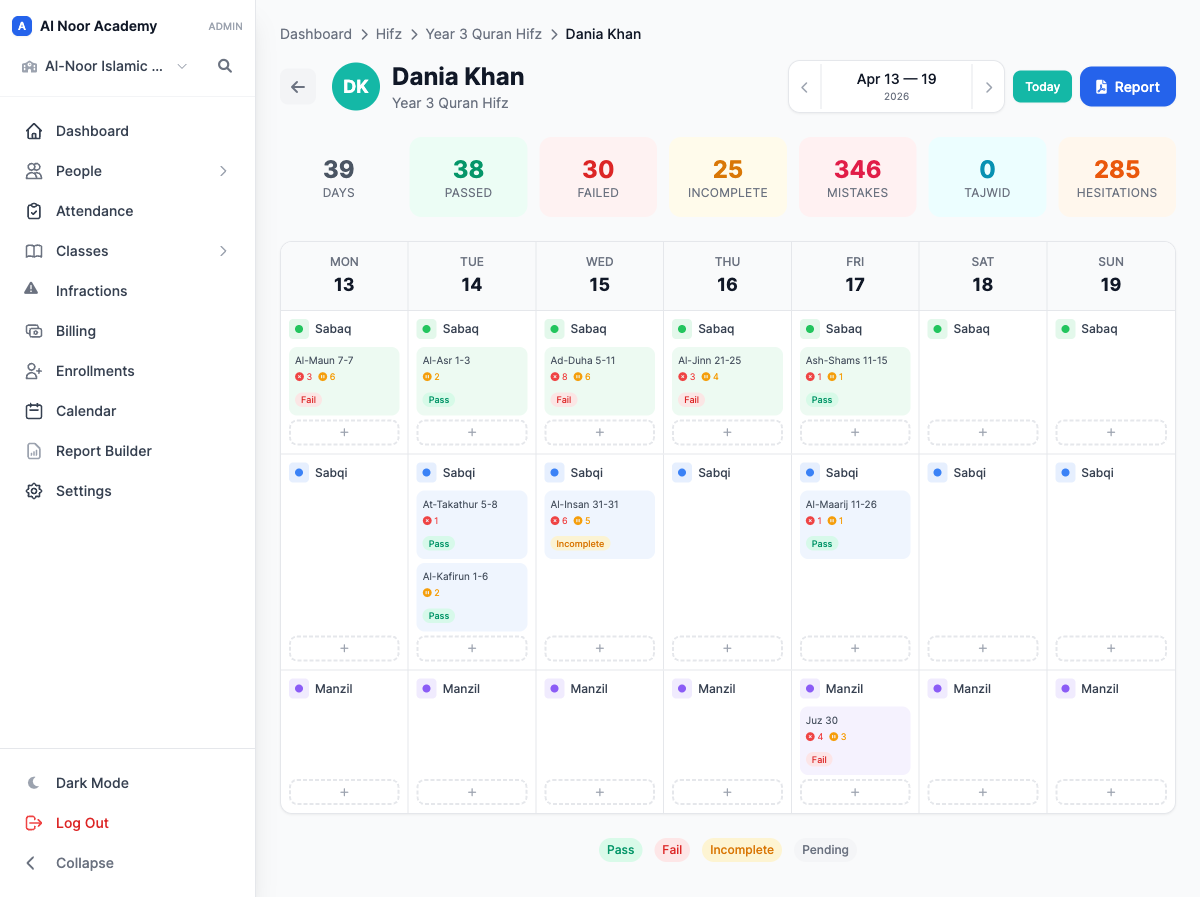
Click a student and the week is laid out with all-time totals on top: days tracked, passed, mistakes, hesitations. Tap any day to see exactly what was recited and how it went.
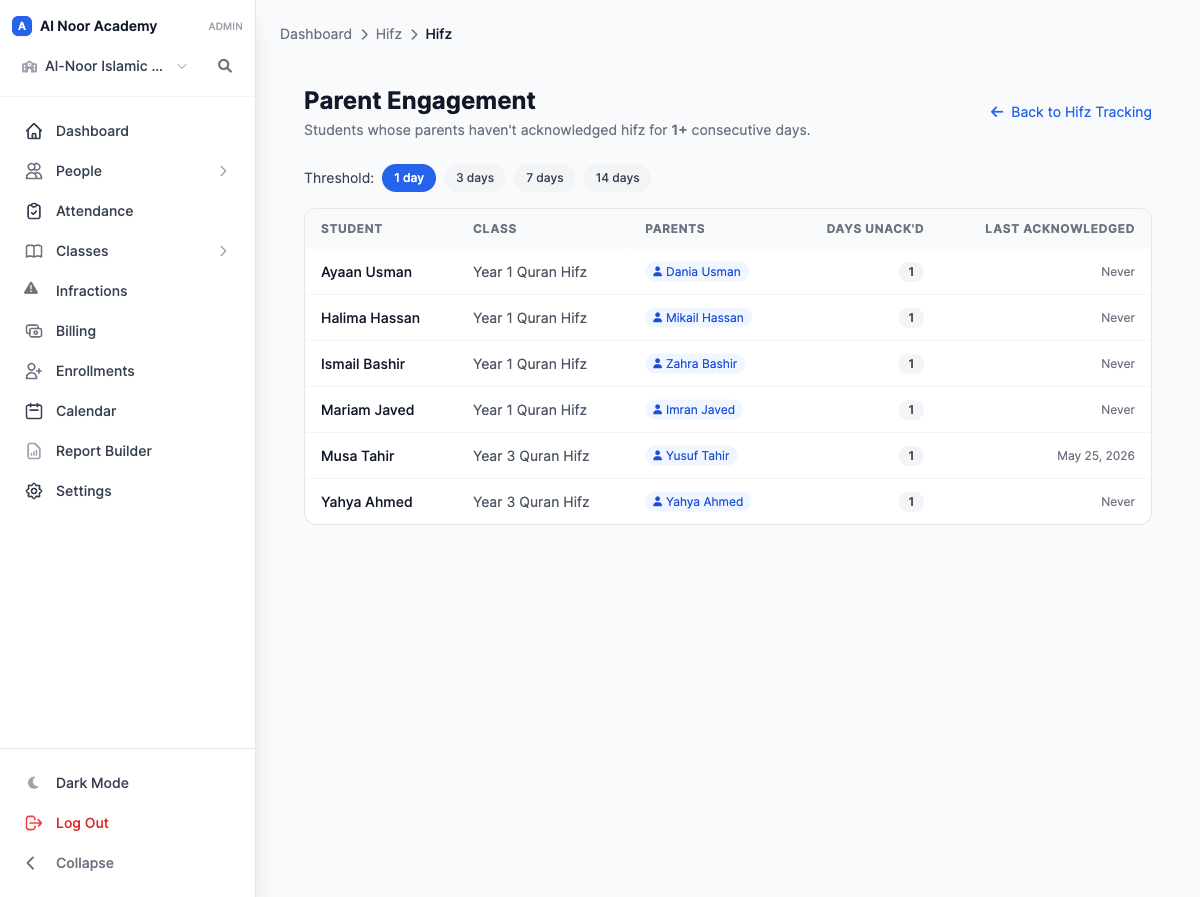
Here is the part that changes the relationship with families: each day's entry can be acknowledged by a parent from their phone, so the teacher knows the family actually saw it — a read receipt for Hifz. And an engagement view flags the families who have gone quiet, with the days they've missed and when they last checked in, so you can reach out before a child drifts.
Categories are yours to define beyond the default three, and Hifz classes can skip the gradebook entirely — letter grades were never the point. More in Hifz tracking that keeps parents in the loop and our sabaq, sabqi, manzil guide.
Reports you can hand to anyone
Everything above would be half-finished if it stayed on a screen. So every record in MarkTrack turns into a clean, printable report in one click.
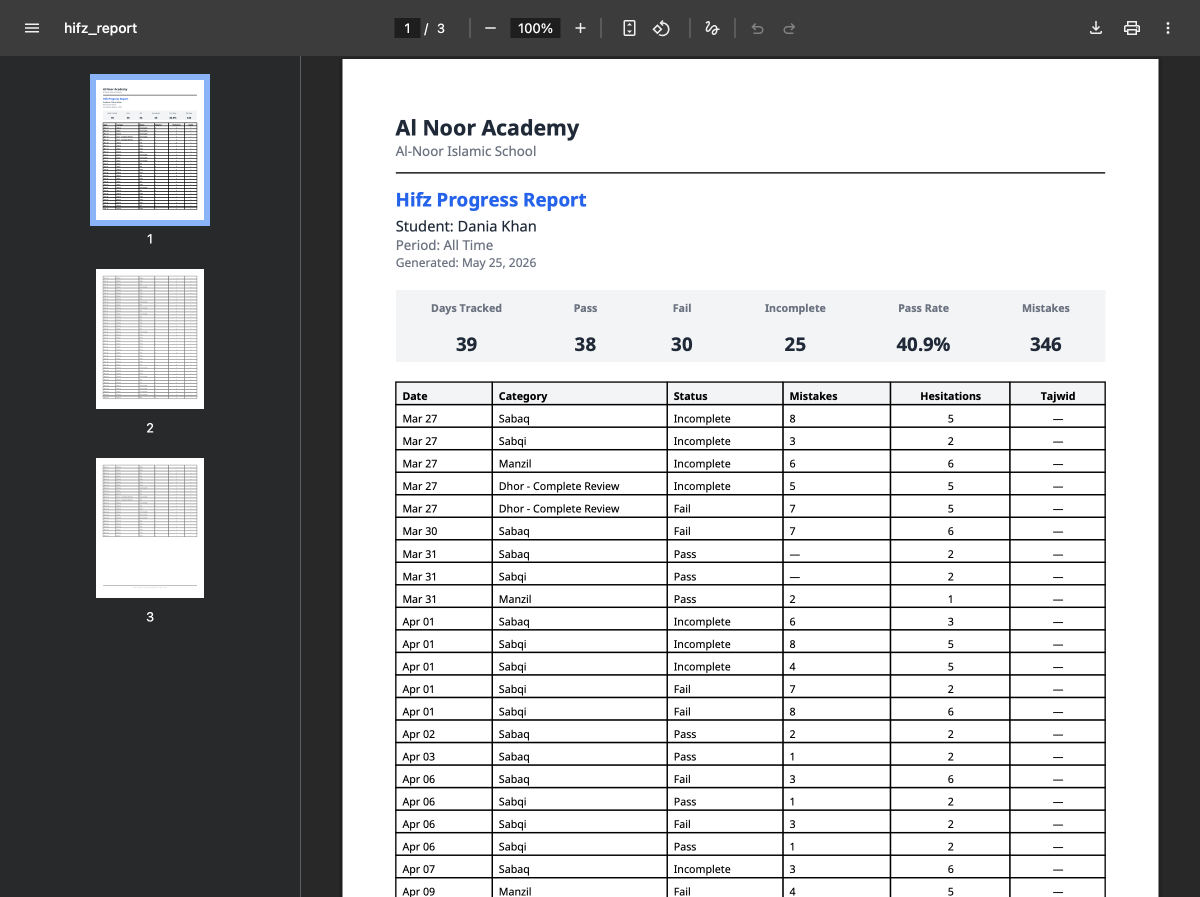
Pick a student and a date range and download a Hifz progress report — totals up top, then every day listed out. It's the PDF you hand a parent at a meeting, or file at the end of term.
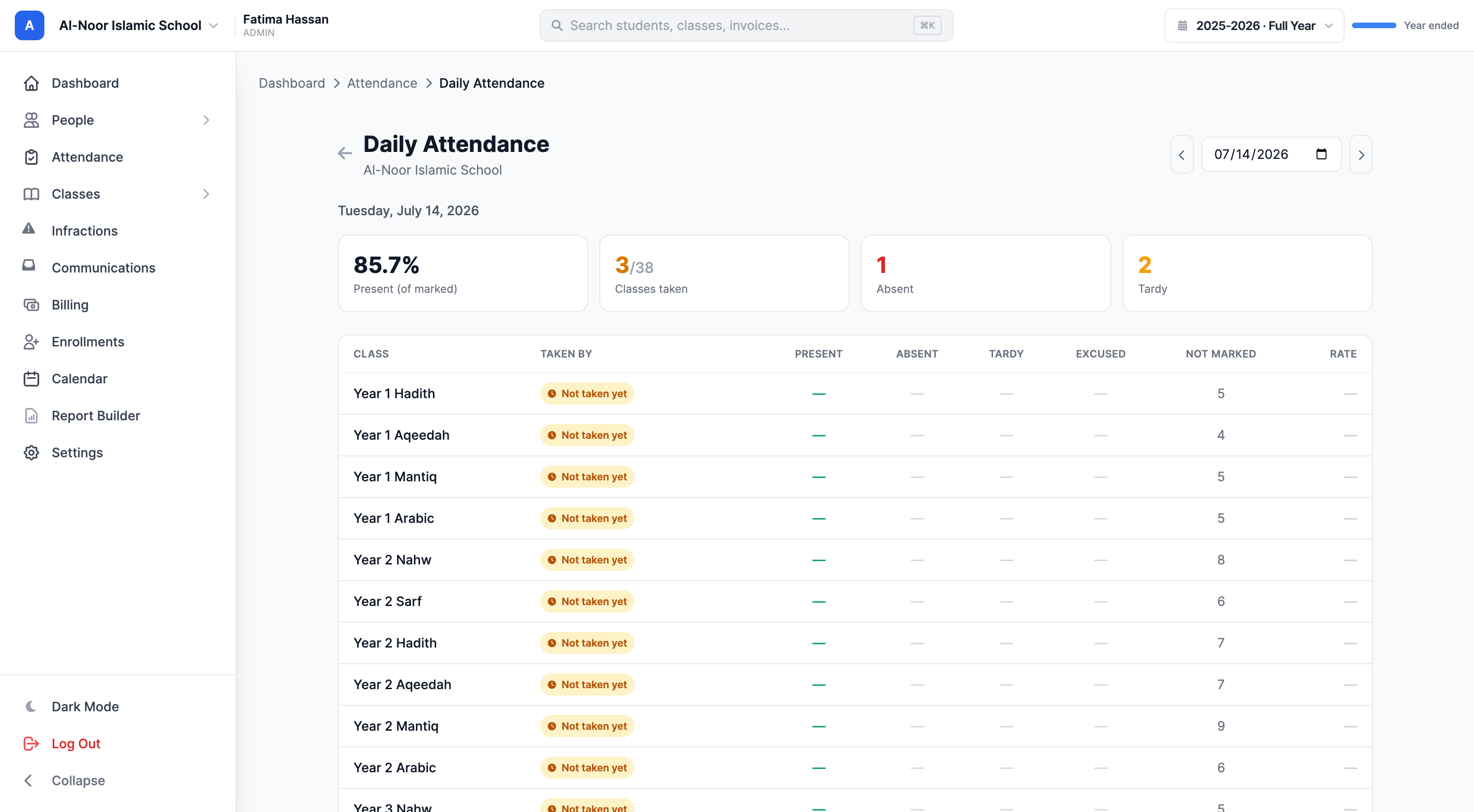
The daily attendance report reads the whole school's day on one page: the present rate, absences and tardies, and a per-class grid showing who took each class — with an amber flag on any class nobody has taken yet. It's how an administrator finds the one register that didn't get done, before lunch instead of at the end of the week.
Class attendance exports to CSV, Excel, or PDF. A student's profile carries their attendance, grades, and Hifz reports in one place. And the attendance Command Center (next section) exports its entire record the same way — which is exactly what you want to have when a compliance question arrives.
Attendance, end to end
Attendance is where most school software shows its age: a grid of checkboxes and nothing else. MarkTrack treats it as a system — taking it, excusing it, approving it, alerting on it, and reading the trends — and every piece feeds the next.
Take it your way
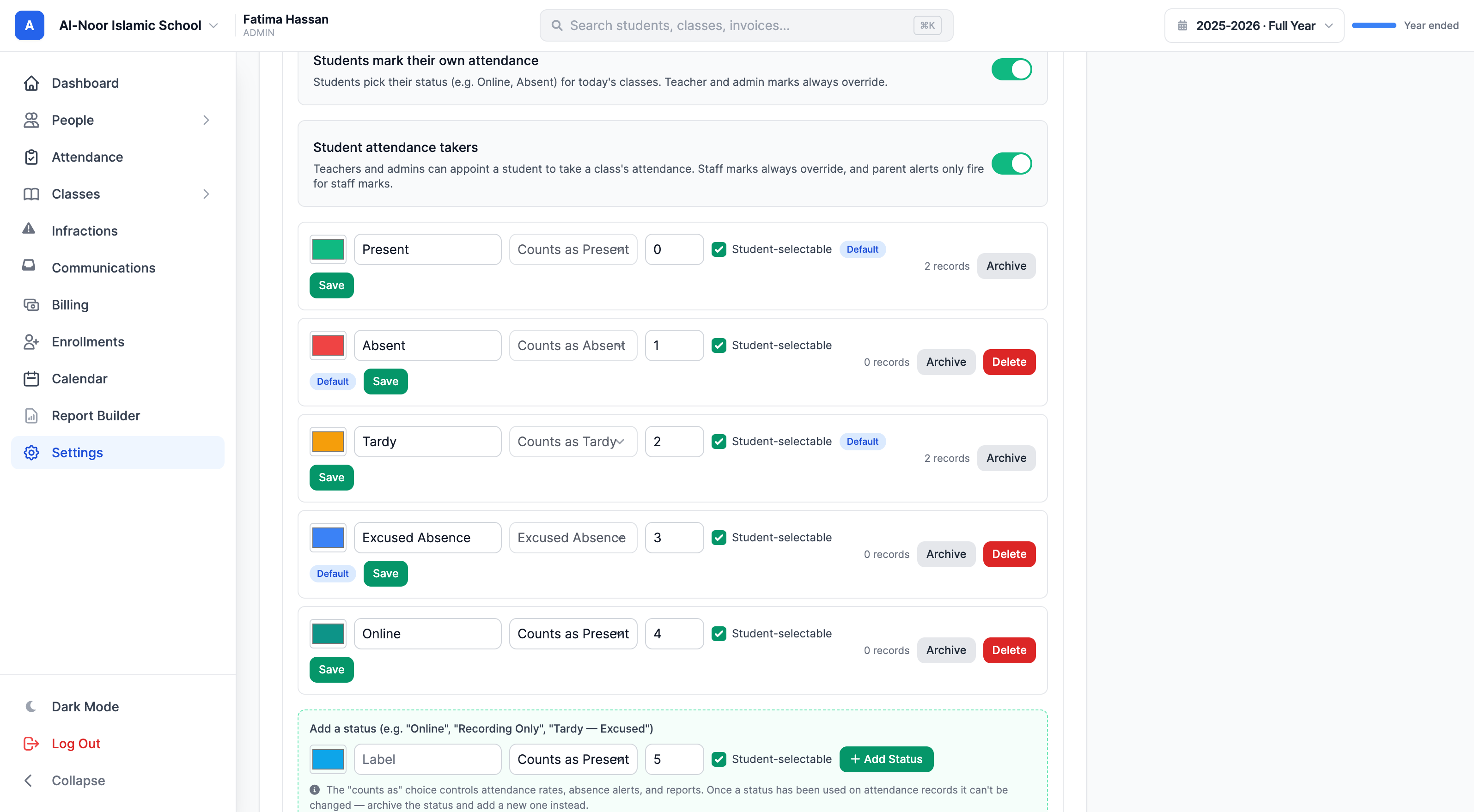
Present and absent aren't enough for a real school, so you can define your own statuses — an evening program adds Online, a Hifz class adds Recording Only — each mapped to what it counts as, so rates stay honest. Teachers take a class in seconds; schools that want it can let students mark themselves or appoint a class helper as an attendance taker. Every mark records exactly who made it and when — the grid can tell you whether it was the teacher, the student, or the helper, and at what time.
Families request absences from their phone
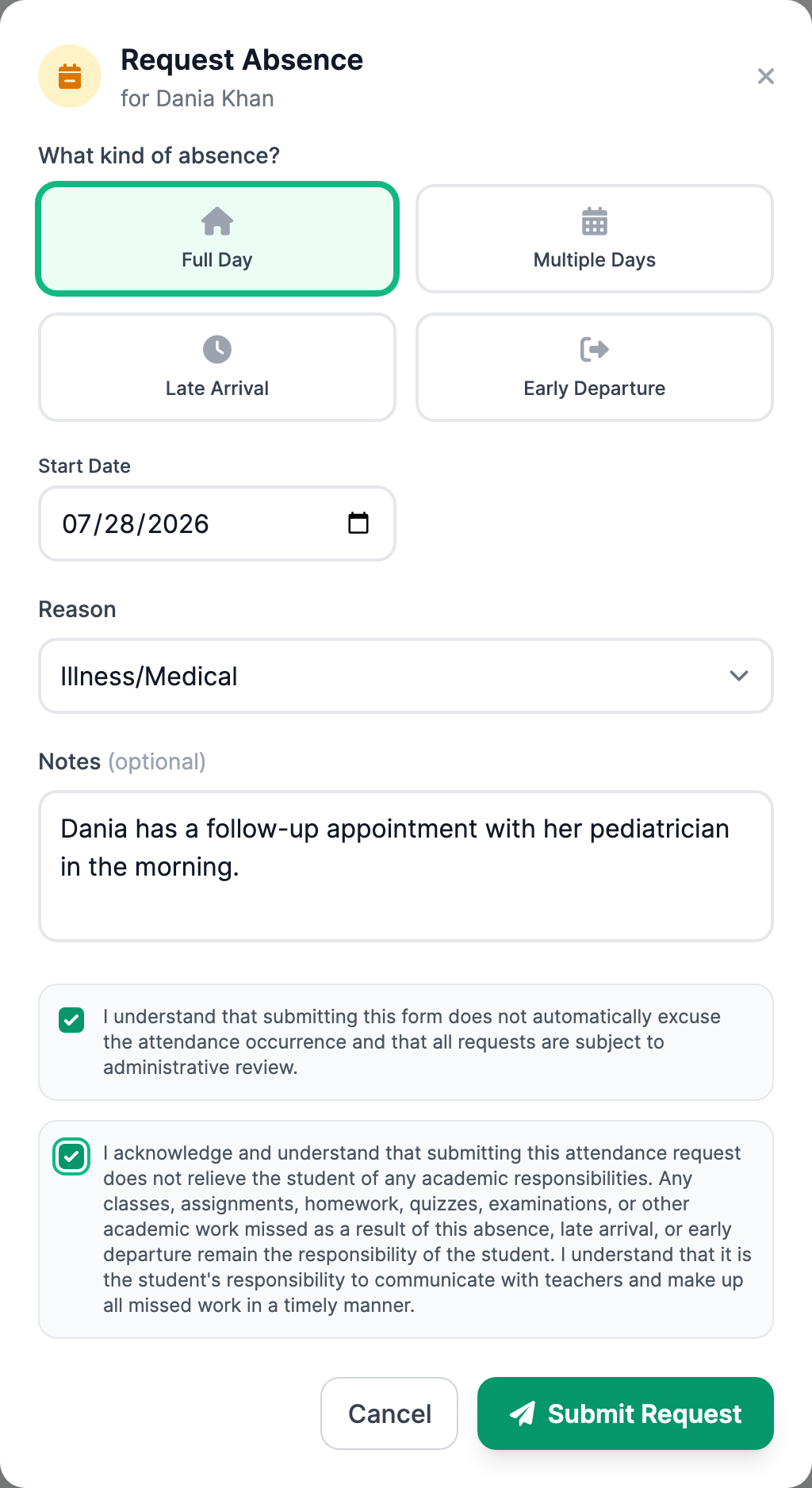
The phone call to the office — "Yusuf has a dentist appointment Thursday" — becomes a two-minute form. A parent picks the type (a full day, several days, arriving late, or leaving early), gives the reason, adds a note, and ticks the school's acknowledgment boxes. Older students with their own login can submit requests too, and every request records exactly who asked. The family then sees each request in a list with a status chip — pending, approved, rejected — and can cancel a pending one themselves.
Approving takes one look
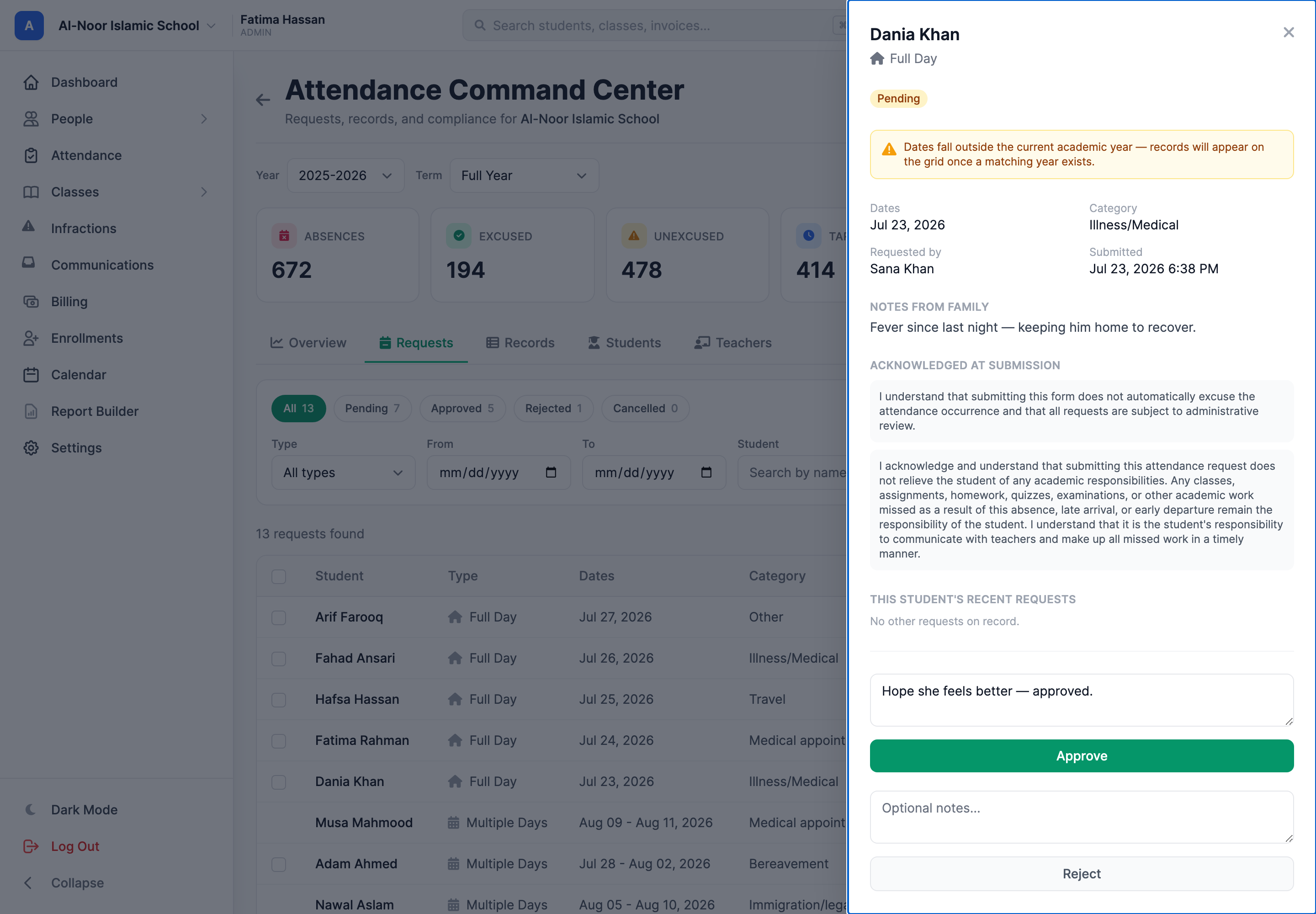
The moment a request lands, the right admins get an email with one button that drops them into the review drawer: the student, the category, who asked, the family's note, the acknowledgments they agreed to, and that student's recent requests for context. Approve or reject with a note, and the family gets the outcome by email — nobody refreshes a portal waiting for news. Requests that sit longer than 48 hours come back as a daily reminder until someone decides. And an approved request doesn't create work: the excused rows land on the teacher's grid automatically.
The Command Center runs the whole thing
Attendance → Command Center is one tabbed dashboard for all of it. The Overview opens on live numbers for the year or term you've filtered to — absences, excused vs. unexcused, tardies, your overall attendance rate, and how many requests are waiting on you — with a weekly trend line, a status breakdown, and attendance rate by level underneath. The Records tab is the school's full register: every mark, searchable by student, class, teacher, date, or status, with CSV, Excel, and PDF export and a history timeline on every mark showing who changed what, and when.
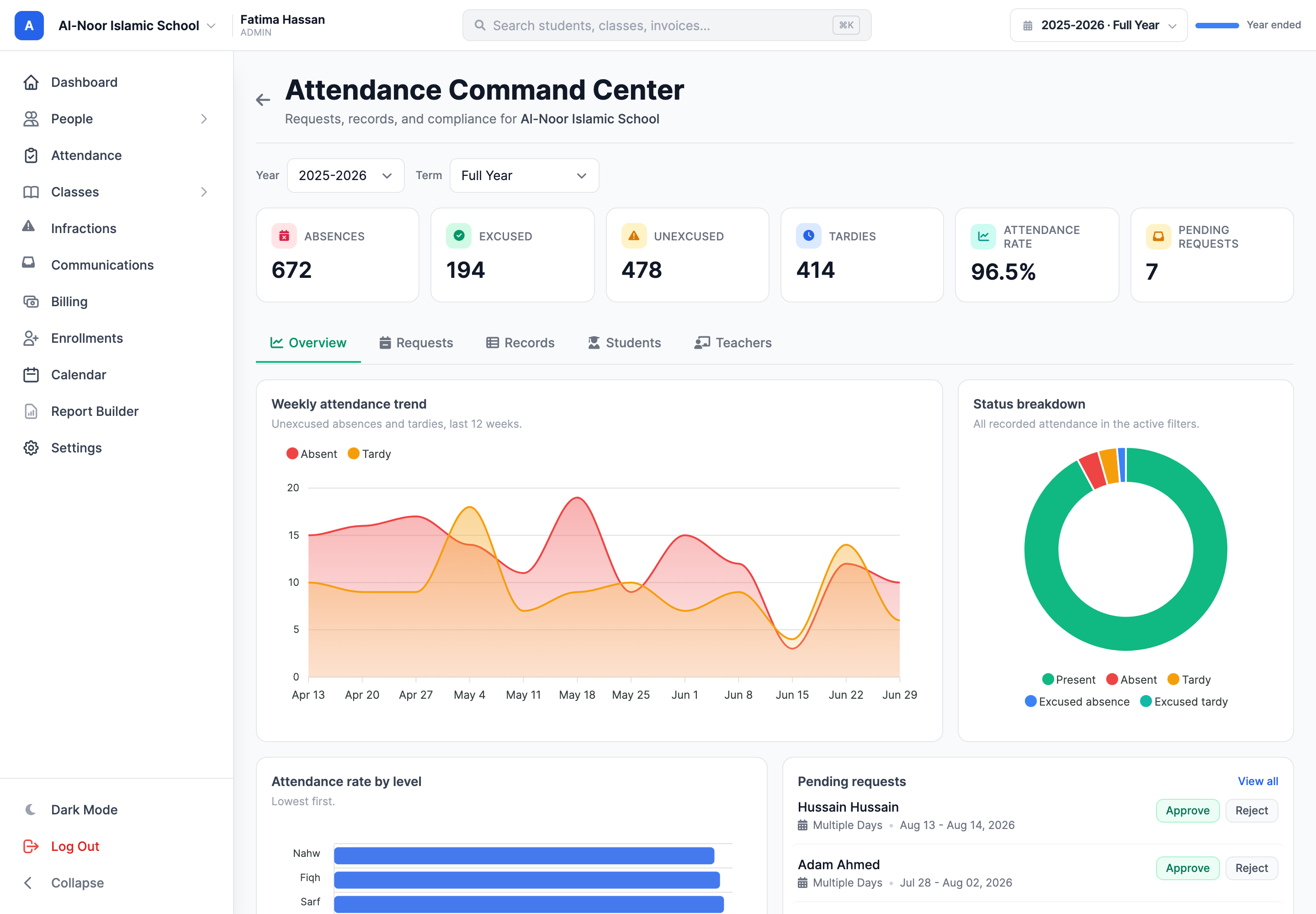
The full walkthrough is in Introducing Command Center, and the taking-attendance side in flexible attendance tracking.
Push notifications, the moment it matters
When a teacher marks a child absent, the parent's phone gets a push notification that moment — on iPhone and Android, through the MarkTrack app, with optional SMS and instant email alerts for schools that want them. No setup for the family beyond installing the app.
Two details make it feel seamless rather than noisy. Alerts only fire on staff marks — a student self-marking, or a class helper taking the register, never pages a parent until a teacher confirms. And an absence the family already requested doesn't alert at all, because approving the request already told them. Parents get the message that matters and none of the ones that don't.
Analytics in your pocket
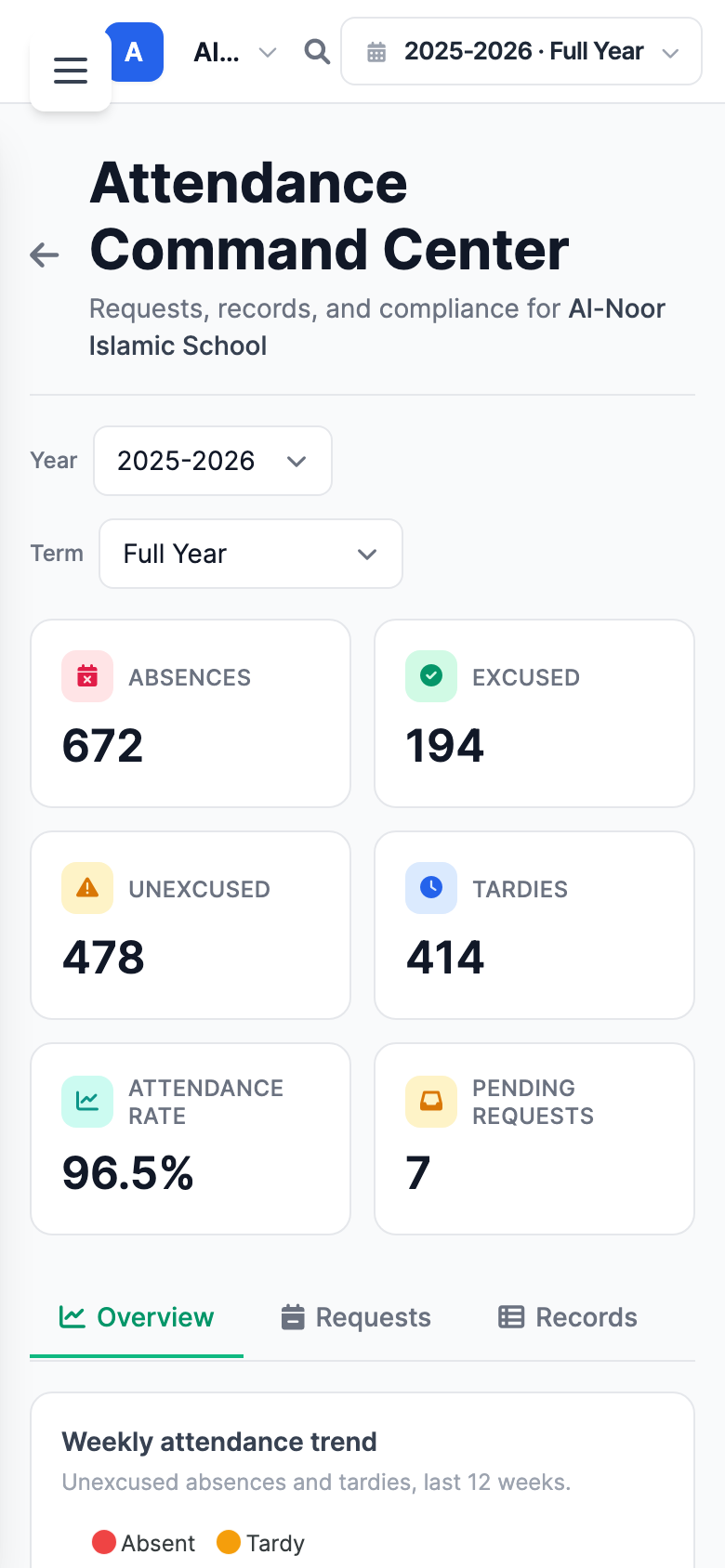
The Command Center's analytics follow you to a phone screen — the KPI cards stack, the trend chart stays readable, and a principal can check the school's day from the car park. It's a genuinely beautiful set of numbers to have one thumb away.
Native iOS and Android apps
MarkTrack ships real native apps — not a website in a wrapper. The iPhone app looks and moves like an iPhone app; the Android app is proper Material design, the way Gmail or Calendar feels on a Pixel, with full dark mode. Teachers take attendance, log Hifz, and check grades from a phone; parents get the push notifications from the section above.
These are actual screenshots from the apps — the same week grid on both platforms, each speaking its platform's language:
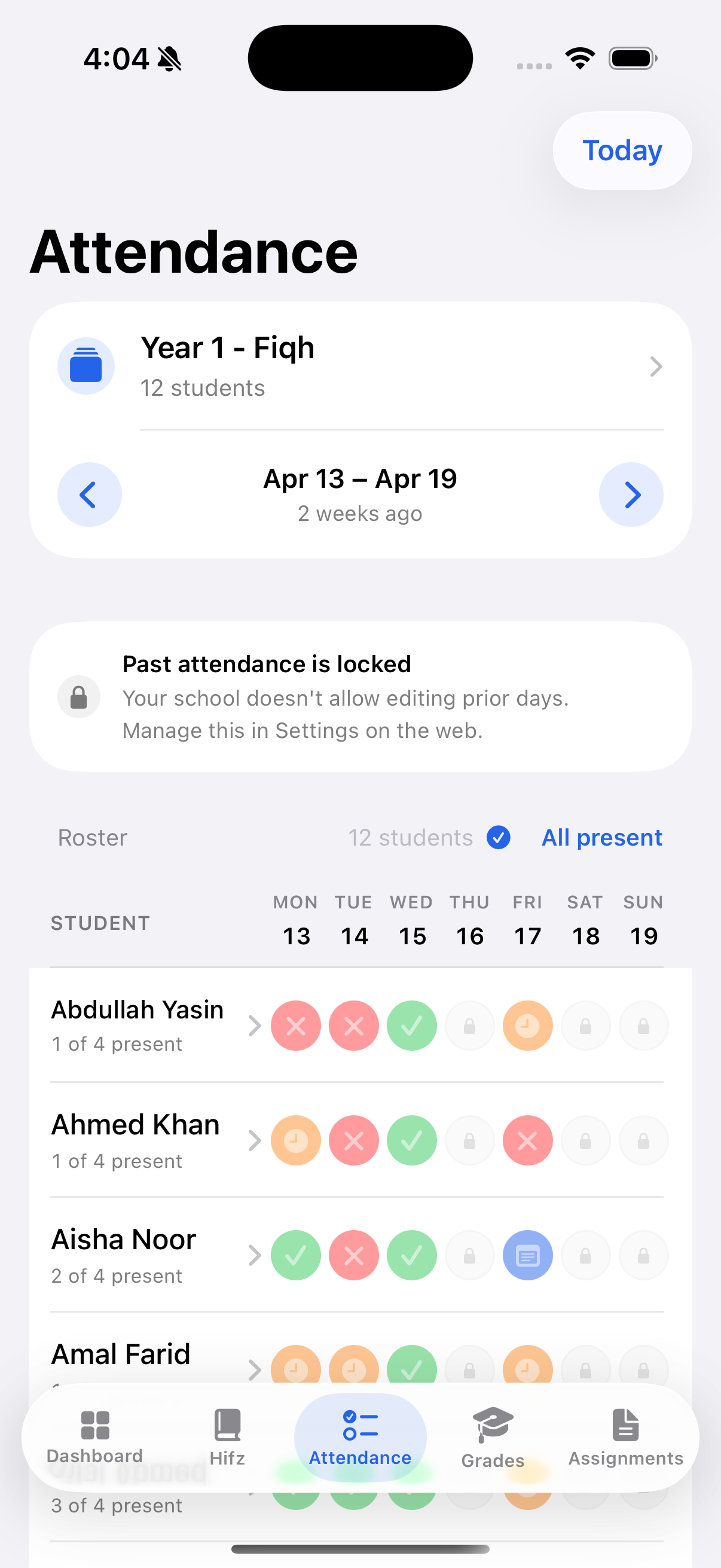
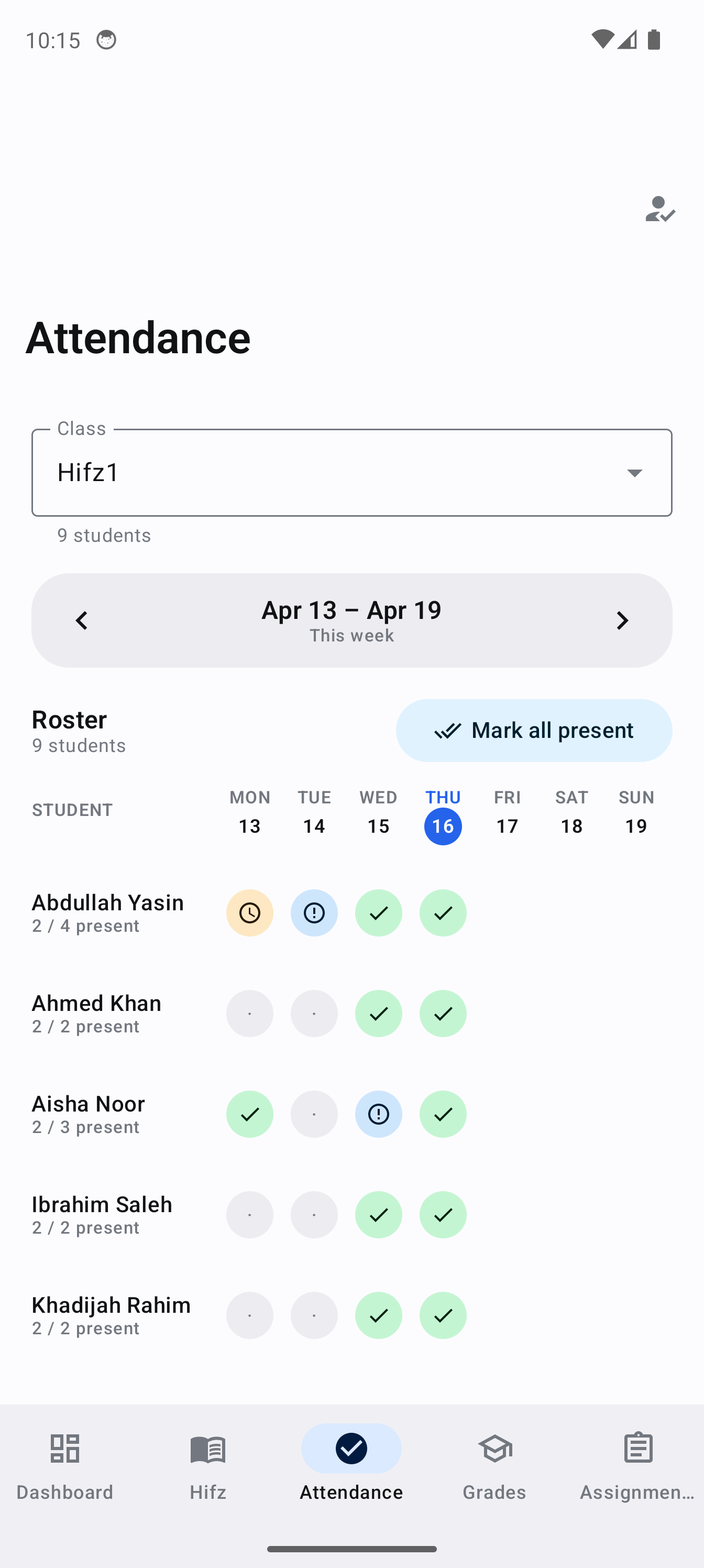
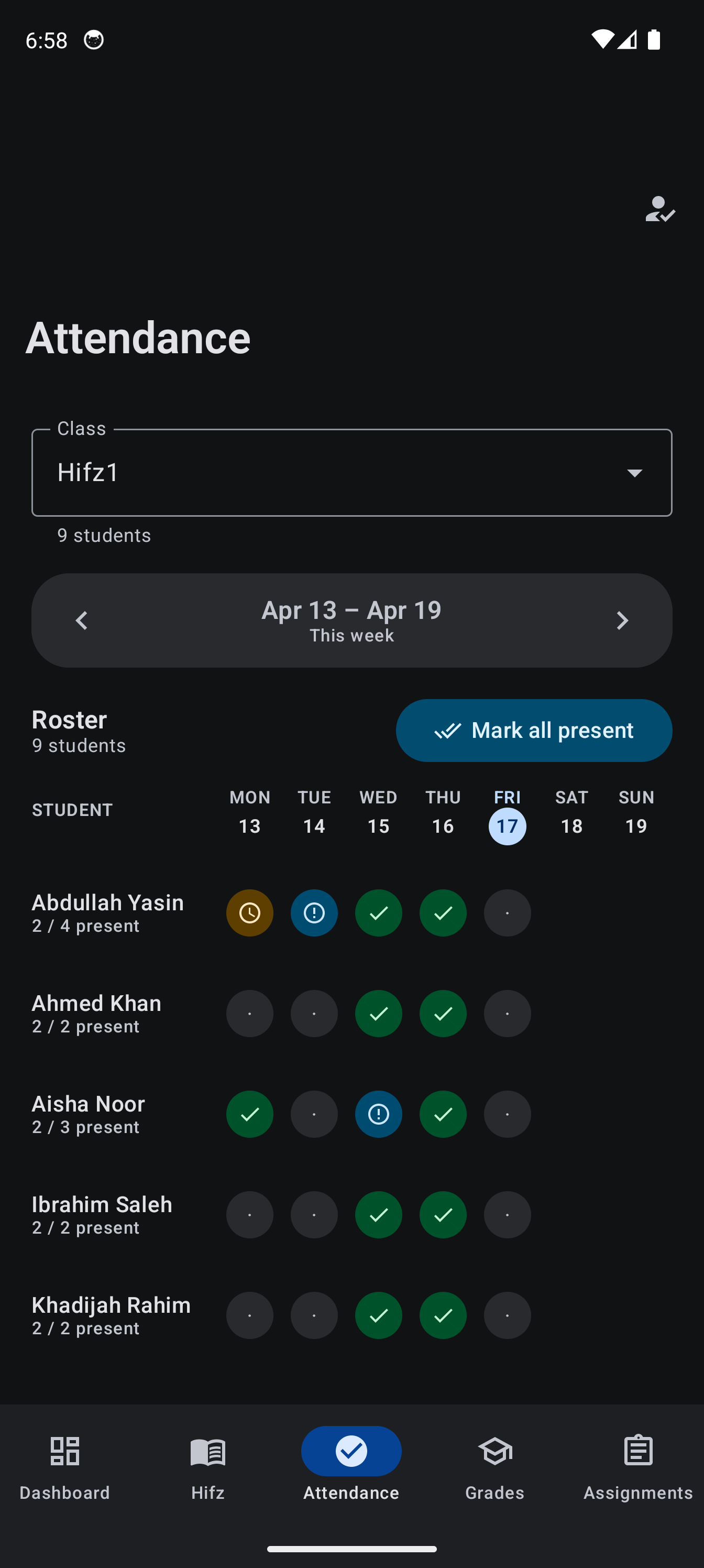
Both apps are built to feel instant: screens you've opened before paint immediately from a local cache and refresh quietly in the background, so a teacher standing in a classroom with weak Wi-Fi still sees their roster. One account can hold several schools — a parent with children at the full-time school and the weekend maktab switches between them in two taps.
A gradebook that speaks numbers and words
Schools grade in two honest ways. Some think in points and percentages — quantitative. Some think in skills and mastery — qualitative. Most software supports the first and makes the second pretend to be a number. MarkTrack does both properly, per class, in the same school.
Quantitative: points, weights, and your own letter scale
The gradebook is a spreadsheet that knows what it's doing: click a cell, type a score, and the letter grade and class average update live. Categories and weights are set per class — not per district — so every teacher can grade the way their subject demands.
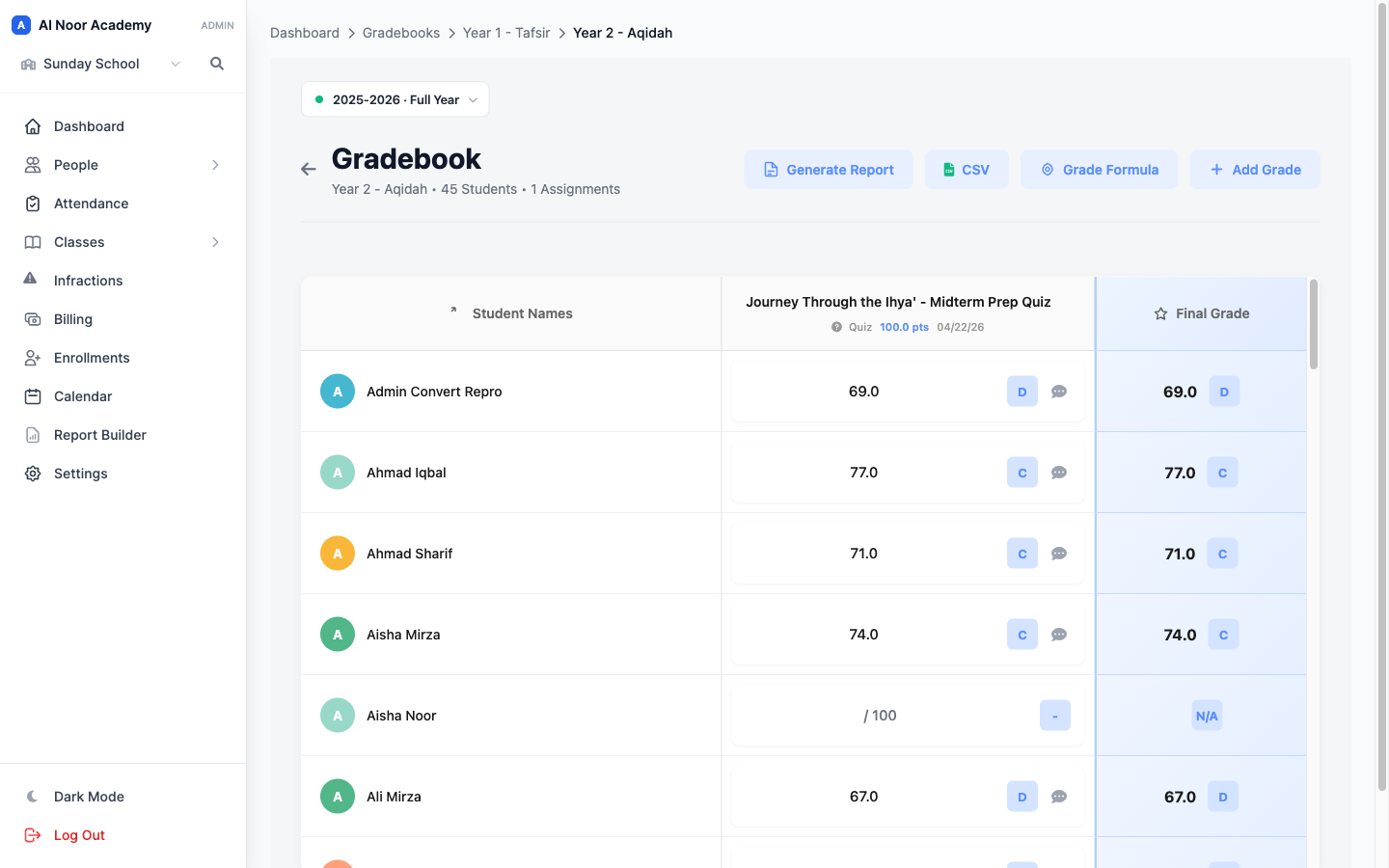
A concrete example. The Year 8 Fiqh teacher runs Quizzes 20%, Homework 10%, Tests 40%, Final Exam 30%. The Tafsir teacher next door adds a Memorization 25% category and drops homework entirely. The Qur'an teacher adds Recitation and Participation. Same school, three different formulas, all fine — MarkTrack just checks each one adds up to 100%.
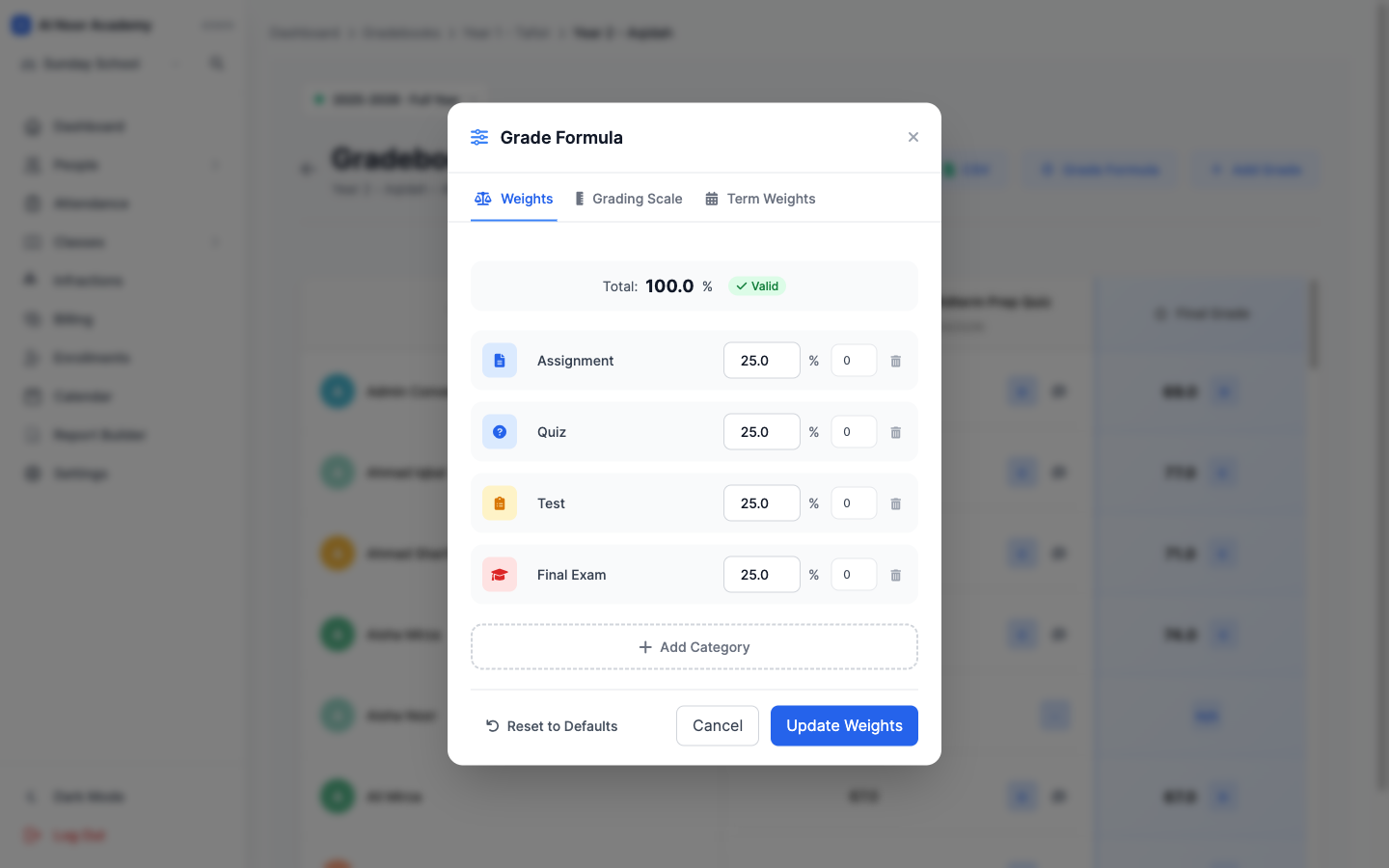
The letter scale is the school's: strict 93–100 = A, relaxed 90–100 = A, or the full A+ to F− spread. Set it once and every gradebook respects it.
Qualitative: skills and mastery, no percentages anywhere
Ask a Qāʿidah teacher or a kindergarten teacher for a grade and you won't hear "87 percent". You'll hear that a child is meeting expectations here and still practicing there. Turn on skills grading for a class and the gradebook changes shape: each student gets a colored proficiency pill per skill. The teacher clicks the pill and picks a level. That's the whole interaction — no decimals, no mental math about whether a five-year-old's letter recognition is a 3 or a 3.5.
Another concrete example, from an Islamic nursery class. Skill area Qur'an & Adab: Recites the duʿāʾ before eating — Mastered. Performs wudu steps in order — Practicing. Recognizes letters with fatha — Introduced. Nobody turned any of that into a 73%, and no parent had to decode one.
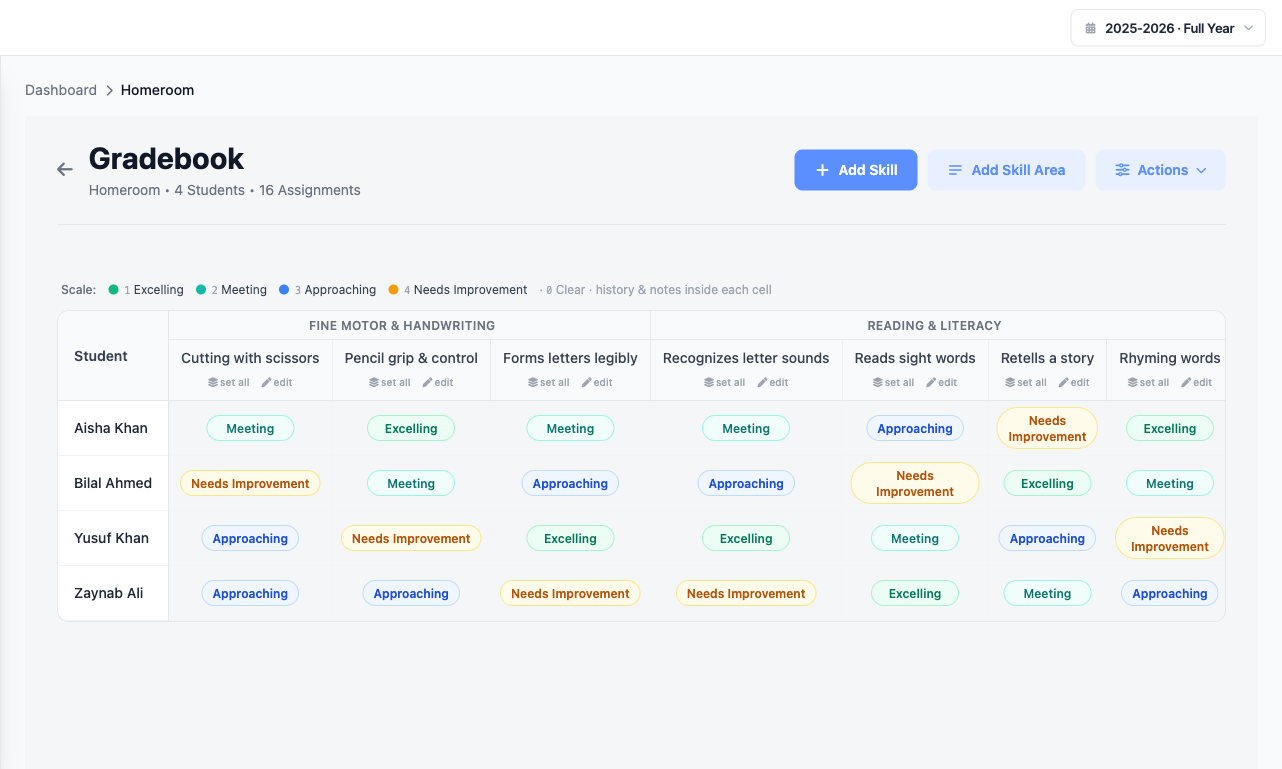
The scale itself is yours — the words and the colors. Excelling / Meeting / Approaching / Needs Improvement for one school, 4-3-2-1 for another, Introduced / Practicing / Mastered for a Montessori program. Under the hood each level is still a number, so MarkTrack can sort a roster and spot a trend — but no teacher, student, or parent ever sees a raw score.
| Quantitative | Qualitative | |
|---|---|---|
| Teacher enters | Scores — 18/20 on a quiz | A level — "Meeting", "Practicing" |
| Family sees | Percentages and letter grades | Proficiency labels, never a number |
| Fits best | Fiqh exams, Arabic tests, transcripts | Qāʿidah, early years, character & adab |
| Report card shows | Grades by term, averages, GPA | Skills by area with your scale's legend |
Because the mode is per class, one school runs both at once: Year 10 Fiqh grades numerically for the transcript while the nursery Qāʿidah class reports Introduced / Practicing / Mastered — and both land on real report cards.
Build your own report card
A report card is the one artifact a school will not change to fit its software. Parents know it, the board approved it, it's the school's identity on paper. So MarkTrack meets it from both directions.
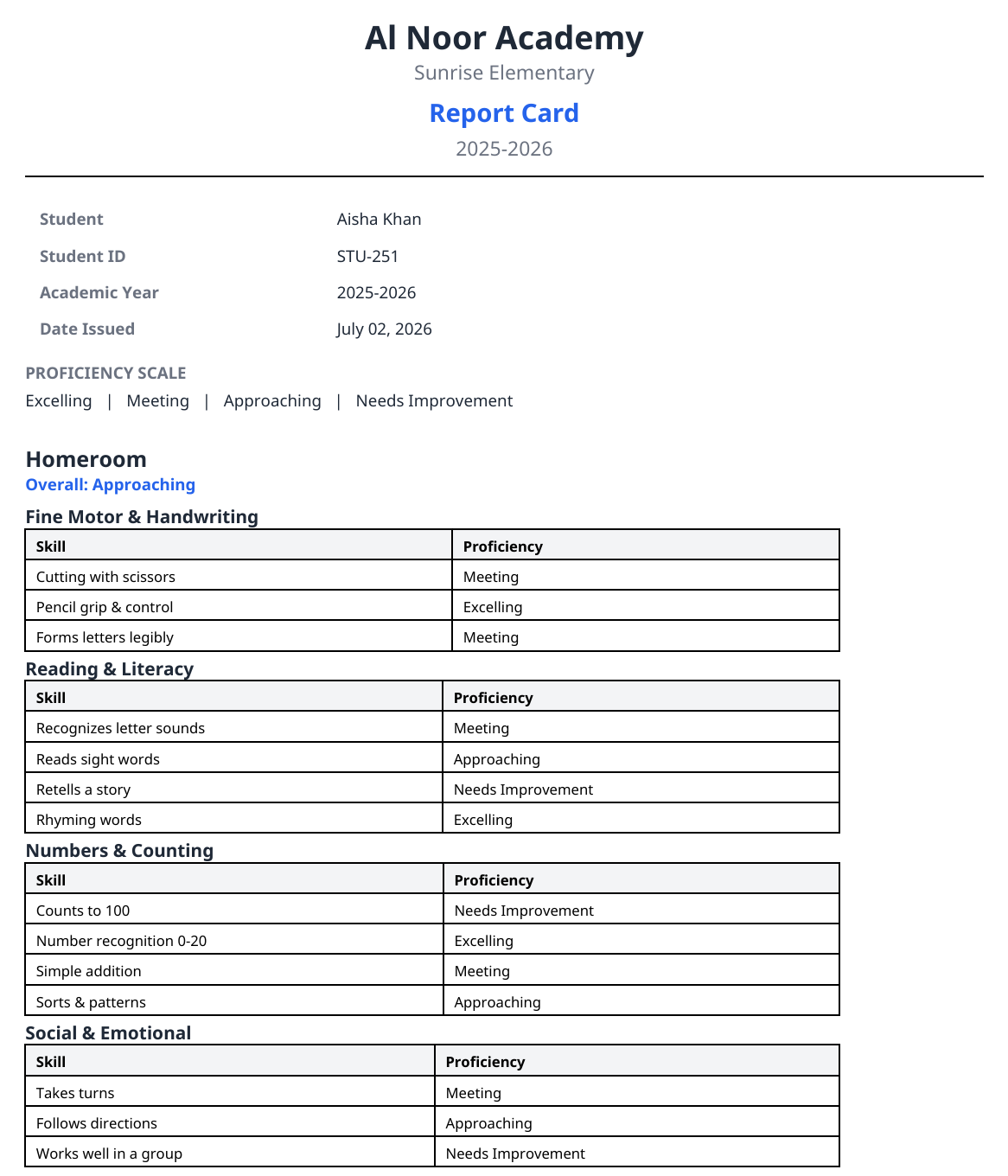
From the gradebook, one click generates a finished card — a numeric card with grades by term, or a standards-based card with skills grouped by area, proficiency labels, attendance totals, and your scale's legend printed at the bottom so parents know exactly what "Approaching" means. Qaidah and Hifz standing print on the same card as everything else — a maktab that never opens a gradebook still gets a real line instead of a row of dashes.
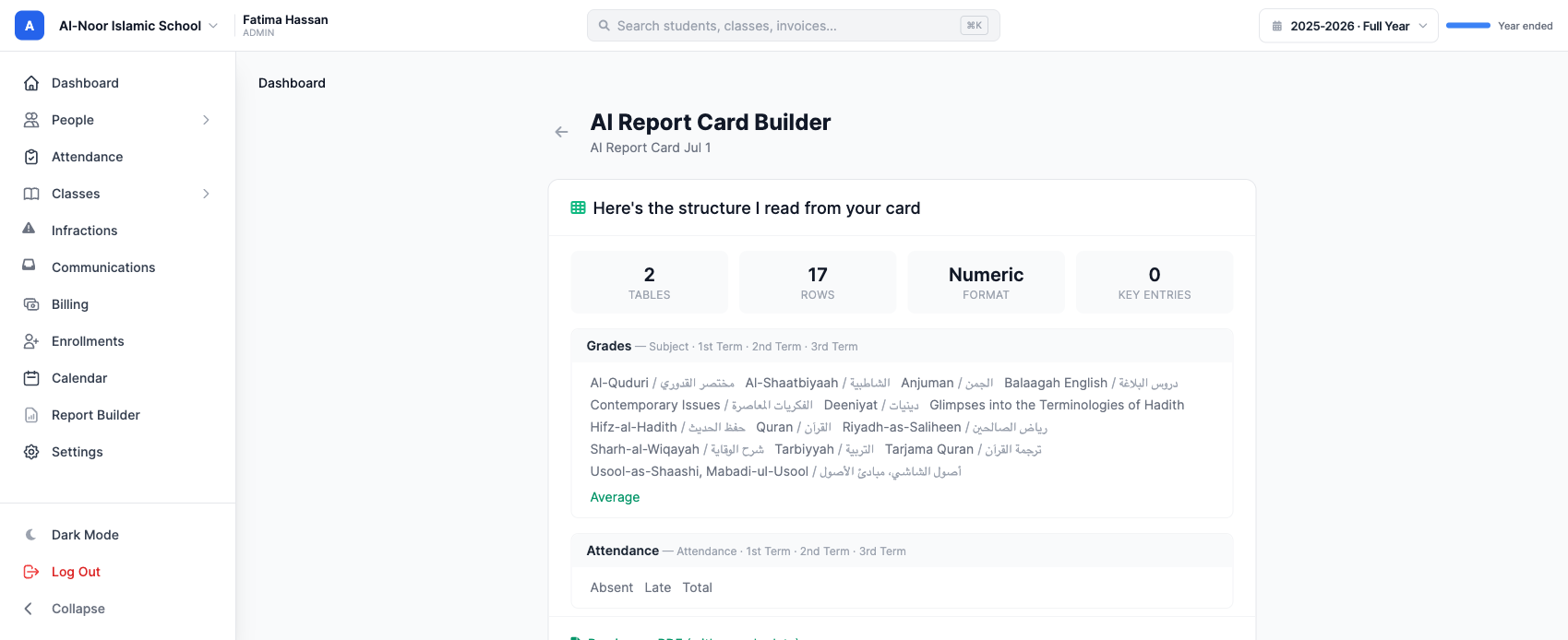
And if you already have a card you love, keep it. Upload the report card your school uses today — a photo, a PDF, a scan, even an Excel file — and MarkTrack's AI reads its structure and rebuilds it as a reusable template: the tables, the row and column layout, bilingual English/Arabic subject labels, term columns, average rows, the attendance block. You confirm what it read, and you have a template wired to your classes. No dragging fields, no retyping subjects.
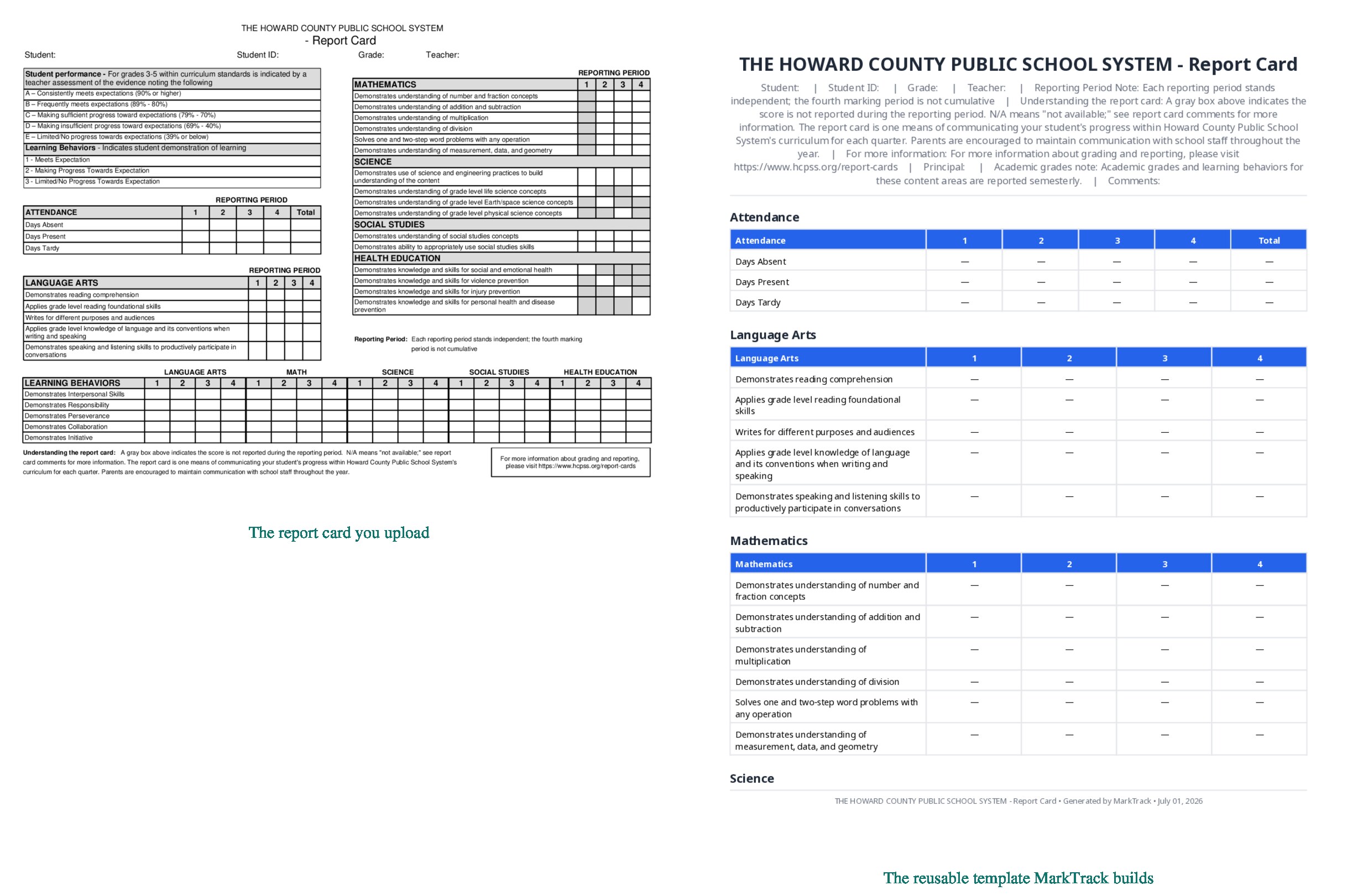
We measured the builder against 46 real report cards from schools around the world and wrote up the results honestly in the AI report card builder deep-dive.
Common questions
Does this work for a weekend maktab, or only full-time schools?
Both, and everything in between. Features are per-school toggles — a
maktab that doesn't teach Qāʿidah never sees the Qaidah menu — and one
organization can hold a full-time school, a Hifz program, and a weekend
maktab side by side. See
MarkTrack for small schools and maktabs
and MarkTrack for large Islamic schools.
Can we track Hifz and academic subjects in one system?
Yes — that's the point. The same student has a Fiqh gradebook, a Hifz log,
and one report card carrying both, and their parent sees all of it in one
app.
How do families pay tuition?
By card, at enrollment or from emailed invoices — with autopay off,
offered, or required per enrollment form. Siblings can share
one invoice per family,
and sibling discounts apply themselves.
How long does setup take?
Days, not weeks. Bring whatever spreadsheet your current system exports and
the AI import reads it as it is
— you review the families it found, and the accounts are created for you.
See it with your own school's data
The honest way to choose school management software is to put your own school into it: your programs, your fee structure, your Qāʿidah, your report card. That takes an afternoon with MarkTrack, and we'll do it with you.
Interested in trying out MarkTrack for free?
Get in touch