
Switching from JotForm
The JotForm alternative built for school enrollment
If you run enrollment for a school in 2026, you have probably built it on JotForm at least once. A JotForm for the application, a Stripe or PayPal field bolted on for the registration fee, a Google Sheet to track who actually paid, and then a long evening copying every accepted family into your student system by hand. JotForm is a genuinely good form builder. It just was never built to enroll students.
This guide walks through the same job done in MarkTrack instead: one enrollment form that knows your schools, charges a registration fee per school and per child, collects it, and turns each accepted family into real student and parent accounts — with no spreadsheet in the middle. The whole setup takes an afternoon, and most of it is screenshots below.
Where JotForm runs out of road for enrollment
The form itself is never the problem. These three things are:
- JotForm does not know your school. A submission is just a row in a table. It cannot tell that “Yusuf Rahman” is a returning parent of two students, it cannot create a student account, and it cannot enroll anyone. Every accepted applicant gets re-typed into your SIS by hand.
- One flat price. A JotForm payment field charges a fixed amount or a simple product list. A real Islamic school often has more than one program — a full-time school, a weekend school, a Hifz program — each with its own registration fee, and a family enrolling three children should pay for three children. JotForm pushes you into a separate form per campus and a calculator on the side.
- The form is the end of the line. After submit you still have a pile of follow-up work: who paid, who is accepted, who is actually enrolled, who needs a login. The form should be the start of enrollment, not a dead end that hands you a spreadsheet.
MarkTrack closes all three. Here is the build, step by step.
Step 1 · Build the form — it already knows your campuses
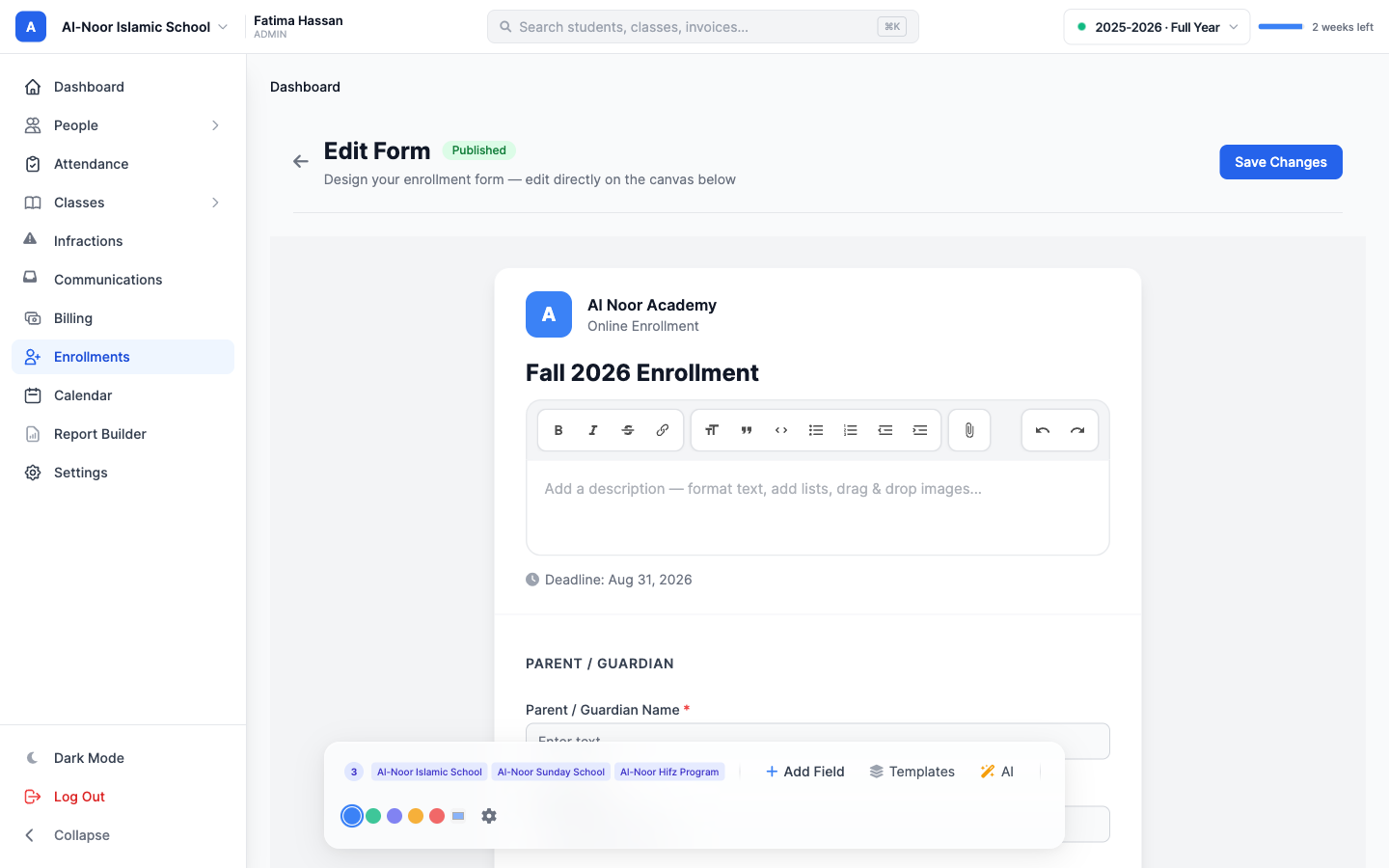
You start in the enrollment builder. It looks a lot like any form builder: a live canvas you edit directly, drag-in fields, ready-made templates, and an AI button that writes the whole field list from a one-line prompt. The difference is in the bottom bar — this form is linked to the three campuses in your organization, so everything downstream can be priced and routed per campus.
Step 2 · Set a registration fee per school
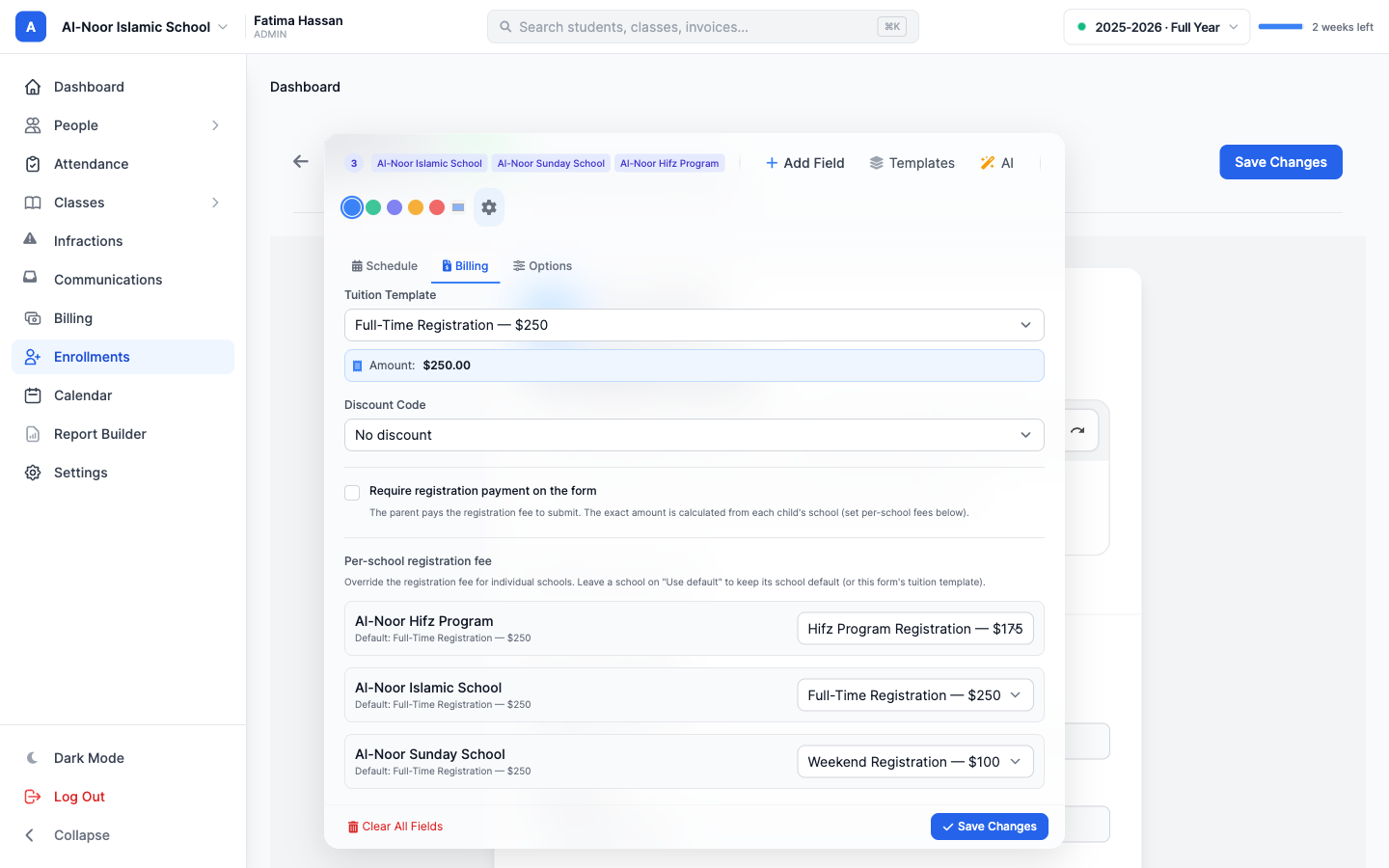
This is the part JotForm cannot do. In the Billing tab you set a default registration fee, then override it for each individual school. Full-time gets $250, the weekend program gets $100, the Hifz program gets $175 — one form, three prices, no duplicate forms to maintain.
You can either email the family an invoice after you accept them, or flip “Require registration payment on the form” so they pay on submit with a card, Apple Pay, or Google Pay. The amount is always recalculated on the server from each child’s chosen school, so a tampered or stale price can never get through.
Step 3 · Turn on family applications and per-child fields
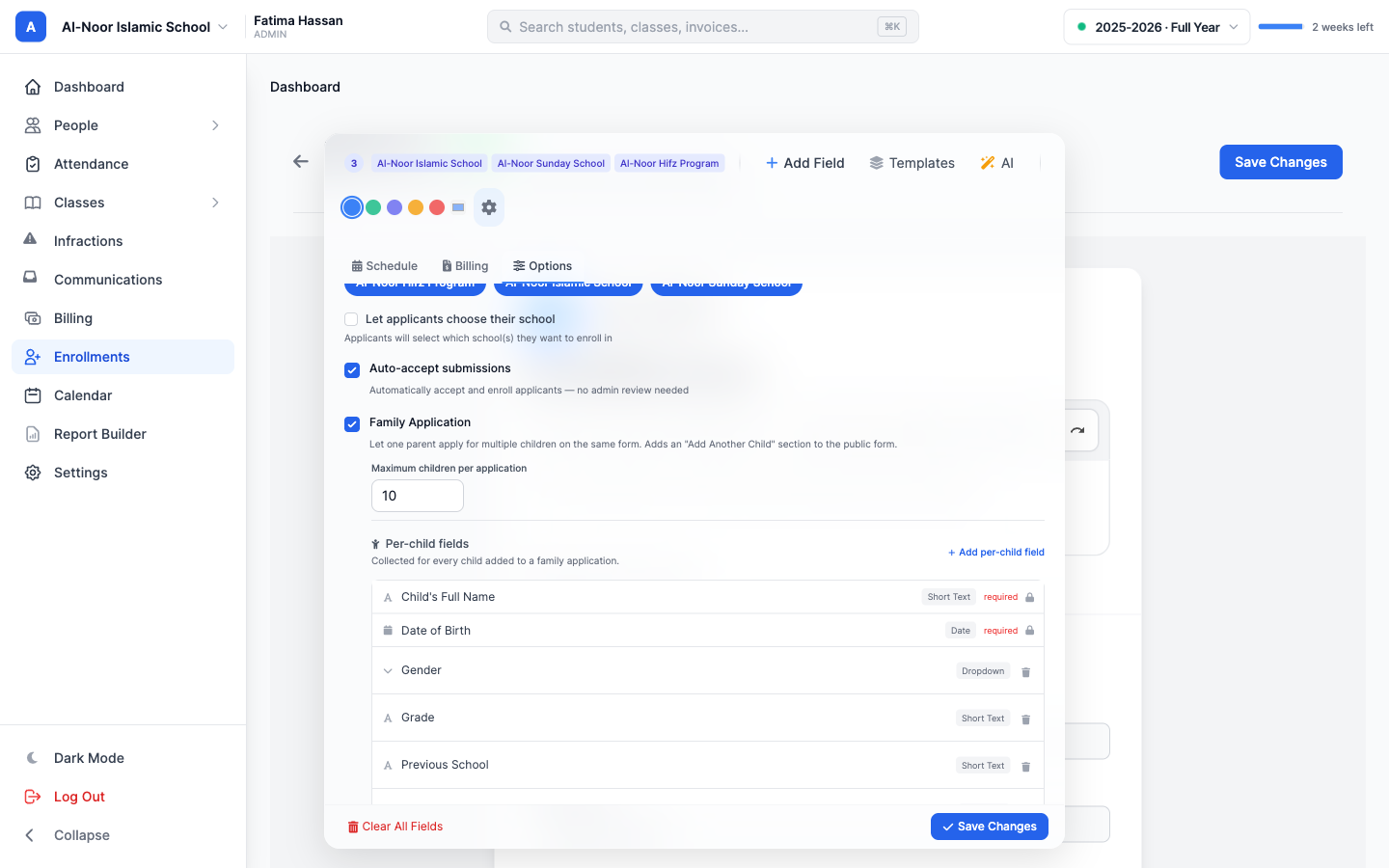
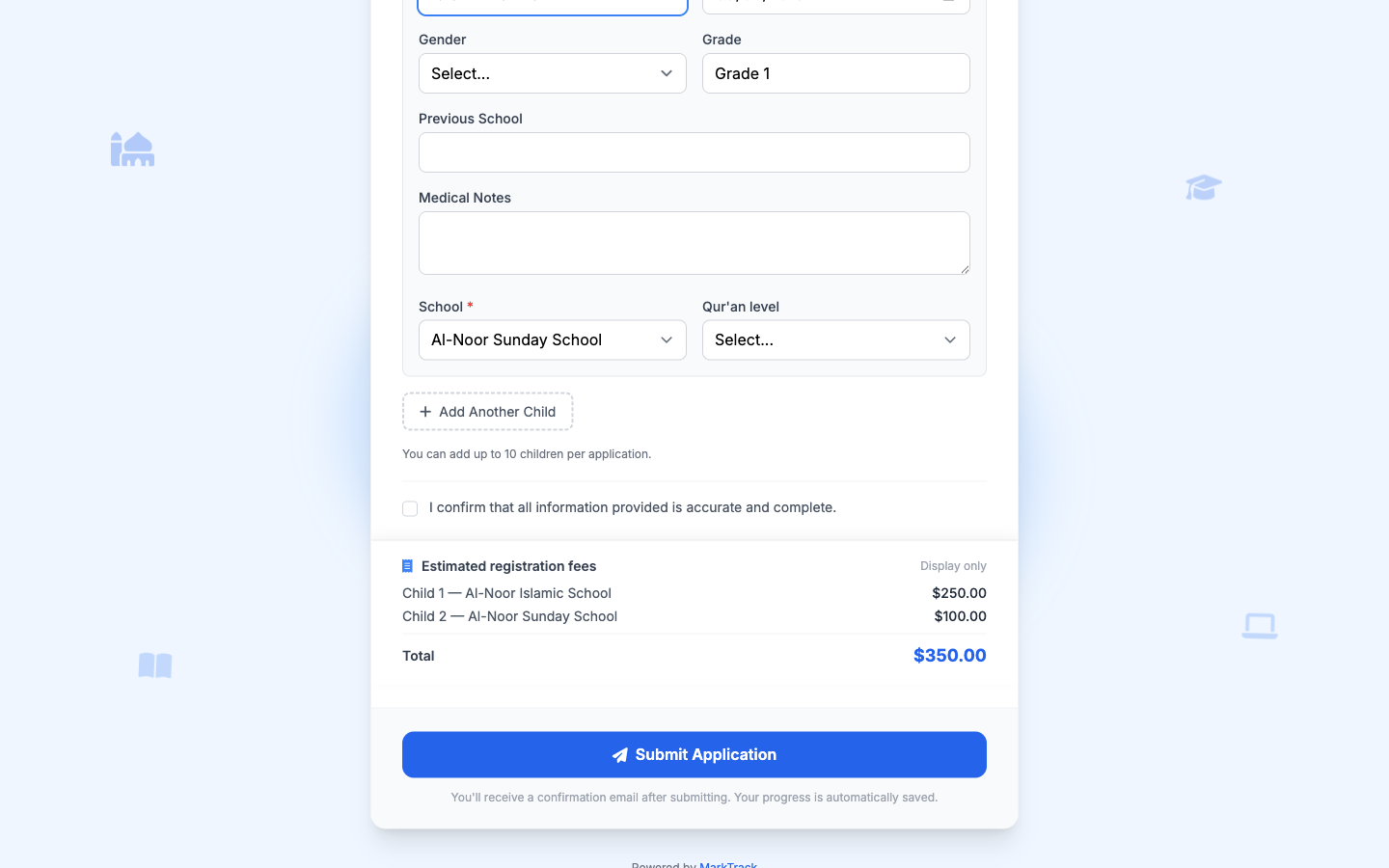
Most families have more than one child. In the Options tab you switch on Family Application, and the public form gains an “Add Another Child” section. Then you decide what to collect for each child — name and date of birth are built in, and you add your own: grade, Qur’an level, which campus the child is enrolling in, anything you need. One parent fills the application once for all of their children.
Step 4 · What the parent sees
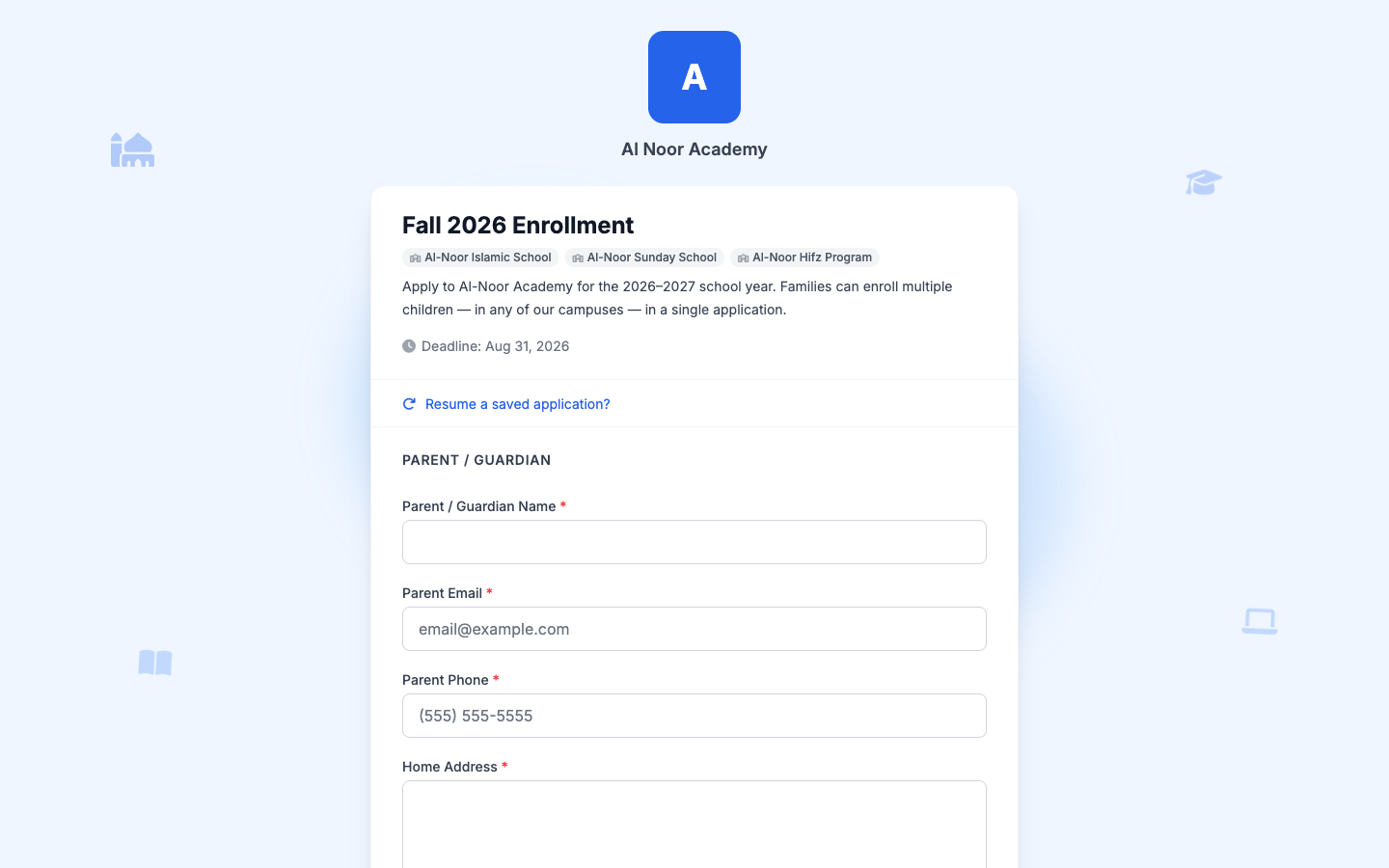
Publish, and you get a public link to share anywhere — your newsletter, WhatsApp, the masjid bulletin. The page is clean and branded with your school’s name, and a parent fills it out from their phone in a couple of minutes. No MarkTrack account required to apply.
Step 5 · The fee adds up per child, automatically
As the parent adds children and picks a campus for each, a running total builds itself. A child at the full-time school is $250, a sibling in the weekend program is $100, and the family sees $350 before they ever submit. No calculator, no “we’ll send you the amount later,” no math for you to redo. This is the per-school, per-child pricing JotForm simply cannot express on a single form.
Step 6 · One family invoice, and the students are enrolled
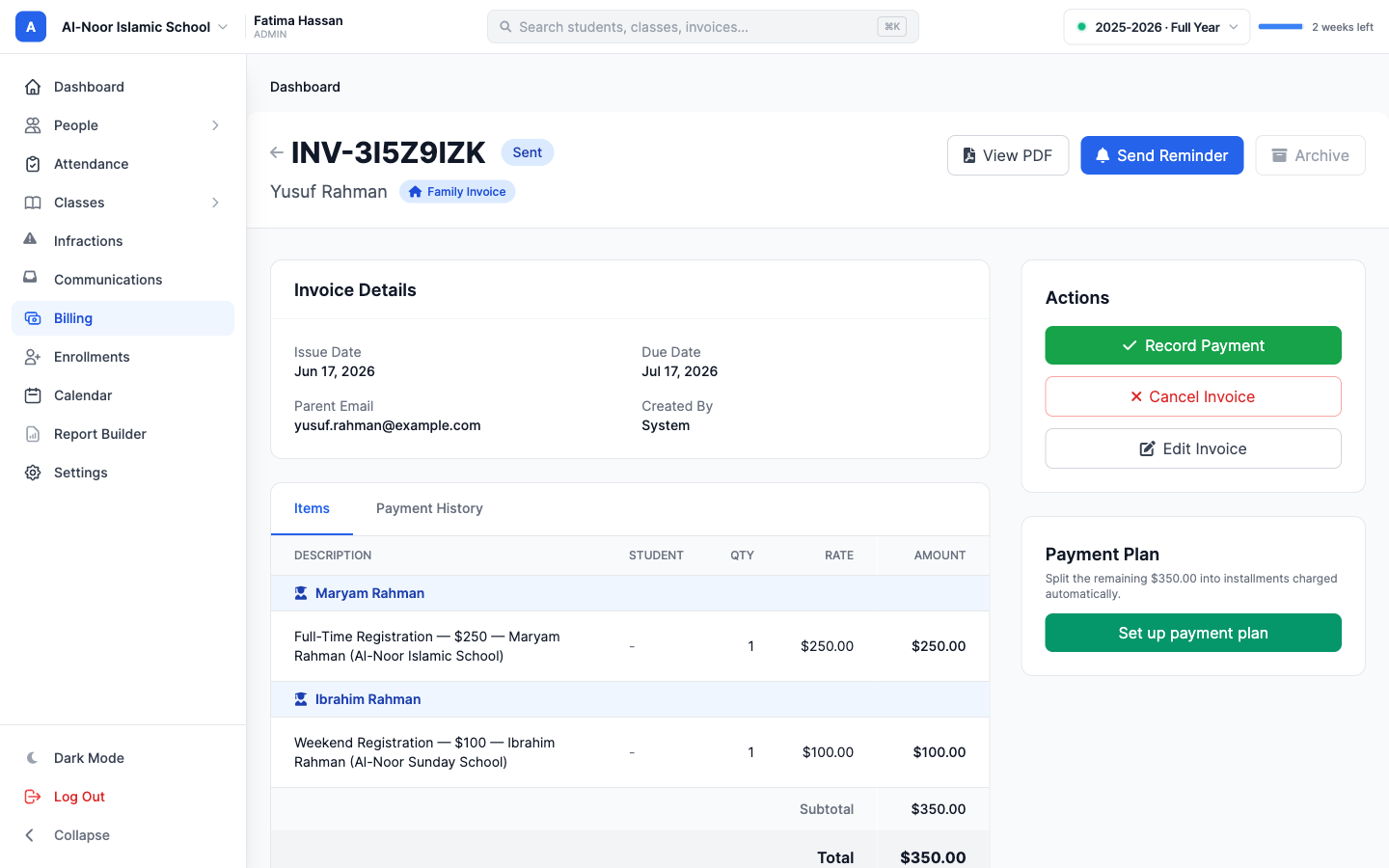
This is where the spreadsheet disappears. The moment the application is accepted, MarkTrack creates the parent and student accounts, enrolls each child at the campus they chose, and issues one family invoice that line-items every child at their own school’s registration fee. Three kids across two campuses, one bill, paid in one click.
You did not re-type a single name. The form was the start of enrollment, not a row in a sheet you have to reconcile.
What this actually replaces
One MarkTrack enrollment form takes the place of the whole JotForm stack you would otherwise wire together:
- The JotForm for the application itself
- The separate forms or hidden calculations for per-campus pricing
- The Stripe or PayPal field bolted on for the fee
- The spreadsheet tracking who paid
- The hours of copying accepted families into your student system
- The follow-up emails chasing unpaid registration
And it goes further than JotForm can: sibling discounts apply themselves, you can block a parent’s login until the registration fee is paid, and every child in a household lands on one invoice instead of three.
Why move before the 2026 season
Enrollment season is the worst possible time to be wrestling a form tool that does not understand schools. If you are already mapping out Fall 2026, this is the moment to switch — build the form once, set your per-campus fees, and spend the season accepting families instead of reconciling a spreadsheet. If you are bringing a roster over from another system too, the Fall 2026 setup guide walks through the rest of onboarding end to end.
See everything MarkTrack does, start a free trial, or book a call and we will help you move your enrollment over.
Related reading
Interested in trying out MarkTrack for free?
Get in touch