
For Montessori Schools
The best LMS for Montessori schools in 2026
Ask a Montessori guide how a four-year-old is doing and you will not hear a percentage. You will hear that he was presented the Pink Tower in June, has been practicing it since, chose it unprompted on Tuesday, and worked at it for the better part of an hour. Montessori record-keeping is a running log of presentations, repetitions, and observations — and almost every piece of school software ever built wants to turn that into a number out of a hundred.
So most Montessori schools give up on the software. The albums live in a binder, the observations live on index cards or in a notebook, attendance lives in a spreadsheet, and tuition lives somewhere else entirely. It works, until the guide leaves mid-year and takes the context with her, or a parent asks what actually happened between September and March.
MarkTrack is built the other way around. A school can be switched into qualitative grading, which replaces numbers with your own words, groups works into your own albums, and keeps a dated observation history behind every single one. This post walks through what that looks like — and why it fits Muslim-run Montessori schools especially well, since Hifz, enrollment, and family billing live in the same system.
Your albums, your words — not Excelling and 87 percent
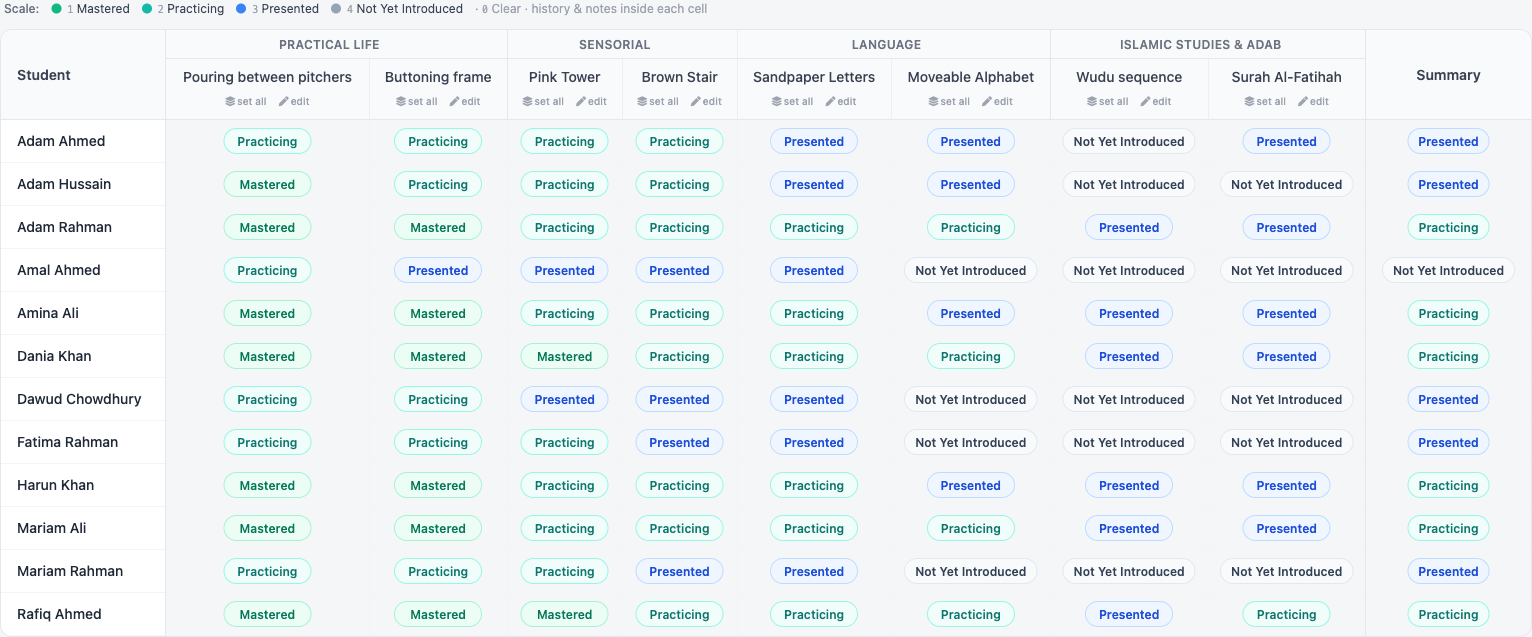
Turn on qualitative grading for a school and the gradebook changes shape. Every cell becomes a proficiency pill instead of a score box. The guide clicks the pill and picks a level. That is the whole interaction — no decimals, no weighting, no deciding whether a child's pincer grip is a 3 or a 3.5.
Crucially, you define the scale. The words and the colors are yours. A Montessori school typically wants Presented → Practicing → Mastered, plus something like Not Yet Introduced for works still on the shelf. You set those four levels once, in your own language, and every cell, roster, and report card in the school uses them from then on.
Works are grouped into skill areas that the guide defines, which is exactly where your albums go: Practical Life, Sensorial, Language, Mathematics, Cultural — and, in a Muslim Montessori classroom, Islamic Studies & Adab sitting right alongside them as a first-class area rather than an afterthought bolted onto a Western curriculum.
The part that actually matters: the observation record
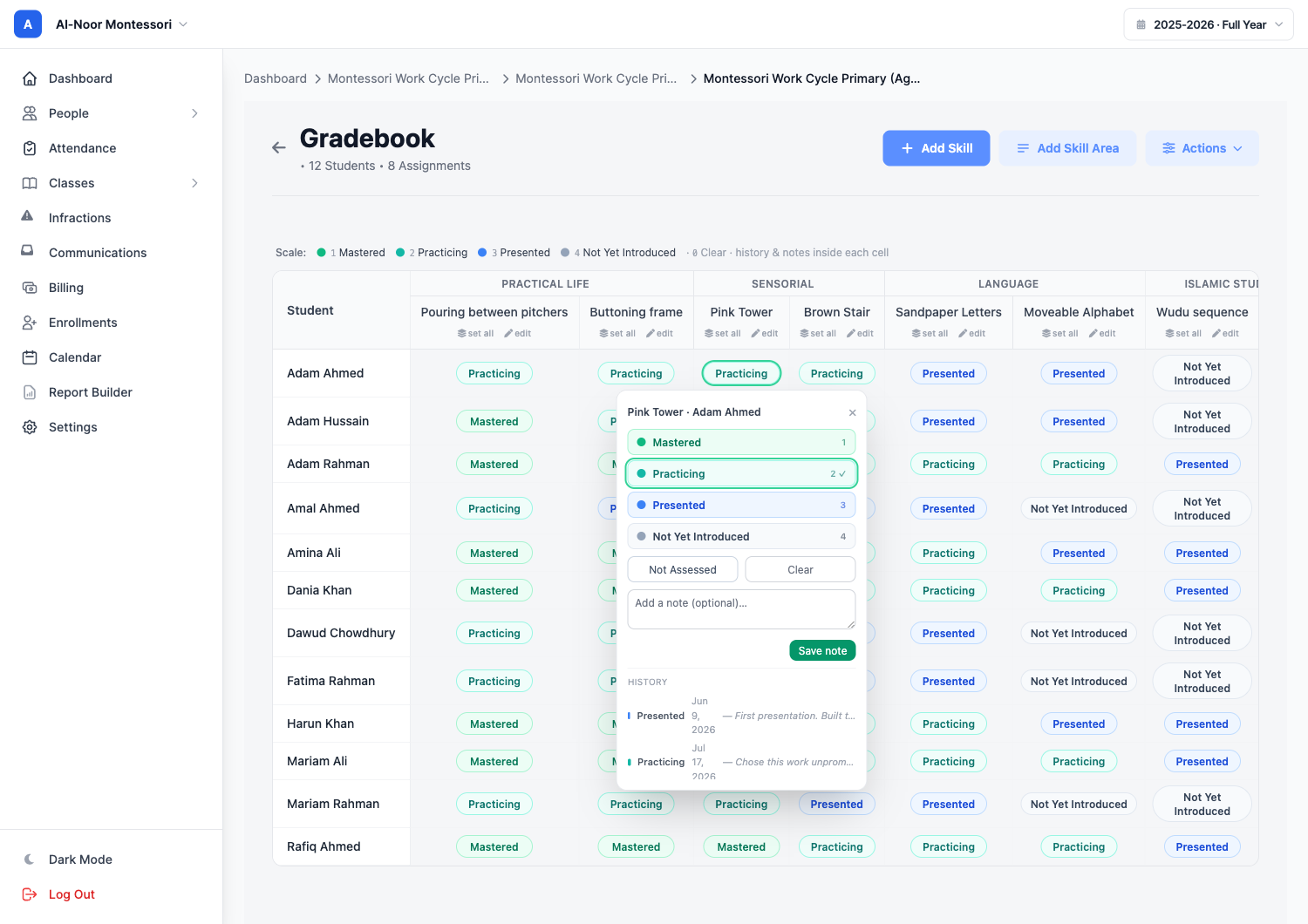
Here is where most "standards-based" software stops and Montessori record-keeping begins. In a Montessori classroom the current level is the least interesting thing about a work. What matters is the sequence: when it was first presented, how many times it was returned to, what the child did with it, when it finally became effortless.
So in MarkTrack every cell holds a dated, append-only history. Click the pill and you get the scale, a note field, and the full trail underneath: Presented, Jun 9 — "First presentation. Built the tower with guidance, then carried the cubes back one at a time." Practicing, Jul 17 — "Chose this work unprompted and concentrated for the whole cycle."
Setting a new level never overwrites the old one; it adds a row. That makes the gradebook behave like an observation notebook that happens to be searchable, backed up, and still there in September when a new guide takes the classroom. The history is a guide's tool — report cards and the parent portal show the current level only, so families see progress rather than a running commentary.
Progress reports with no numbers anywhere
Report-card season is where Montessori schools usually lose a weekend, because the thing the office has to produce — a narrative progress report organized by album — is precisely the thing the software cannot generate. So it gets rebuilt by hand in a word processor, every term, for every child.
In MarkTrack it is one button from the gradebook. Works are grouped under their album headings, each with its label; the child's overall sits at the bottom with attendance totals; and your proficiency scale is printed on the report so a family knows exactly what "Presented" means. There is no percentage on the page, because there was never a percentage to begin with.
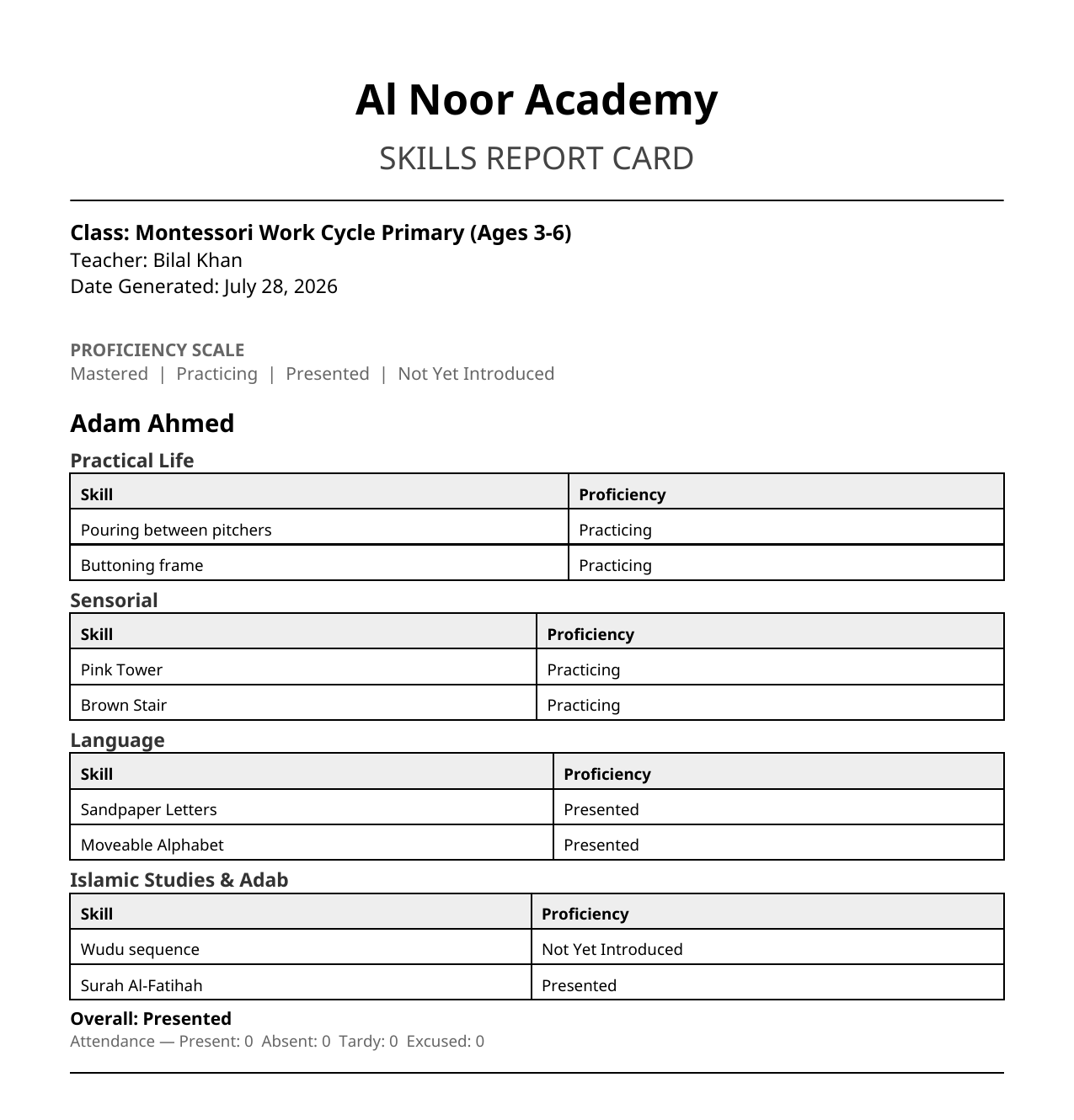
And if your school already has a progress report it likes — one that took a committee and three years to settle on — you do not have to abandon it. MarkTrack's AI report card template builder takes a photo, PDF, or Excel of your existing card and rebuilds it as a reusable template, and it is qualitative-aware, so it lays out areas, works, and your scale rather than forcing a numeric grid.
Hifz in the same system as the albums
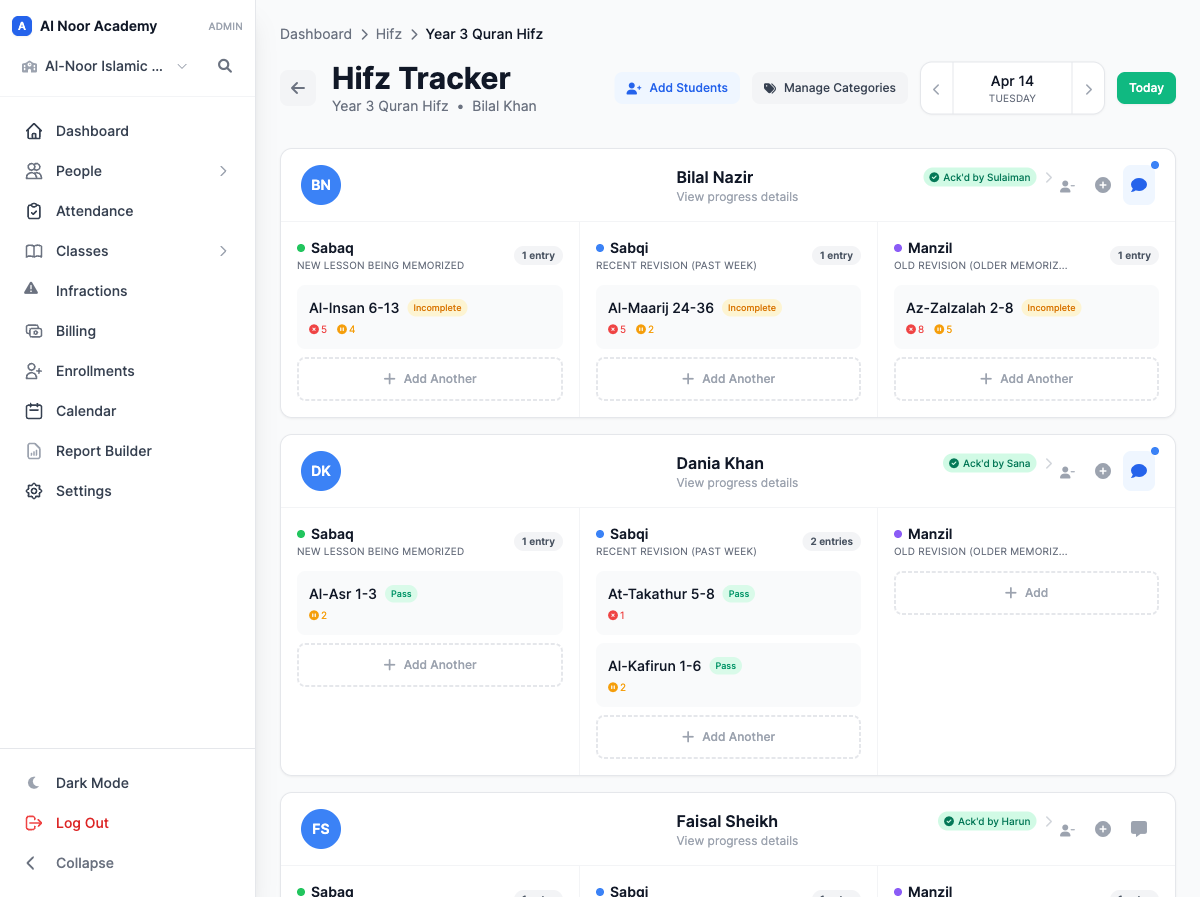
This is the piece no general-purpose Montessori app has, and the reason Muslim Montessori schools tend to end up running two systems. Quran memorization is not a subject with a grade — it is a daily cycle with three moving parts: Sabaq (the new lesson), Sabqi (recent revision), and Manzil (older revision).
MarkTrack has a purpose-built Hifz tracker for exactly that. A teacher logs each portion by surah and ayah range, marks it passed or incomplete, notes mistakes, and the parent gets it on their phone and acknowledges it — which is how you find out whether revision is actually happening at home. You can add your own categories beyond the three, and haydh days for female students are handled discreetly.
Structurally it fits Montessori nicely: memorization is a repetition-based practice logged over time, which is the same shape as the observation record. A child's Practical Life work and her Sabaq live in one place, under one login, on one report to the family.
Enrollment that a small school can actually run
Montessori schools are often small, and small schools do not have an admissions office. They have one administrator who is also the bookkeeper and sometimes also a guide. So enrollment has to be genuinely self-service.
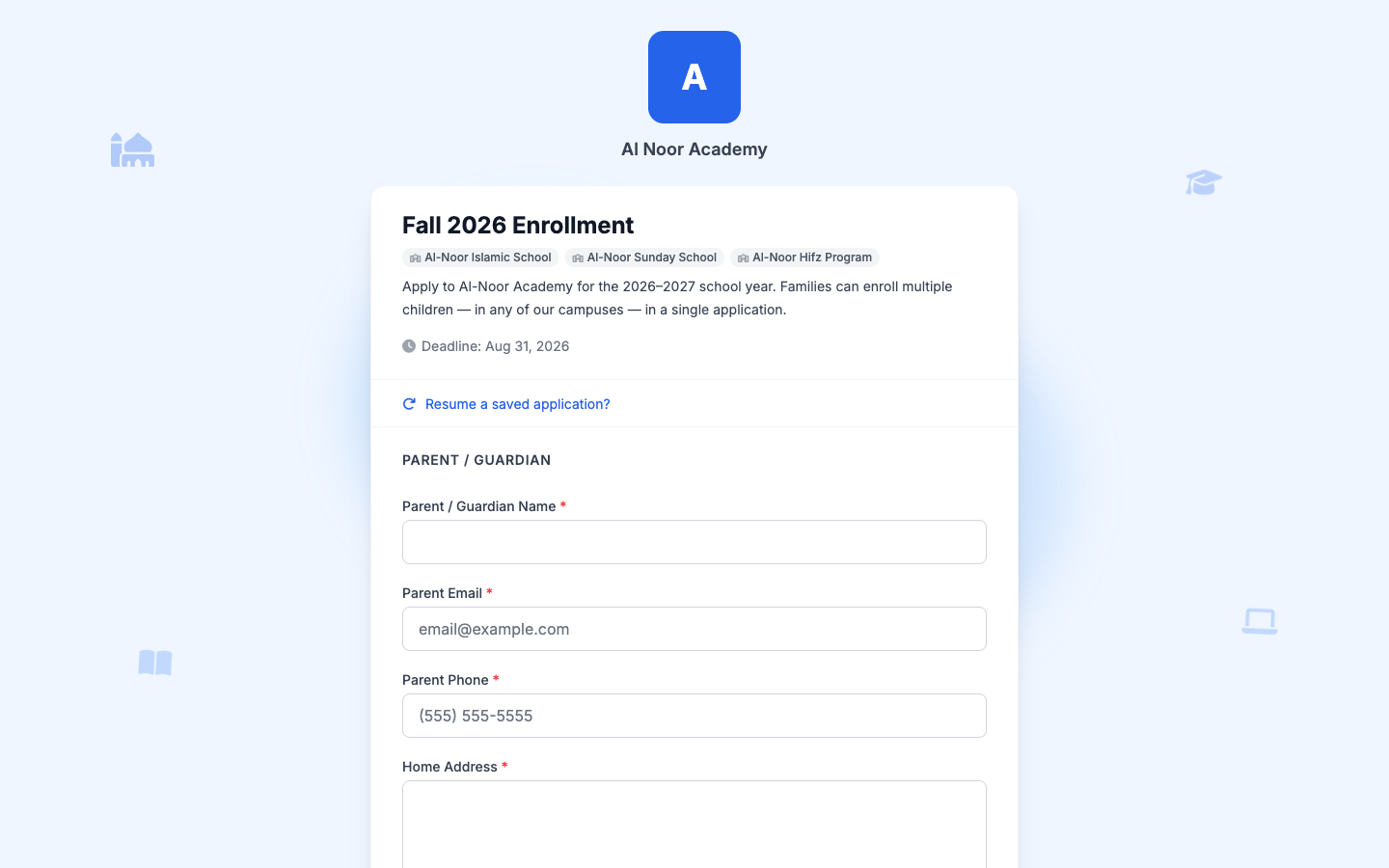
In MarkTrack you build an enrollment form by dragging fields, publish it at a public link, and embed it on your own website. Families do not create an account to apply — no login wall between an interested parent and your application. They can enroll several children in one submission, save a half-finished application and resume it later, and pay the registration fee inline as they submit.
When you accept an application, the student, the parent, the family link, and the class placement are created for you. Nobody retypes anything into a spreadsheet.
Small enough for one classroom, big enough for five campuses
A lot of Montessori schools start as one Primary classroom in a masjid basement and grow into a Primary plus a Lower Elementary plus a weekend program. Most software makes you pick a size bracket and punishes you for outgrowing it.
MarkTrack is multi-school by design. One organization can hold several schools — your Montessori program, a weekend maktab, a Hifz program — each with its own classes, its own staff, and its own grading mode. Your Montessori school can be qualitative while the Hifz program stays on its own tracker and the weekend school grades traditionally, all under one login. A family with a child in two of them still gets one invoice, with sibling discounts applied automatically.
Attendance scales the same way. A Montessori classroom that meets as one group all day can take attendance once for the whole day rather than period by period — which is how a Children's House actually runs.
Easy enough that nobody books a training call
The most common thing we hear from small schools is that they never scheduled onboarding. A guide sets a level by clicking a pill and typing a sentence. An administrator publishes an enrollment form by dragging fields. A parent opens an invite email and finds their child's works, attendance, Hifz, and tuition without instructions — on the web or in the native iPhone and Android apps.
That matters more in Montessori than almost anywhere else, because the whole pedagogy rests on the adult being free to observe. Software that demands attention is software that takes the guide out of the classroom.
How a Montessori school is set up in MarkTrack
The mapping is short:
- Each classroom (Primary, Lower Elementary) is a class, with its age span in the name
- Each album is a skill area — Practical Life, Sensorial, Language, Mathematics, Cultural, Islamic Studies & Adab
- Each work is a skill inside its album, with no due date, because a work is not an assignment
- Each presentation or observation is a dated entry with a note, appended forever
- Your scale is whatever your school says it is
The short version
If you run a Montessori school you need software that records observations rather than scores, groups work by album, prints a progress report a family can read, and does not need a full-time administrator to operate. If you run a Muslim Montessori school you also need Hifz tracking, family billing, and enrollment that works without a login — in the same system, not in three.
That combination is genuinely rare, and it is why we would put MarkTrack in front of a Montessori school in 2026. Explore the features page, or get in touch and we will set up your albums and your scale with you.
And if you are curious where all of this came from — a doctor, a slum in Rome, and a question about children — we wrote a separate piece on the life and method of Maria Montessori.
Related reading
Interested in trying out MarkTrack for free?
Get in touch