
For Elementary Schools
Why MarkTrack is the best LMS for elementary schools
Ask a first-grade teacher for a student's grade and you will not hear "87 percent." You will hear that she is meeting expectations in reading, still approaching them in handwriting, and excelling at working with a group. Elementary teachers think in skills and mastery, not points and percentages — and for years the software made them pretend otherwise, forcing developmental progress into a gradebook that only understands numbers.
MarkTrack was built the other way around. For a K-5 school, grading, report cards, and everything a family sees can be standards-based from the ground up: teachers grade by skill, families read proficiency labels, and nobody has to translate "Cutting with scissors" into a number nobody wanted in the first place.
Grade by skill, not by percentage
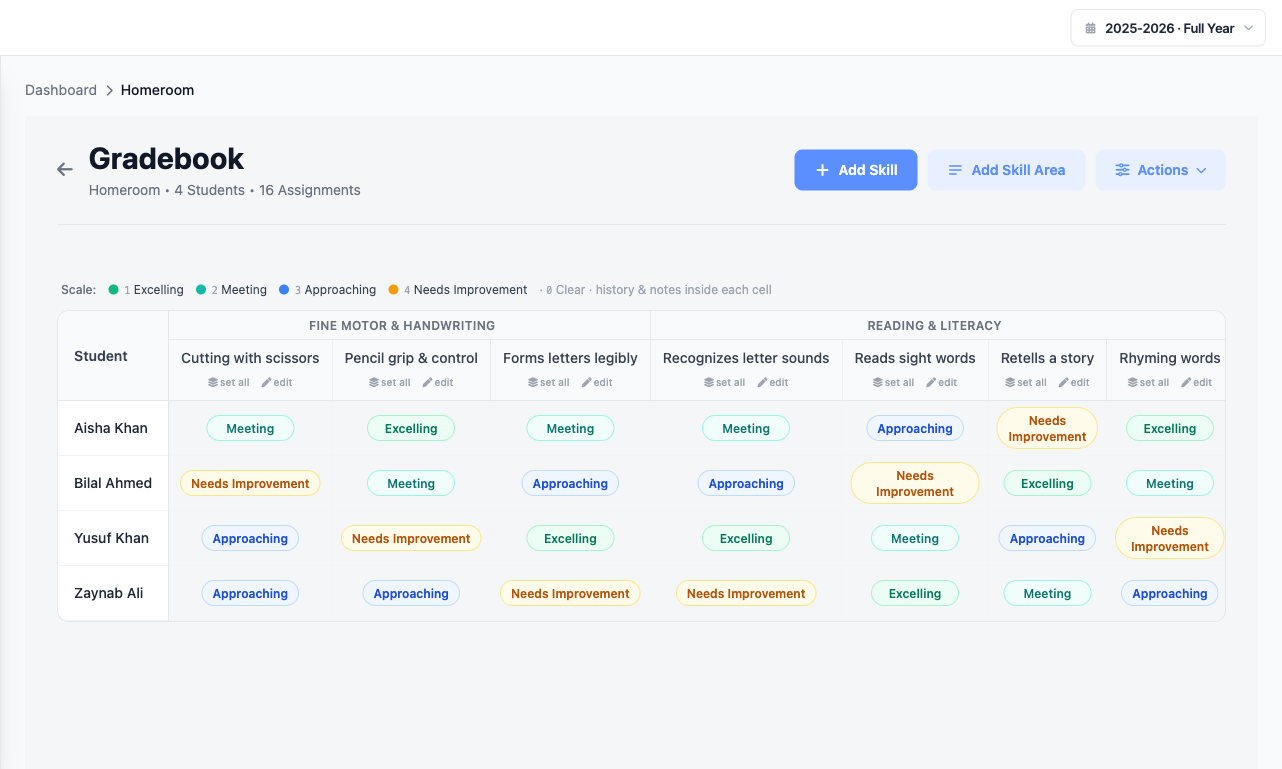
Turn on skills grading for a class and the gradebook changes shape. Instead of a column of scores, each student gets a colored proficiency pill per skill. The teacher clicks the pill and picks a level — that is the whole interaction. No decimals, no weighting, no mental math to decide whether a five-year-old's scissor grip is a 3 or a 3.5.
Skills are organized into skill areas the teacher defines — Fine Motor & Handwriting, Reading Foundations, Social & Emotional — so a report reads the way a real elementary card reads, grouped by the things that actually matter at that age. Every cell keeps its own history and notes, so when a parent asks "how is she doing with scissors," the answer and the trail behind it are right there.
Numbers under the hood, labels on the surface
Here is the design choice that makes the whole thing work: MarkTrack is numeric under the hood, labels on the surface. Behind each proficiency level is an ordinary number, so the system can still do the things numbers are good at — sort a roster, roll a class up into an overall, sanity-check that a student is trending up over a term. But every surface a teacher, student, or parent actually touches shows a label: Excelling, Meeting, Approaching, Needs Improvement. Never a raw score, never a percentage.
That means an elementary school gets the reporting power of a real gradebook without ever exposing a child to a number. And a school that grades the traditional way is completely unaffected — skills grading is a mode you turn on, not a rewrite you inherit.
Report cards in one click
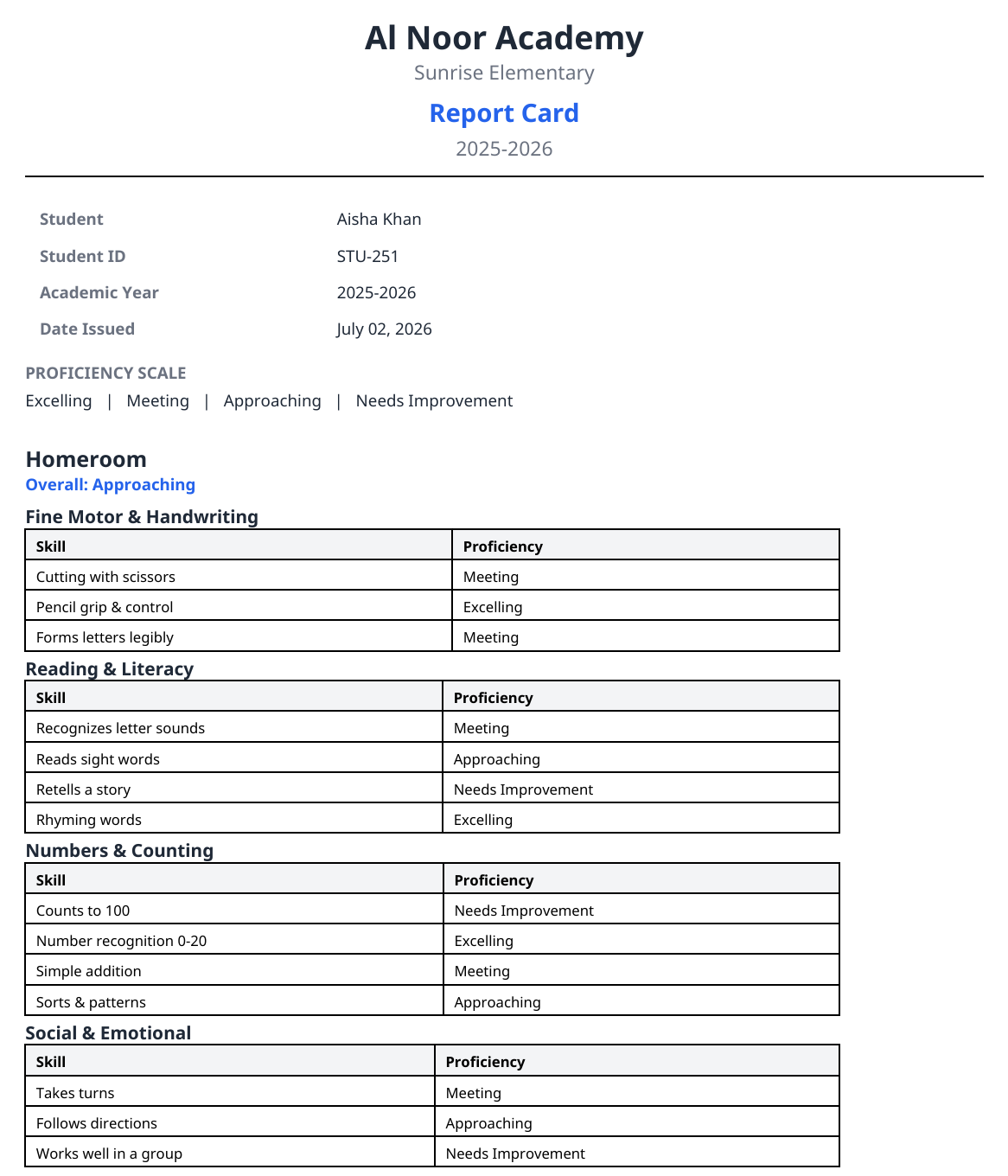
The payoff shows up at report-card time, which is where elementary offices usually lose a weekend. From the gradebook, one button generates a standards-based report card: skills grouped by skill area, each with its proficiency label, an overall for the class, attendance totals, and a proficiency-scale legend printed at the bottom so parents know exactly what "Approaching" means. No numbers anywhere on the page — because there weren't any to begin with.
Bring your own report card — AI rebuilds it
Most elementary schools already have a report card they like, often one that took years and a committee to settle on. You do not have to give it up. MarkTrack's AI report-card-template builder lets you upload the card your school already uses — a photo, a PDF, or an Excel file — and "Build from existing card" reads its structure and rebuilds it as a reusable template inside MarkTrack.
The builder is now fully qualitative-aware: when your card grades in proficiency levels rather than numbers, it recognizes that and lays out skill areas, skills, and your proficiency scale to match — not a numeric grid pretending to be a skills card. You keep the report parents already recognize, MarkTrack does the data entry. There's a full technical walkthrough here, including an honest accuracy breakdown across dozens of real report cards.
Your school's scale, your school's words
No two elementary schools describe mastery the same way. One uses Excelling / Meeting / Approaching / Needs Improvement; another wants 4-3-2-1; a Montessori program wants Introduced / Practicing / Mastered. The Grading Scale editor lets each school set its own proficiency levels, the words, and the color for each one — and the skill areas and skills are teacher-defined too. The scale you build is the scale every gradebook, cell, and report card uses.
(And the palette stays calm and legible — emerald, teal, blue, amber — chosen so a report card reads clearly for parents rather than looking like a highlighter exploded.)
Easy enough that nobody needs training
The most common thing we hear from new elementary schools is that they never booked a training call. A teacher takes attendance with one tap, sets a proficiency by clicking a pill, and generates a report card from the same screen. A parent opens the invite email and finds their child's skills, attendance, and tuition without a how-to. That is the whole point: the software should disappear so the teaching doesn't.
Everything a K-5 school needs, in one place
Skills grading is the piece elementary schools come for, but it sits on top of a complete platform, so the office isn't stitching five tools together:
- Attendance in a tap, from the web or a native iPhone and Android app
- One invoice per family with automatic sibling discounts and recurring tuition
- Online enrollment forms that collect registration fees and enroll students automatically
- Communications — email or message a class, a grade, or the whole school in two clicks
- Report Builder for admins who want to slice across grades, attendance, and behavior without a spreadsheet
One database, one login, one place parents check — whether your school grades in skills, in letters, or a mix across grade levels.
The short version
If you run an elementary school, you want a gradebook that thinks in skills, report cards that read like report cards, a scale in your own words, and software your teachers can use on day one. MarkTrack does that out of the box — and keeps attendance, billing, enrollment, and family communication in the same system. That combination is what makes it the LMS we'd put in front of a K-5 school in 2026.
Explore the platform on the features page, or get in touch for a walkthrough with your own report card.
Related reading
Interested in trying out MarkTrack for free?
Get in touch