
Stop running field trips on Google Forms
Every Islamic school admin has done this version of the dance at least once. A field trip is coming up. You need a permission slip, a headcount, an emergency contact, and twenty bucks per kid. So you open Google Forms, write the questions, share the link. Then you make a separate Excel sheet to track who paid. Then a group chat thread fills up with Venmo screenshots and "I'll bring cash on Friday." You reconcile it all the night before. Half the chaperone roster is wrong because two parents replied to the wrong message.
This is the workflow for any non-enrollment school form. Field trips. Iftar RSVPs. Quran club interest sign-ups. Volunteer drives. Hifz competition registrations. The form part is fine. The matching submissions to parents already in your school and collecting money on the same submit is what breaks.
Three tools, three places, three sources of truth
The mess goes like this:
- Google Forms collects responses but does not know who your parents are. So you cannot tell at a glance whether "Aisha M" who signed up is Aisha Mahmood the parent of two third-graders or someone else with that name.
- Excel tracks who paid, but only because someone manually marked the row green after a Venmo notification scrolled past on a Friday.
- Group chats or email hold the actual money trail. Screenshots, half-promises, "I sent it to the wrong number."
Nobody is malicious here. The tools were never designed to talk to each other. So the school admin becomes the integration layer. That is hours of cross-referencing every time you run a field trip.
One form. One submit. Done.
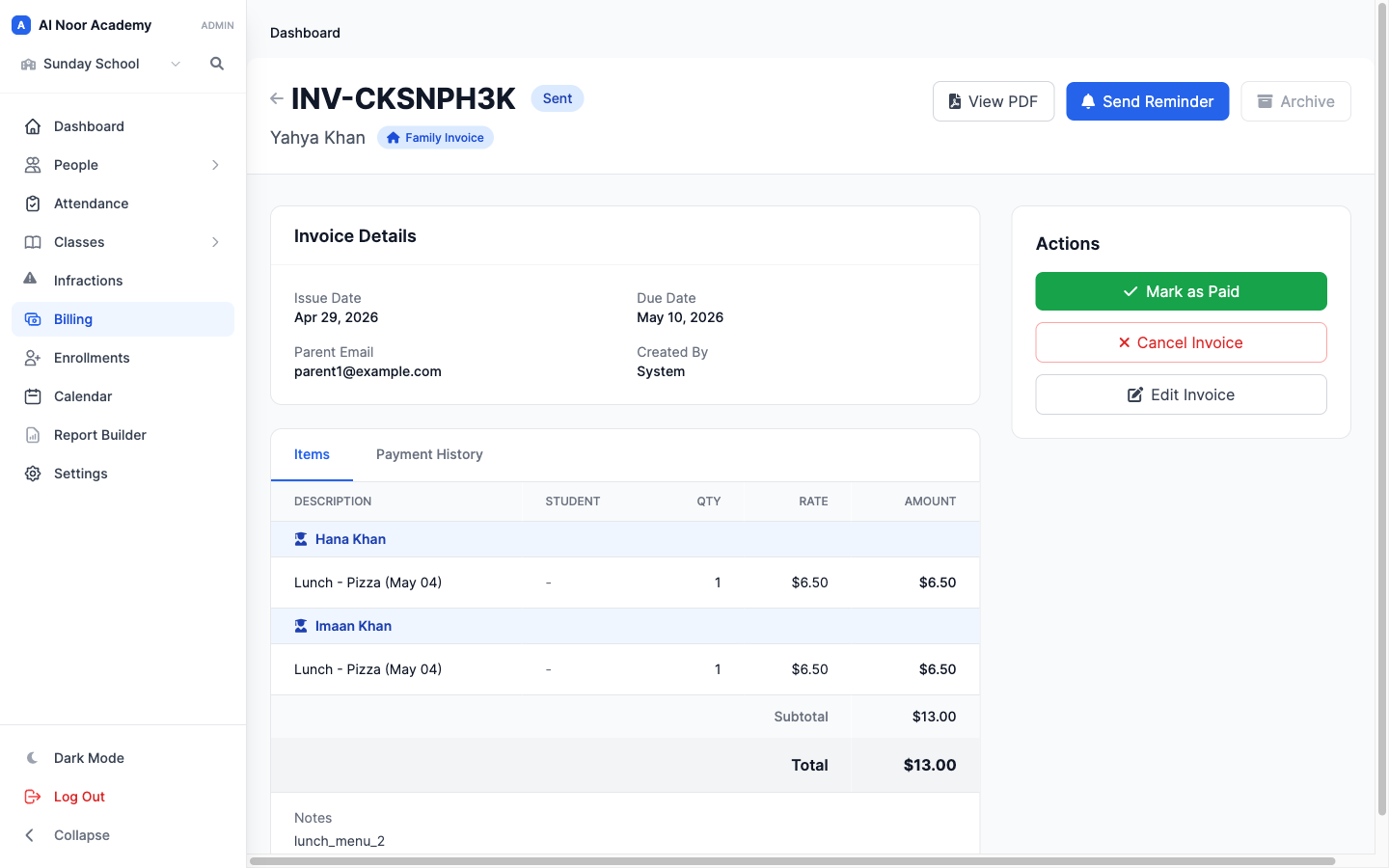
MarkTrack ships a form builder that looks a lot like Google Forms, but it knows your school. When a parent submits, the system matches their email to the parent record you already have. If the form charges money, an invoice fires off in the same beat. No spreadsheet. No follow-up.
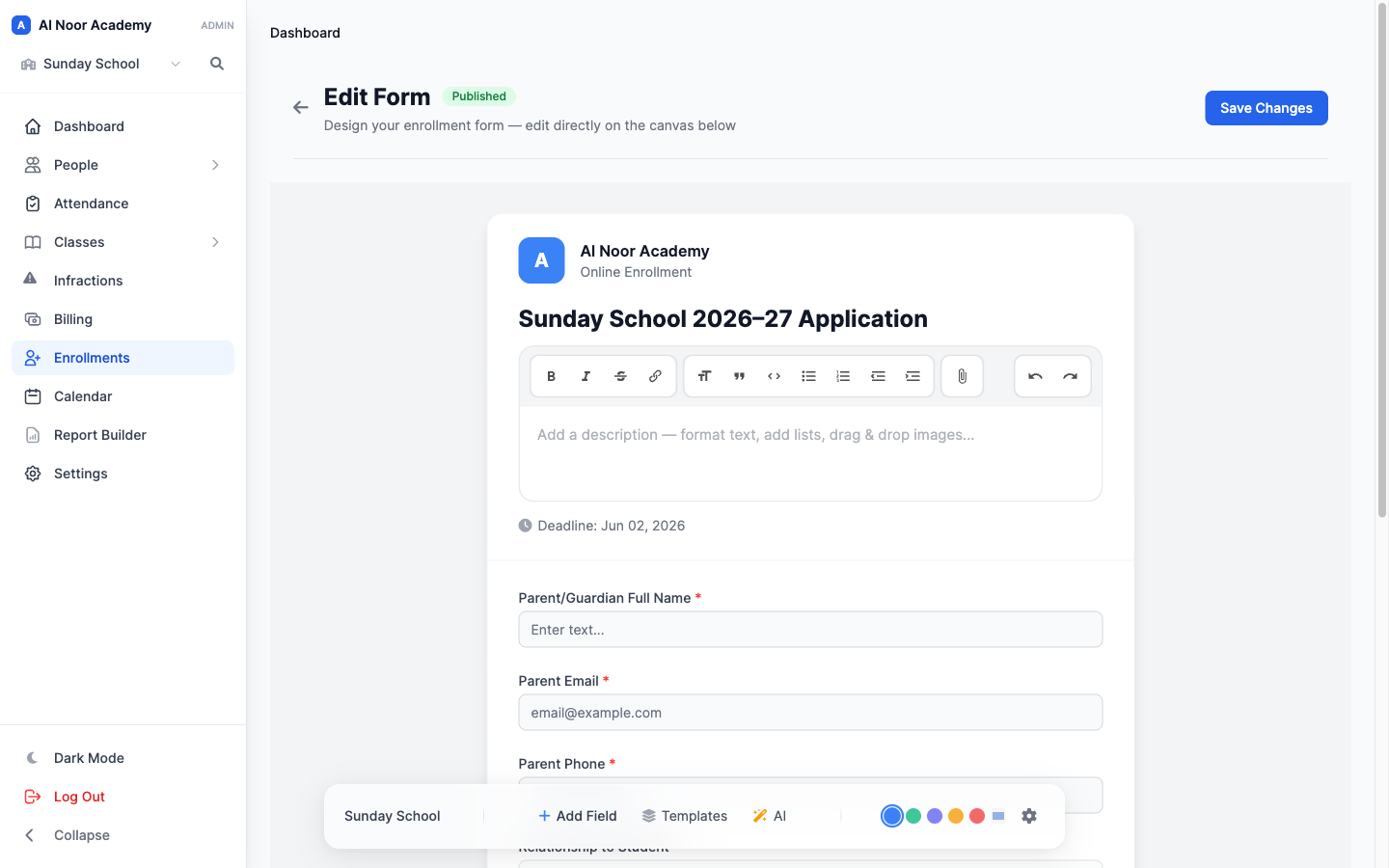
Setting up a field trip form, end to end
Here is the actual flow on a Tuesday morning, in five clicks.
- Hit New Form, choose Generic.
- Drag in your fields. Name, student, emergency phone, the "I give permission" checkbox, allergies, signature. Or let AI write the field list from a one-line prompt like "permission slip and emergency contact for a masjid field trip."
- Open the Billing panel in the settings drawer. Pick a tuition template (a $20 line item you set up once) and switch payment mode to Email invoice (pay later).
- Hit Publish. Copy the public link.
- Share it in the parent newsletter.
That is the entire admin side. From here, the system does the matching and invoicing on its own.
What the parent sees
A clean, branded page with your school's name at the top. They fill it out from their phone in under two minutes. They submit. They get a confirmation email a few seconds later. If the form is paid, a second email lands a moment after that with a Stripe-hosted invoice link. One click and they pay with Apple Pay, Google Pay, or a card.
No Venmo, no checks in a sealed envelope sent in with a third grader, no separate followup. The parent transacts with your school the way they already transact with everything else.
What you see on the admin side
The submission shows up tagged as Existing user next to the parent's name, so you can see right away that the system found a match. The invoice it created is linked from the submission row, so you can click straight through to the live payment status. You never open a spreadsheet.
What this actually replaces
Concretely, one Generic form with a tuition template attached replaces all of the following:
- The Google Form for the waiver and headcount
- The Excel sheet tracking payment status
- The Venmo or Zelle thread collecting the money
- The follow-up reminder email two days before the trip
- The reconciliation spreadsheet the night before
- The deposit slip you write at the bank with cash from envelopes
And it does it without you connecting Zapier to three SaaS tools or hiring an ops person.
What it works for, beyond field trips
The same Generic form with payment works for any school event that is not enrollment.
- Iftar RSVPs. Charge $15 per adult, $5 per child. Get a final headcount the morning of.
- Quran competition registrations. Free to enter, but with a $10 study guide upsell. The parent picks at submit.
- After-school program sign-ups. Collect interest first, charge later when you confirm the class is running.
- Fundraiser pledges. Set a custom amount field. Parent fills in, invoice goes out.
- Photo permission forms. No payment, just the legal sign-off, archived against the student record.
For the not-paid case, leave Payment on "No payment required" and the form is just a clean, branded version of what you would have built in Google Forms. The matching to existing parents still happens. So your admin view still shows you exactly who replied without you cross-referencing your roster.
How this compares to MarkTrack's Info Form
MarkTrack also has an Info Form, which looks similar at first glance. The difference is who it is for. Info Forms are for collecting extra data from existing parents and students you have already invited. You pick the recipients yourself and the system emails each one a private link. Good for medical updates, emergency contact refreshes, transportation surveys.
Generic forms are public. Anyone with the link can fill them out. The system matches by email after the fact. That is what makes them right for field trips and events, where you cannot pre-list every parent who might respond. If the parent is in your roster, they get the auto-invoice. If they are not, you still get the submission and can follow up manually.
Pick Generic when the audience is open. Pick Info Form when the audience is a specific list.
The five-click summary
You have a field trip next Friday. Here is the playbook from the moment you finish your coffee.
- New Form, Generic.
- AI prompt: "field trip waiver, emergency contact, permission, signature."
- Billing panel, pick the $20 field-trip template, set pay-later.
- Publish, copy link.
- Paste in the parent newsletter.
By dismissal time on Friday, you have signed waivers, a paid roster, and a final headcount, all in one place, with no spreadsheet to reconcile. That is the whole point.
Related reading
Interested in trying out MarkTrack for free?
Get in touch